Game Is Hard Level 299 Solution Walkthrough & Answer
How to solve Game Is Hard level 299? Get instant solution & answer for Game Is Hard level 299: "Fix the controller."
Doesn't look like your level?
App updates can sometimes shuffle the order of puzzles. If this level 299 walkthrough doesn't match your screen, don't worry! You can browse our All Levels guide to find your exact puzzle by its picture.
Quick Answer for Game is hard Level 299 (Do This)
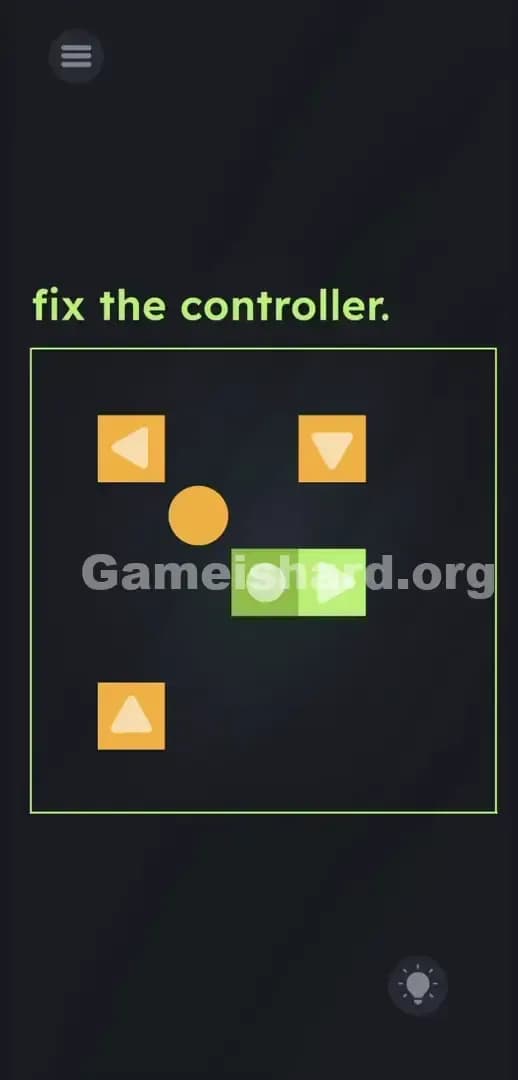
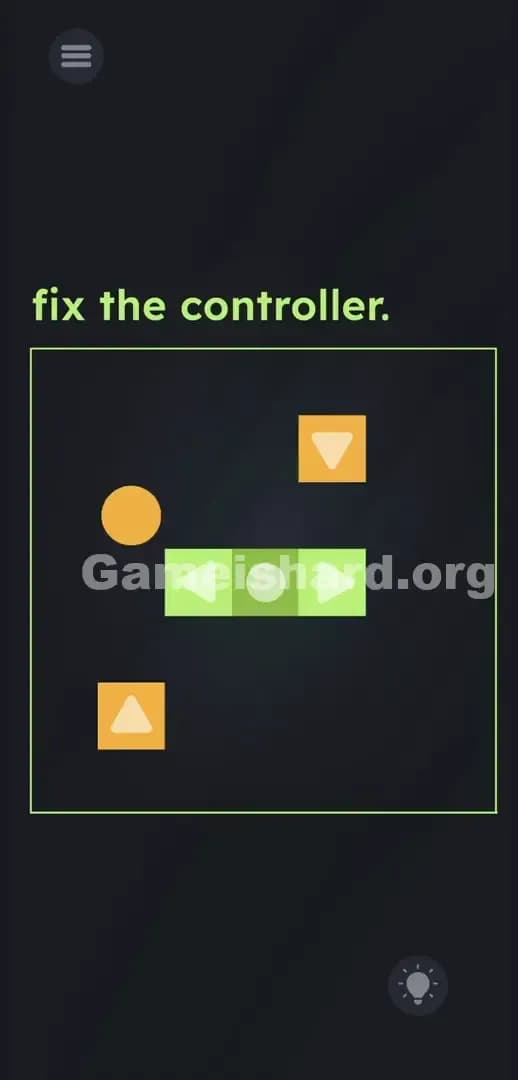
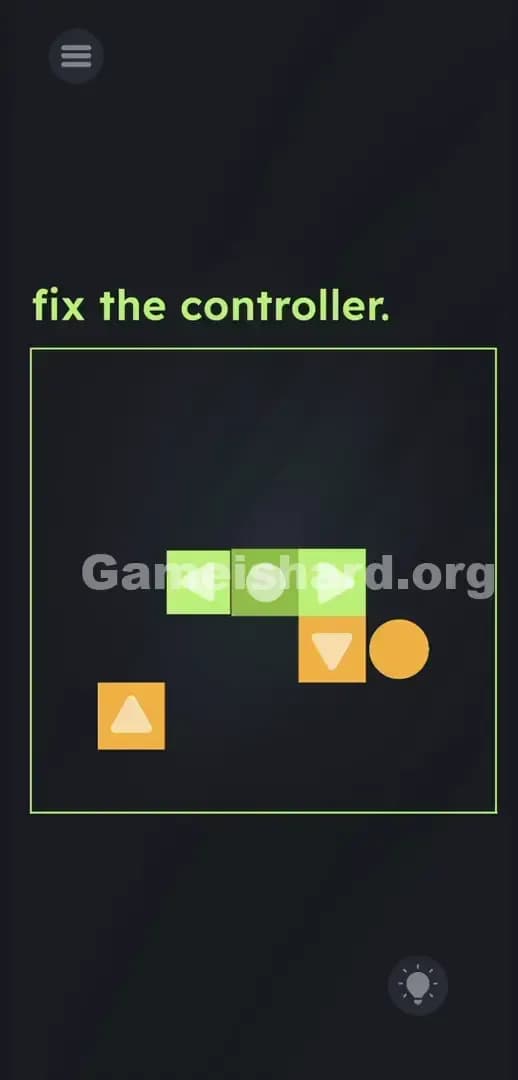
Solution: Tap the scattered controller pieces to steer the orange ball behind the loose Up, Down, and Left blocks, then ram the ball into them to shove each piece into the empty green slots next to the Right block. Use the ball as a physical bulldozer to force the UI back together.
Game is Hard Level 299 Overview
The Hook
You stare at the screen. The prompt demands you fix the controller. You swipe the screen. You tap and hold. You try dragging the scattered pieces into the obvious empty slots. Nothing happens. Classic setup. The game wants you to think the pieces are broken puzzle fragments. They aren't. They are fully functional. You just have the wrong perspective.
The Objective
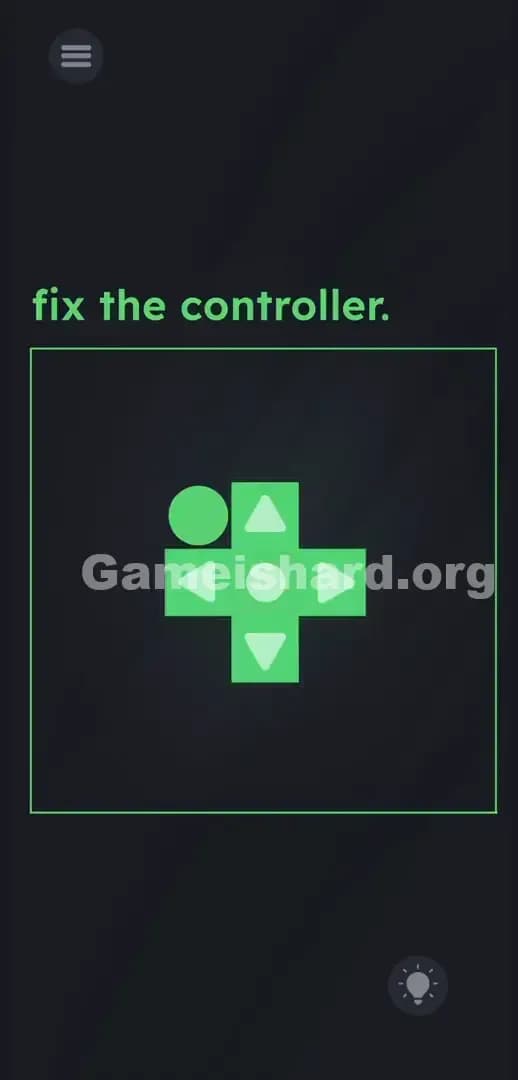
You need to assemble a complete four-way directional pad in the center of the screen. The green block with the Right-facing arrow is already locked down. The other three directional pieces are floating around randomly. You have to physically force them into the empty green spaces using an indirect tool.
- Button trick: The puzzle pieces are the controls.
- UI drag: Inverted expectation. Dragging is completely disabled.
- Hidden object functionality: The ball is a tool, not decoration.
- Logic trap: The interface is the game world.
It’s not a typo. It’s ammo.
What You See on Screen in Game is hard Level 299
The layout looks like a broken retro console menu. At the top left, the prompt reads fix the controller. in bright green text.
Below that, a thin green square border frames the puzzle area. Inside this box, chaos reigns. Sitting dead center is a solid green block with a white Right-facing arrow. Attached to its left side is a faded green cross shape featuring three empty circular slots. This is your target zone.
Scattered randomly around the edges of the box are three loose orange square blocks. One has an Up-facing arrow, one has a Down-facing arrow, and one has a Left-facing arrow.
Finally, there is a solid orange ball floating aimlessly in the negative space between the blocks.
In the bottom right corner, you have your standard lightbulb hint button. Ignore it. You don't need it.
What’s Tricking People in Game is hard Level 299
The Trap
UI Blindness strikes again. You see a puzzle piece that perfectly matches a silhouette, you immediately try to grab it. We are hardwired by thousands of hours of mobile gaming to touch and slide objects to their logical destinations. The developers know exactly how you think. They programmed the game to entirely ignore those drag inputs. You swipe frantically. The screen does absolutely nothing. Tapping these blocks doesn't select them for dragging. Tapping them triggers an entirely different mechanic.
The Wrong Instincts
I tried swiping the orange ball directly into the slots. Nope. I tried dragging the orange arrow blocks directly onto the green cross. Dead end. I even tried tilting my phone thinking gravity might slide the pieces together. Complete waste of time. The game is baiting you to treat this like a standard jigsaw puzzle.
My Reaction
Total facepalm. I got mad and just started tap-spamming the loose Up block out of pure frustration. Suddenly, the orange ball jumped up one space. I stopped. I tapped it again. The ball jumped again. The arrows aren't just shapes on puzzle pieces. They are literally the buttons controlling the ball.
Game is hard Level 299 Step-by-Step Walkthrough
The Setup
Look directly at the orange ball. Stop looking at the blocks as puzzle pieces. Treat them as a remote control. The ball is your bulldozer. You are going to steer it using the arrow blocks to physically shove the scattered pieces into the center.
The Action
- Tap the loose Up, Down, Left, or the fixed Right arrow block. Watch the orange ball move exactly one space in that corresponding direction.
- Pick your first target. Let's start with the orange Left-facing arrow block. It is usually hovering awkwardly near the top left.
- Tap the arrows to steer the orange ball so it sits directly on the right side of the Left-facing arrow block. You want the ball positioned between the block and the right wall.
- Tap the Left button on your screen. The orange ball will lunge left. It will physically collide with the loose block and shove it across the screen.
- Keep tapping the Left button. Bump the loose block until it slides perfectly into the far-left green slot on the cross. You will see it click into place.
- Now, steer the orange ball out of the way. Bring it back to the center of the arena.
- Repeat this exact bulldozer process for the remaining loose blocks. If you are targeting the Up-facing arrow block, get the ball directly underneath it, then spam the Up button to shove it into the top slot.
- Once the Left, Up, and Down pieces lock into the center controller, the level instantly clears.
Troubleshooting
- Stuck on a wall: If the orange ball gets pinned against the green border line, just tap the opposite directional arrow to back it out into open space.
- Cornered blocks: Do not accidentally push an orange block deep into a corner. If you do, carefully maneuver the ball to the exposed side of the block. Nudge it back out into the open playing field.
- Overshooting: Tap slowly. If you rapidly spam the buttons, you might push a block straight past the green target zone. One tap equals one grid movement.
The Logic Behind Game is Hard Level 299
The game is relentlessly testing your assumptions about control schemes. You naturally assume you control the blocks to solve the puzzle. In reality, you use the blocks to control the ball, which then solves the puzzle.
Think about how a standard controller works. You press a piece of plastic. A digital signal fires. An action happens on screen. Game is hard Level 299 flips this entirely backward. The piece of plastic is inside the screen. The digital action is moving a physical object that then interacts with the plastic piece.
You are dealing with "Linguistic Deconstruction" applied to interface design. A button on a screen usually exists on a layer above the game world. It is the UI. The game world is beneath it. This level crushes those layers together. The UI is the game world. The buttons are physical objects subject to collision physics. It completely breaks the fourth wall. The instructions are bait; the UI is the real puzzle.
Pro Tip for Game is Hard Level 299
Skip the confusion and run this exact sequence to clear the level fast.
- Target the closest block to the center first to clear up maneuvering space.
- Position the orange ball perfectly parallel to the destination slot before initiating the push. This prevents off-axis mistakes.
- Tap rhythmically. Do not spam. One tap, one movement.
- Use the fixed green Right button strictly for moving the ball eastward. It will never budge from its spot.
Do not waste a single second dragging items. Dragging is disabled here.
FAQ
Why won't the blocks move when I drag them? Because they are functioning input buttons, not draggable sprites. Tapping them sends a movement command to the ball. The game disabled touch-and-drag completely for this stage to force you into the bulldozer mechanic.
I pushed a block into the corner, now what? Don't panic. Steer the ball around to the exposed side of the trapped block. Nudge it back toward the center of the arena. There is no fail state or time limit. You can always recover a bad push.
Does the order of the blocks matter? No. You can push the Up, Down, or Left block into the center in any sequence. The level only checks if all three empty green slots are filled.
What is the green Right block actually for? It serves two purposes. First, it acts as your "move right" input button for the ball. Second, it serves as the physical anchor point for the controller assembly. It is permanently bolted to the screen.
Get more level walkthrough on Gameishard.org
Stop wasting time on sites that bury the answer under ten paragraphs of fluff. Our guides are built to be fast, accurate, and straight to the point. Share this guide with your Discord friends who are raging at Game is hard Level 299. Check back for the next level when you inevitably get stuck again.