Game Is Hard Level 56 Solution Walkthrough & Answer
How to solve Game Is Hard level 56? Get instant solution & answer for Game Is Hard level 56: "we need a zero."
Doesn't look like your level?
App updates can sometimes shuffle the order of puzzles. If this level 56 walkthrough doesn't match your screen, don't worry! You can browse our All Levels guide to find your exact puzzle by its picture.
Quick Answer for Game is hard Level 56 (Do This)
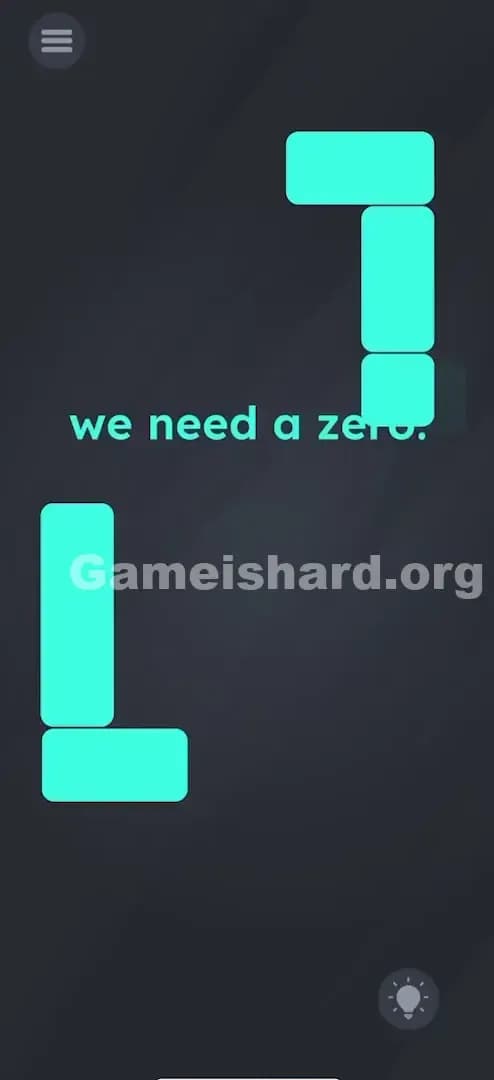
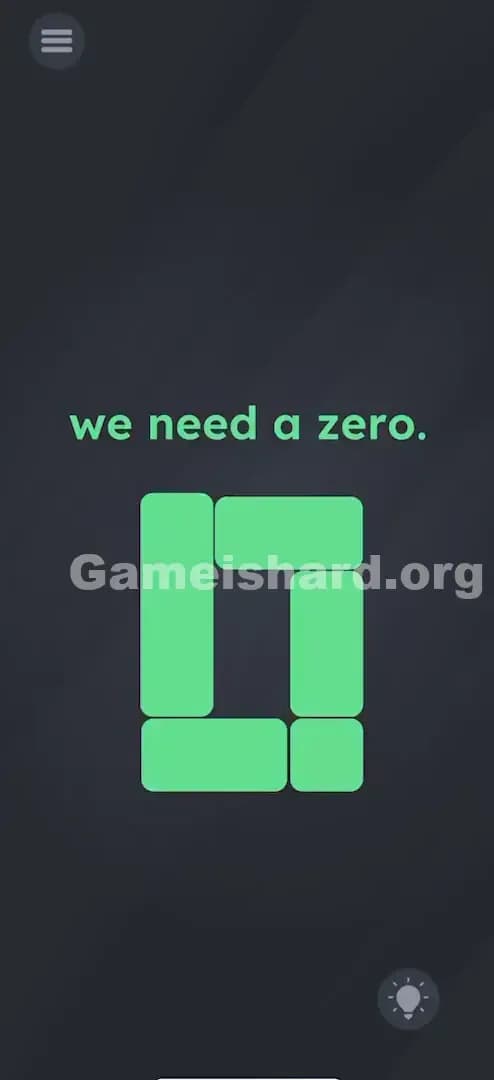
Solution: Drag the small square onto the bottom-left "L" shape to merge them, then drag that newly merged piece onto the top-right inverted "L" to create a zero shape.
(Clarification: The shapes stick together like magnets. You are essentially building a digital "0" out of three tetris-like blocks.)
Game is Hard Level 56 Overview
The Hook of Game is hard Level 56
You stare at the screen. It says "we need a zero." There is no keyboard. No number pad. Just some floating, blocky shapes that look like rejected Tetris pieces. You try drawing a zero with your finger? Nothing. You shake the phone? Nothing. This level is a classic example of "Construction Logic." The game isn't asking you to find a zero; it's asking you to manufacture one.
The Objective in Game is hard Level 56
Your goal is to physically assemble the number "0" using the green geometric shapes scattered around the screen. This isn't a math problem; it's a jigsaw puzzle.
Key Mechanics in Game is hard Level 56
- Object Merging: Some items in this game have "sticky" properties. If you touch them together, they fuse.
- Shape Recognition: You need to visualize the negative space. How do two "L" shapes and a dot make a rectangle with a hole in the middle (a zero)?
- Drag & Drop: This is the primary interaction. Tap, hold, and move.
- Sequential Assembly: You can't just mash everything together at once. Order matters.
It’s not a typo. It’s ammo. The prompt tells you exactly what to build, but the UI hides the blueprints.
What You See on Screen in Game is hard Level 56
The layout is stark and minimalist.
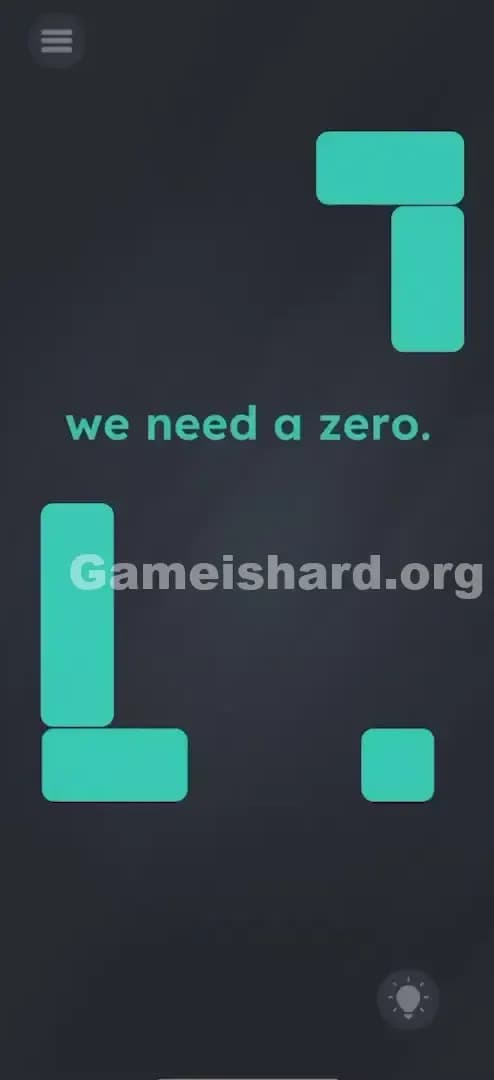
- Center Text: The phrase "we need a zero." floats in the middle, mocking you.
- Top Right: A large, inverted "L" shape (green). It looks like a corner piece.
- Bottom Left: A standard "L" shape (green). It mirrors the top one.
- Bottom Right: A lonely, small green square.
- Background: The standard dark grey void.
There are no buttons, no timers, and no hidden drawers. Everything you need is right there, staring you in the face, disassembled.
What’s Tricking People in Game is hard Level 56
The Trap of Game is hard Level 56
The biggest trap here is "Tetris Brain." Players see these shapes and immediately think of clearing lines or fitting them into a grid. You might try to stack them neatly at the bottom. But Game is Hard doesn't care about neat stacks. It cares about shapes. The visual trick is that the "0" isn't round. It's digital—like on an old calculator or a scoreboard.
The Wrong Instincts of Game is hard Level 56
- Drawing a Zero: Many players instinctively try to trace a circle on the screen.
- Searching for Numbers: I spent a solid minute looking for a hidden number in the text "Level 56" or the prompt itself.
- Shaking the Device: Usually a good Hail Mary pass, but useless here.
My Reaction to Game is hard Level 56
I stared at this for way too long. I kept trying to drag the top shape down, but it wouldn't budge. I thought the game was glitching. Turns out, I was just grabbing the wrong brick. Facepalm moment of the day: realizing that only one specific piece is the "driver" for the whole puzzle.
Game is hard Level 56 Step-by-Step Walkthrough
The Setup of Game is hard Level 56
Ignore the text. Focus entirely on the green blocks. Your workspace is the whole screen. You are identifying three pieces: Top Piece, Bottom Piece, and the Small Square.
The Action in Game is hard Level 56
- Grab the Square: Place your finger on the small green square located near the bottom right.
- The First Merge: Drag that square over to the bottom-left "L" shape. Aim for the empty notch in the "L" to make it a solid rectangle (or just touch them together).
- Verification: They should snap together. Now, when you move the square, the "L" moves with it. They are one unit.
- The Final Assembly: Keep holding that square (which is now attached to the bottom piece). Drag the entire combined chunk up to the top-right shape.
- Complete the Loop: Fit your bottom chunk into the top chunk to form a hollow rectangle—a digital "0".
Troubleshooting at Game is hard Level 56
- "It won't move!": The large "L" shapes might be static (unmovable) until you use the small square as a "handle." Always drive the movement using the small square.
- "They aren't sticking": You need to get close. The hitbox is generous, but you have to actually overlap the shapes slightly or hit the connection point.
- "I made a rectangle but nothing happened": Make sure you didn't make a solid block (a filled-in rectangle). A zero needs a hole in the middle. The shapes should form a perimeter.
Micro-Details That Make the Move Register on Game is hard Level 56
Precision is surprisingly key here. The game uses "snap zones." When you drag the small square to the bottom "L," you don't need pixel-perfect alignment, but you do need to be close enough for the game logic to detect a "merge event."
Once merged, the physics change. The bottom "L" loses its independent weight and becomes a child object of the square. If you try to drag the "L" part of the new combo, it might not register. Always drag by the square. It’s the anchor.
I fixed it by… realizing I was trying to drag the big pieces first. They feel heavy or locked. The small square is the key; it unlocks the movement for everything else.
The Logic Behind Game is Hard Level 56
This level is a test of "Affordance." In design, affordance refers to the properties of an object that show you how to use it (a button looks pushable, a handle looks grabbable).
Here, the game breaks affordance. The big shapes look movable but aren't. The small shape looks insignificant but is actually the primary tool. It also relies on the player recognizing a "digital zero" (rectangular) rather than a "handwritten zero" (circular). It forces you to think in retro-LCD display terms.
Recurring Game is hard pattern: The UI is the puzzle. The pieces aren't just decoration; they are the interactive elements.
Pro Tip for Game is Hard Level 56
If you are speed-running or replaying, just remember the flow:
- Right to Left (Square to Bottom L).
- Bottom to Top (Merged piece to Top L).
- Done.
Don't overthink the alignment. The snap mechanic does 90% of the work for you. Do not waste time trying to move the top piece; it is anchored to the background until the final merge.
Alternative Attempts on Game is hard Level 56 (What Doesn’t Work, and Why)
- Dragging the top shape down: It is nailed to the wall. You must bring the mountain to Muhammad.
- Pinching to zoom: This isn't a photo app. Multi-touch gestures do nothing here.
- Spelling "ZERO" with the letters: The prompt text is just a hint, not a movable object this time.
- Tapping the "0" in the level number: A classic trick in other levels, but Level 56 doesn't use the level indicator as a prop.
- Shaking to shuffle pieces: The pieces are static until dragged. Gravity is turned off.
- Waiting for a hint: The hint bulb works, but it costs currency/ads. The only time mechanic is your own patience.
Common Mistakes for Game is Hard Level 56
- Trying to form a solid block: A zero has a hole! If you fill the space completely, you've made a brick, not a number.
- Dragging the "L" instead of the square: The touch target priority seems to be on the square.
- Giving up because the top shape won't move: This is the #1 rage-quit reason. It feels broken, but it's intentional design.
- Misinterpreting the shape: Thinking you need to make the letter "O" (round) instead of the number "0" (rectangular/digital).
- Resetting too often: If the pieces don't snap instantly, don't reset. Just wiggle the square around the connection point.
Pattern Recognition: How to Spot This Trick in Future Game is Hard Levels
The Tell
Whenever you see geometric, blocky shapes that look like segments of a calculator display (7-segment display), the solution will almost always involve building a number or letter.
The Habit
When you see loose shapes:
- Test which ones move (tap and drag everything).
- Test which ones stick (smash them together).
- Visualize 8-bit or digital clock typography.
Game is hard Level 56 FAQ (Short, Useful)
Q: Why won't the top piece move on Game is hard Level 56? A: It's locked in place. You have to build the rest of the zero and bring it up to the top piece.
Q: Does the order of merging matter on Game is hard Level 56? A: Yes. You usually need to merge the movable pieces first (square + bottom L) before connecting to the static piece (top L).
Q: I made the shape but the level didn't end on Game is hard Level 56? A: Check your alignment. It needs to look like a proper digital zero. Wiggle it slightly into place until it "snaps" and turns green/completes.
Q: Can I separate the pieces after merging them in Game is hard Level 56? A: No. Once they merge, they are glued for good. If you messed it up badly (unlikely here), you might need to restart the level.
Get more level walkthrough on Gameishard.org
Stuck on the next puzzle? We’ve got straight-to-the-point guides for every single level of Game is Hard. We cut the fluff so you can get back to feeling like a genius. Bookmark us and keep your streak alive!
Good luck with Game is hard Level 57—it gets weirder from here.