Game Is Hard Level 34 Solution Walkthrough & Answer
How to solve Game Is Hard level 34? Get instant solution & answer for Game Is Hard level 34: "one more to one."
Doesn't look like your level?
App updates can sometimes shuffle the order of puzzles. If this level 34 walkthrough doesn't match your screen, don't worry! You can browse our All Levels guide to find your exact puzzle by its picture.
Quick Answer for Game is hard Level 34 (Do This)
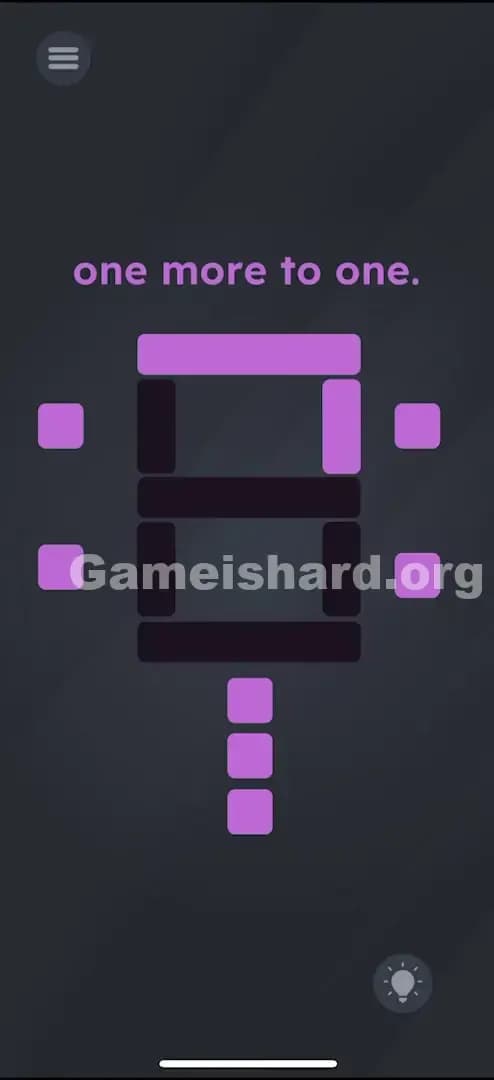
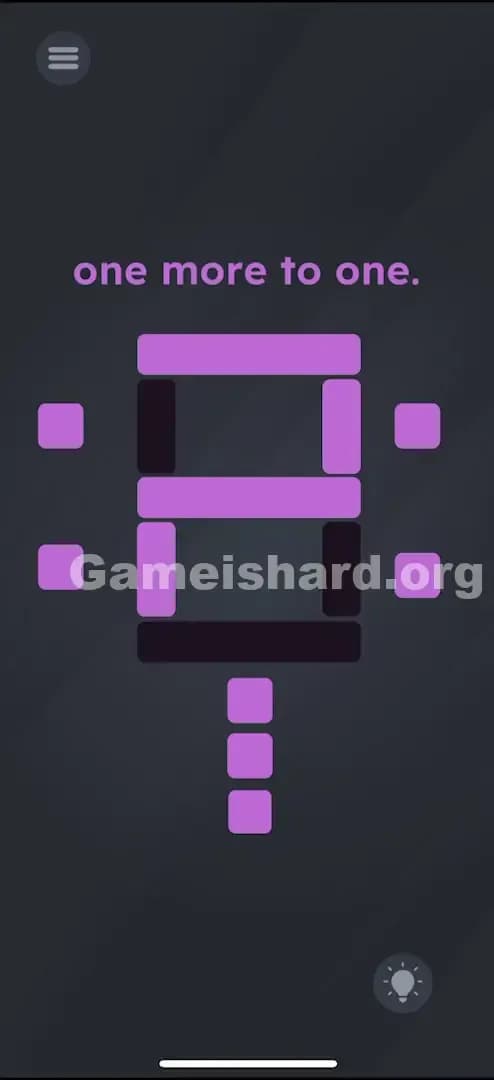
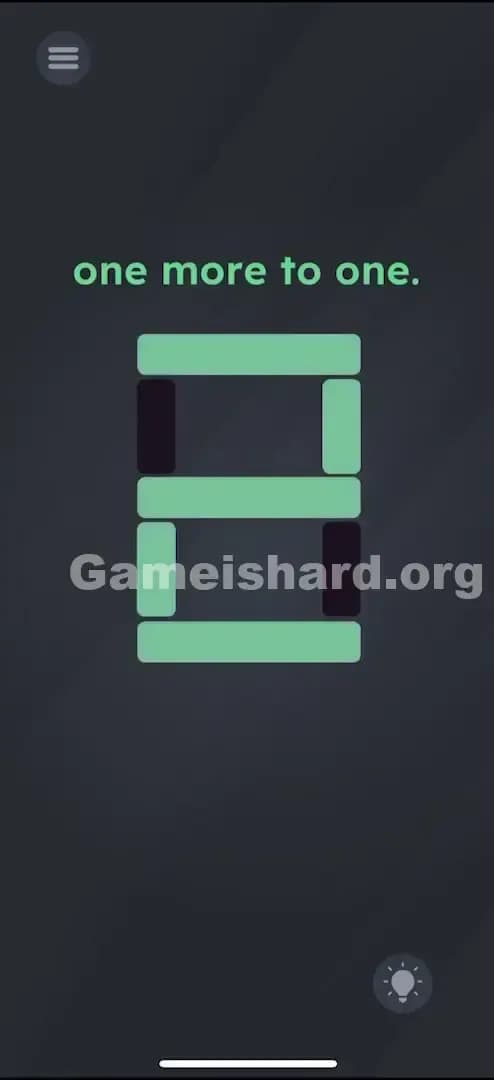
Solution: Tap the purple buttons surrounding the digital display to form the number 2: use the bottom three buttons to activate the horizontal bars, the top-right button for the upper vertical bar, and the bottom-left button for the lower vertical bar.
Make sure every other bar is turned OFF so the display clearly reads "2".
Game is Hard Level 34 Overview
The Hook of Game is hard Level 34
You open Game is hard Level 34 and you are greeted by a classic digital display, like something off an old alarm clock or a scoreboard. The text says "one more to one," which sounds like a riddle, but it's actually just simple math disguised as a logic puzzle. The frustration hits when you tap the black bars directly and realize they don't light up. The game wants you to be an engineer, not just a player.
The Objective in Game is hard Level 34
Your goal is to manipulate the segmented display to show the correct number. The riddle "one more to one" translates to 1 + 1. So, you aren't trying to make "1". You are trying to make the answer, which is 2.
Mechanics Involved in Game is hard Level 34
- Control Panel Logic: The buttons outside the display control specific segments inside it.
- Pattern Recognition: You need to visualize the shape of the number "2" in a 7-segment display format.
- Toggle State: Buttons act as on/off switches, not just triggers.
It’s not a typo. It’s ammo.
What You See on Screen in Game is hard Level 34
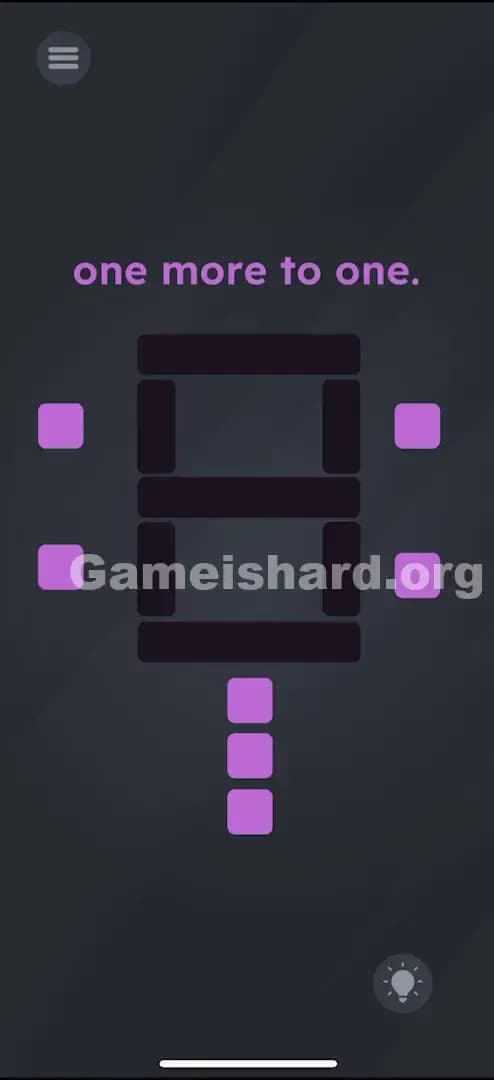
The screen is dark with a central puzzle element.
- Top Text: "one more to one." This is your clue.
- Center: A large, dark "8" figure made of seven segmented bars. This is a classic 7-segment display skeleton. Currently, all bars are dark (off).
- Surroundings: There are purple square buttons placed around this display:
- Two on the left.
- Two on the right.
- Three stacked vertically at the bottom.
- The Vibe: It looks like a control panel for a scoreboard or a bomb defusal kit.
What’s Tricking People in Game is hard Level 34
The Trap of Game is hard Level 34
The biggest trap here is the riddle itself. Players often see "one more to one" and try to input the number 1 on the display. If you make a "1", nothing happens. The game is asking for the result of the equation, not a representation of the text.
The Wrong Instincts of Game is hard Level 34
- Touching the bars: Everyone tries to tap the black segments directly to light them up. That’s standard touchscreen logic. But here, the segments are passive; the buttons are the active elements.
- Tapping randomly: You might just mash buttons hoping something clicks, but unless you visualize the number first, you’ll end up with a mess of random lines that doesn't trigger the win state.
My Reaction to Game is hard Level 34
I spent a solid minute trying to make the number "11" because I thought "one more to one" meant putting two ones side by side. I felt pretty silly when I realized it was just asking me what 1 plus 1 equals. The math was easy; the interface was the enemy.
Game is hard Level 34 Step-by-Step Walkthrough
The Setup of Game is hard Level 34
Look at the blank 7-segment display in the center. Mentally picture the number 2. A digital "2" is made of five specific segments: the top horizontal, top-right vertical, middle horizontal, bottom-left vertical, and bottom horizontal.
The Action in Game is hard Level 34
You need to light up these segments using the purple buttons. Here is the exact order (though order doesn't strictly matter, the final shape does):
- Horizontal Bars: Tap all three bottom buttons.
- The top button of this trio lights the Middle bar.
- The middle button of this trio lights the Bottom bar.
- The bottom button of this trio lights the Top bar.
- (Basically: Just turn all three bottom buttons ON to get the three horizontal lines of the "2").
- Top-Right Vertical: Tap the upper button on the right side. This lights up the vertical bar on the top right.
- Bottom-Left Vertical: Tap the lower button on the left side. This lights up the vertical bar on the bottom left.
- Verification: Check your work. Does the shape look exactly like a digital 2? If any extra bars are lit (like the top-left or bottom-right), tap their corresponding buttons to turn them OFF.
Troubleshooting at Game is hard Level 34
- It still looks like a 2 but won't pass? You likely have an extra segment lit up that makes it look like a messy "8" or a backward "6". Ensure the top-left vertical and bottom-right vertical bars are strictly OFF.
- Nothing lighting up? Make sure you are tapping the purple squares, not the black bars themselves.
Micro-Details That Make the Move Register in Game is hard Level 34
Precision isn't huge here since the buttons are large, but logic is key.
- Toggle Speed: You don't need to rush. This isn't timed.
- State Persistence: The buttons stay "pressed" or "unpressed." If you mess up, you don't need to reset the whole level; just toggle the incorrect segment off.
- Visualizing the Z shape: The number 2 in digital form looks like a jagged "Z" with a flat bottom. Focus on that zigzag shape.
I fixed it by realizing the bottom three buttons control the horizontal lines in a weird, non-linear order. I just mashed all three to get my horizontal base, then worried about the verticals.
The Logic Behind Game is Hard Level 34
This level tests two things:
- Linguistic processing: Can you translate "one more to one" into "1+1=2"?
- Indirect Control: Most games give you direct agency (touch the thing to move the thing). Game is hard often uses indirect agency (touch this unrelated button to affect the thing). It forces you to map the controls to the output, simulating a broken or complex interface.
The level treats the 7-segment display like a encoded lock. You have the key (the number 2), but you have to figure out how to insert it into the lock (the buttons).
Pro Tip for Game is Hard Level 34
If you are replaying or speedrunning:
- Mash the three bottom buttons immediately.
- Tap Top-Right.
- Tap Bottom-Left.
- Done. Ignore the riddle reading time.
Do NOT waste time trying to drag the text "one" into the display. The text is not interactive in this level.
Alternative Attempts on Game is hard Level 34 (What Doesn’t Work, and Why)
- Making a '1': Using the two right-side buttons to make a '1'. (The prompt implies addition, not display).
- Making an '11': Trying to light up both vertical sides. (Incorrect answer to the math problem).
- Dragging the purple buttons: They are fixed switches, not draggable items.
- Shaking the device: This won't reset the lights or solve the puzzle. It's purely touch-based.
- Lighting up everything (8): A common panic move. Shows '8', which is not the answer to 1+1.
- Using the "Back" or "Menu" button: The top-left UI button is for settings, not part of the puzzle.
Common Mistakes for Game is Hard Level 34
- Misinterpreting the clue: Thinking "one more to one" means "add one more segment to the number one".
- Confusing the buttons: The bottom stack controls horizontals, while the side buttons control verticals. It’s easy to mix them up.
- Leaving 'ghost' segments on: Sometimes you accidentally leave the bottom-right bar on, making the number look like a weird 'a' or backwards '6'.
- Trying to swipe: Swiping across the buttons doesn't work reliably; distinct taps are required.
- Overthinking the math: Some players try to do binary or some complex sequence. It’s just "2".
Pattern Recognition: How to Spot This Trick in Future Game is Hard Levels
The tell
Whenever you see a segmented display (digital clock style numbers), assume the solution involves creating a specific number shape. The controls will almost always be buttons placed outside the immediate area of the numbers.
The habit
Stop reading the text literally. If the text contains numbers or math words ("one," "add," "sum," "left"), convert it to a math equation first. Usually, the solution is the result of that equation.
Game is hard Level 34 FAQ (Short, Useful)
Q: Why isn't the number 1 working in Game is hard Level 34? A: The riddle "one more to one" is an addition problem. 1 + 1 = 2. You need to display the answer, not the components.
Q: Do I have to hold the buttons down in Game is hard Level 34? A: No, they are toggles. Tap once to turn on, tap again to turn off.
Q: Can I reset the lights without restarting in Game is hard Level 34? A: Yes, just tap the lit buttons again to turn them off manually. There is no "clear all" button inside the puzzle.
Q: Is there a specific order for the buttons in Game is hard Level 34? A: No. You can light up the segments in any order you want, as long as the final image forms the number 2.
Get more level walkthrough on Gameishard.org
If this guide saved your streak, we’ve got plenty more where that came from. We write these guides to be fast, accurate, and free of the usual fluff you find on recipe blogs. Share this with your friends if they are stuck on the same level!