Game Is Hard Level 72 Solution Walkthrough & Answer
How to solve Game Is Hard level 72? Get instant solution & answer for Game Is Hard level 72: "how many more boxes do we need?"
Doesn't look like your level?
App updates can sometimes shuffle the order of puzzles. If this level 72 walkthrough doesn't match your screen, don't worry! You can browse our All Levels guide to find your exact puzzle by its picture.
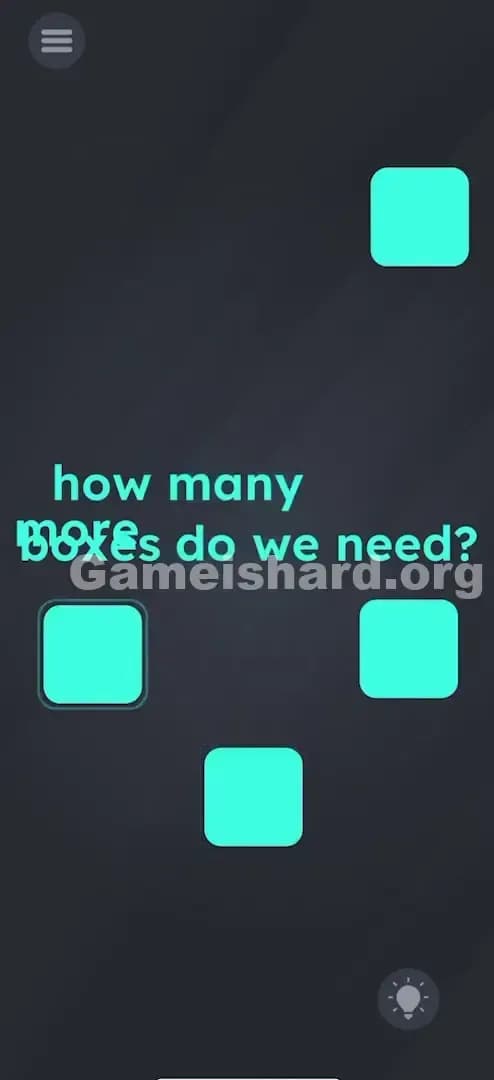
Quick Answer for Game is hard Level 72 (Do This)
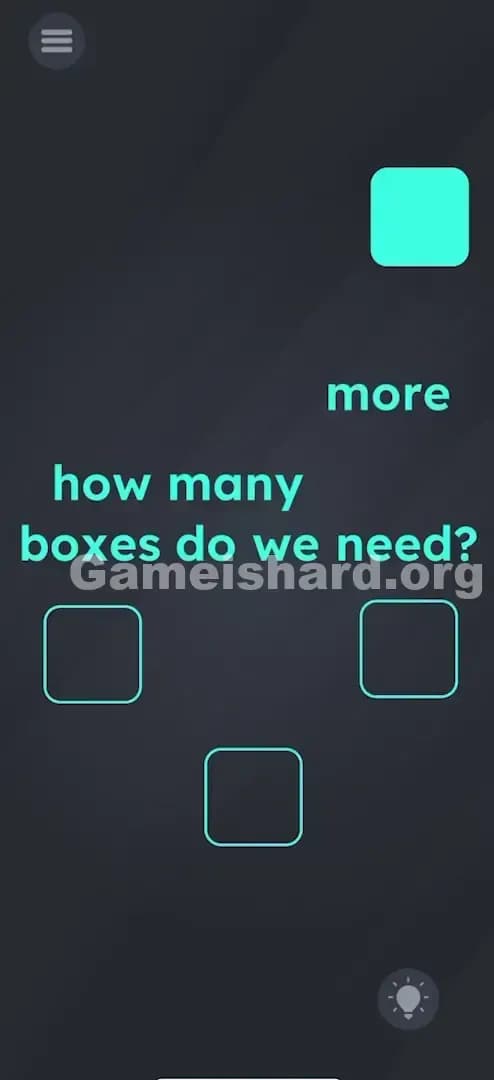
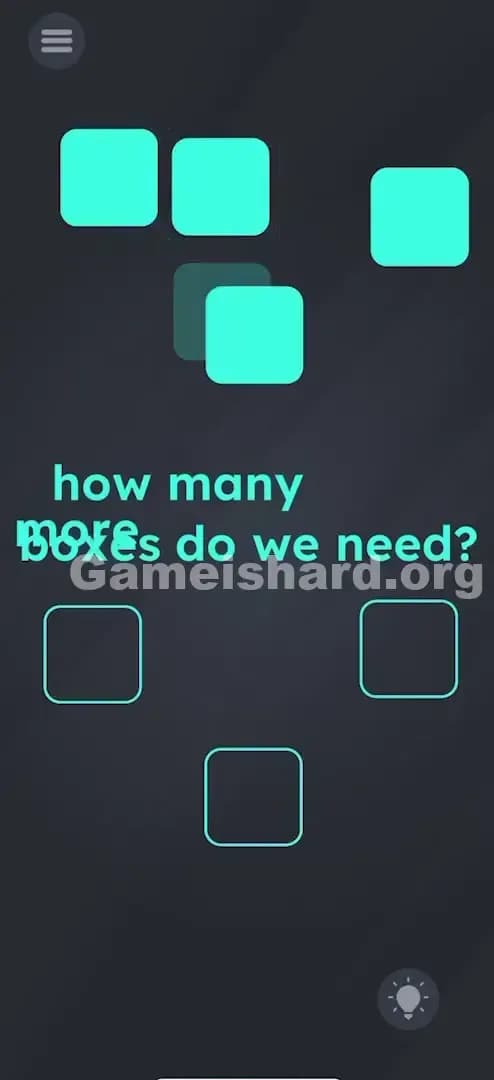
Solution: Drag the single blue square into an outline, then drag the word "more" onto the word "boxes" to create three new squares and place them into the remaining spots.
You need to physically combine the text words to generate the missing pieces.
Game is Hard Level 72 Overview
The Hook of Game is hard Level 72
You are staring at a screen that feels incomplete. You have four empty slots—four distinct outlines waiting to be filled—but the game only gives you one measly blue box. It feels like a bug. Or a math problem where variables are missing. You might be shaking your phone or tapping frantically on the empty space, hoping a hidden box falls from the ceiling. It won't. The game is lying to you about your inventory.
The Objective in Game is hard Level 72
Your goal is simple: Fill every empty outline on the screen with a solid blue square. The problem is scarcity. You don't have enough squares. You have to manufacture them using the environment itself.
Key Mechanics involved in Game is hard Level 72
- Text Dragging: The words aren't just instructions; they are interactive objects.
- Object Spawning: Combining two objects creates new ones.
- Placement Logic: You must fill specific zones to trigger the win state.
- Linguistic Deconstruction: Taking the sentence literally ("more boxes") to force the game to give you exactly that.
It’s not a typo. It’s ammo.
What You See on Screen in Game is hard Level 72
Okay, let's break down the layout so we're on the same page. If you've just alt-tabbed out of frustration, here is what you are looking at:
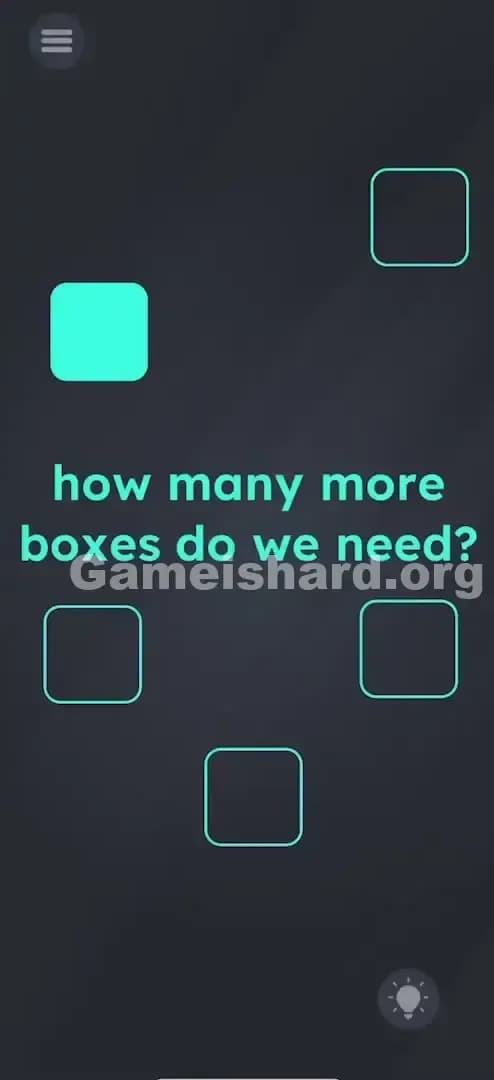
- The Text: In the center, in that familiar teal font, is the question: "how many more boxes do we need?"
- The Inventory: There is exactly one solid blue square floating on the left side of the screen.
- The Targets: There are four empty outlines (square shapes) scattered around the text. One top right, one middle left, one middle right, one bottom center.
- The Background: Dark gray, standard for this game.
- The UI: Menu top left, Hint bulb bottom right.
Crucially, there are no other buttons. No "spawn" button. No "+" sign. Just text and shapes.
What’s Tricking People in Game is hard Level 72
The Trap of Game is hard Level 72
The trap here is "resource anxiety." You see four holes and one peg. Your brain immediately tries to stretch that one resource. Players often try to drag the single box quickly between outlines, hoping to trick the sensor, or they tap the box repeatedly thinking it will duplicate. This is classic Game is hard misdirection. The puzzle isn't about finding hidden boxes; it's about making them.
The Wrong Instincts in Game is hard Level 72
I’ve seen people try to pinch-zoom on the blue box to make it bigger. Doesn't work. I've seen people shake the device violently, hoping to rattle loose some extra squares. Nothing. Some players even try dragging the empty outlines themselves, trying to stack them on top of the one filled box. The game is rigid about what is moveable and what isn't, until you realize the text is moveable too.
My Reaction to Game is hard Level 72
When I first hit Game is hard Level 72, I sat there for a solid two minutes just tapping the screen. I felt like an idiot. I thought maybe I had to drag the box in a specific pattern, like a combination lock. It wasn't until my finger slipped and hit the word "more" that I realized the text was loose. Total facepalm.
Game is hard Level 72 Step-by-Step Walkthrough
The Setup of Game is hard Level 72
Stop looking at the shapes for a second. Look at the sentence "how many more boxes do we need?". Specifically, look at the words "more" and "boxes". These are your ingredients.
The Action in Game is hard Level 72
- Place the First Box: Grab the single solid blue square currently on the screen. Drag and drop it into any of the four empty outlines. It should snap into place or sit comfortably inside. One down, three to go.
- Create Supplies: Tap and hold your finger on the word "more" in the sentence.
- Combine Text: Drag the word "more" directly on top of the word "boxes".
- Watch the Magic: When you drop "more" onto "boxes," the collision will spawn three new solid blue squares that pop out onto the screen.
- Finish the Job: Drag these three new squares into the remaining three empty outlines one by one.
Troubleshooting in Game is hard Level 72
- It didn't spawn: Make sure you are dragging "more" onto "boxes," not the other way around. The order sometimes matters in these physics engines.
- The box won't stick: You don't need pixel-perfect precision, but the blue square needs to be mostly covering the outline. If it's half-off, the game won't register the slot as filled.
- I accidentally moved the text too far: If you scatter the words and lose track of them, just hit the restart button (top left). It's faster than trying to organize a messy sentence.
Micro-Details That Make the Move Register in Game is hard Level 72
Getting the move to register in Game is hard Level 72 can be finicky if you have thick fingers or a small screen. Here is the nitty-gritty:
- The Drop Zone: When dragging "more" onto "boxes," aim for the center of the word "boxes." If you just clip the edge, the script might not trigger the spawn animation. You want a direct overlap.
- Visual Feedback: You will see a small pop or bounce animation when the new boxes appear. If the text just sits there overlapping without spawning anything, lift your finger and try dropping it again.
- Snap Mechanics: The blue squares have a very loose "snap" to the outlines. They don't magnetically lock in hard like a jigsaw puzzle. As long as the center of the solid square is inside the boundary of the outline, you are good.
- I fixed it by... dragging the first box out of the way first. I found that sometimes having the first box sitting in the middle of the text area made it harder to drag the words. I put the first box in the top-right corner outline immediately to clear the workspace.
The Logic Behind Game is Hard Level 72
This level is a classic example of "literal interpretation." The developers are playing a pun on you. You need "more boxes." So, linguistically, you combine the concept of "more" with "boxes" to physically produce the result.
It teaches you a fundamental rule for the rest of Game is hard: The text is not UI. The text is a physics object. Just like a rock or a key in an adventure game, the words in the prompt are inventory items. They have collision, they have properties, and they can interact with other elements.
Usually, the instruction tells you what to do. Here, the instruction contains the solution. The game demands you stop reading the prompt as a question and start seeing it as a pile of resources.
Pro Tip for Game is Hard Level 72
If you are speed-running or replaying, here is the fastest execution method:
- Use your right thumb to drag the existing box to the bottom outline.
- Simultaneously use your left thumb to smash "more" onto "boxes".
- As soon as the three spawn, fling them into the corners.
- Do not waste time reading the text.
- Do not try to drag "boxes" onto "more." It feels slower and buggy.
Alternative Attempts of Game is hard Level 72 (What Doesn’t Work, and Why)
Here is a graveyard of bad ideas I tried so you don’t have to:
- Dragging "boxes" into the outlines: I thought maybe the word "boxes" could fill the hole. Nope. The outline expects a shape, not a text string.
- Clicking the word "more" repeatedly: I hoped it would act like a button. It is dead space unless dragged.
- Shaking the phone: Logic being "maybe they are stuck inside the phone." This works in Level 12, but not here.
- Drawing squares with my finger: I tried to trace the outline to "fill" it. The game doesn't support drawing input on this level.
- Dragging the outline to the box: The outlines are static background layers. They cannot be moved.
- Waiting: Sometimes doing nothing is the answer. Here, waiting just drains your battery.
- Splitting the word "boxes": I tried to pull the word apart to make multiple boxes. The text blocks are solid units; they don't fracture.
Common Mistakes for Game is Hard Level 72
- Ignoring the text: Players focus entirely on the shapes and ignore the sentence.
- Dragging the wrong word: Trying to drag "need" or "do" onto "boxes."
- Box hoarding: Spawning the boxes but forgetting to place the first original box. You need all four spots filled.
- Misalignment: Leaving a box "near" the outline but not "in" it.
- Restarting too soon: Thinking the level is glitched because boxes aren't appearing, when you just haven't combined the words yet.
- Overthinking: Looking for a hidden math equation based on the number of letters. It's just a drag-and-drop trick.
Pattern Recognition: How to Spot This Trick in Future Game is Hard Levels
The tell
Whenever you see a level where you are visibly short on items (e.g., "Feed the 3 dogs" but there is only 1 bone), check the text immediately. The missing items are almost always hidden inside the words or created by manipulating the words.
The habit
Develop a "text touch" reflex. At the start of every level, tap and drag the words in the instruction prompt. If they move, they are part of the solution. If they are static, you can ignore them. This 2-second check will save you hours of frustration in later levels.
FAQ of Game is hard Level 72 (Short, Useful)
Q: Can I spawn more than three boxes in Game is hard Level 72? A: No. The game script only spawns exactly enough to fill the remaining empty slots (three). Once they appear, the text interaction is disabled.
Q: Does it matter which word I drag in Game is hard Level 72? A: Generally, yes. Dragging the modifier ("more") onto the subject ("boxes") is the intended trigger.
Q: Is there a specific order to fill the boxes in Game is hard Level 72? A: No order is required. You can fill the top right first, or the bottom one. As long as all four are filled eventually, you win.
Q: Why isn't the text moving when I touch it in Game is hard Level 72? A: You might be touching the black space between the letters. Aim for the colored pixels of the letters themselves.
Get more level walkthrough on Gameishard.org
That’s how you beat Game is hard Level 72. We write these guides because we know that "Aha!" moment is better when you don't have to watch a 10-minute video to find it. If this helped you stop pulling your hair out, send it to a friend who is stuck on the same screen. Good luck with the next puzzle—it gets weirder from here.