Game Is Hard Level 15 Solution Walkthrough & Answer
How to solve Game Is Hard level 15? Get instant solution & answer for Game Is Hard level 15: "cover all."
Doesn't look like your level?
App updates can sometimes shuffle the order of puzzles. If this level 15 walkthrough doesn't match your screen, don't worry! You can browse our All Levels guide to find your exact puzzle by its picture.

Quick Answer for Game is hard Level 15 (Do This)
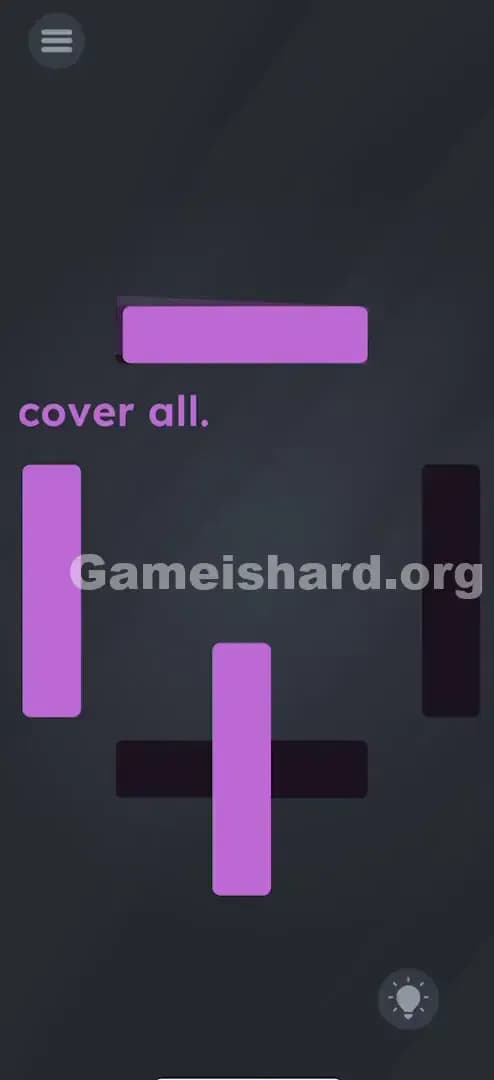
Solution: Rotate the top and bottom purple bars so they lay flat over the horizontal black gaps, then drag the remaining left purple bar all the way to the right to cover the last gap.
(The trick is realizing you can manipulate the bars differently: some spin, some slide.)
Game is Hard Level 15 Overview
The Hook of Game is hard Level 15
You stare at the screen. Four black rectangular gaps. Three purple bars. Basic arithmetic tells you that you are one bar short. You try dragging them, and they just bounce back or don't fit. You try shaking the phone to spawn a fourth bar. Nothing. The instruction "cover all" mocks you because physics (and quantity) seem to be broken here.
The Objective in Game is hard Level 15
The goal is simple: Cover every single black gap with a purple bar. The problem is you only have three objects to cover four spots. This level isn't about resource management; it's about testing every possible touch interaction available to you.
Mechanics Involved in Game is hard Level 15
- Touch & Drag: Moving objects around the screen.
- Rotation / Two-finger twist: Changing the orientation of objects.
- Object recycling: Reusing a "wrong" piece for a "right" spot.
- Hidden Properties: Realizing that different objects on the same screen follow different physics rules.
It’s not a math problem. It’s a geometry puzzle disguised as a shortage.
What You See on Screen in Game is hard Level 15
Okay, let's break down the visual layout so we're on the same page.
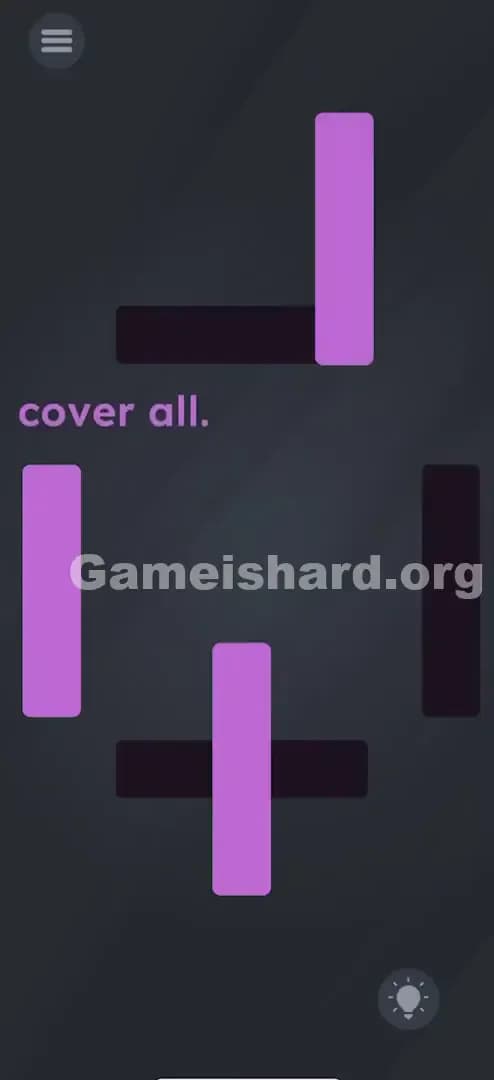
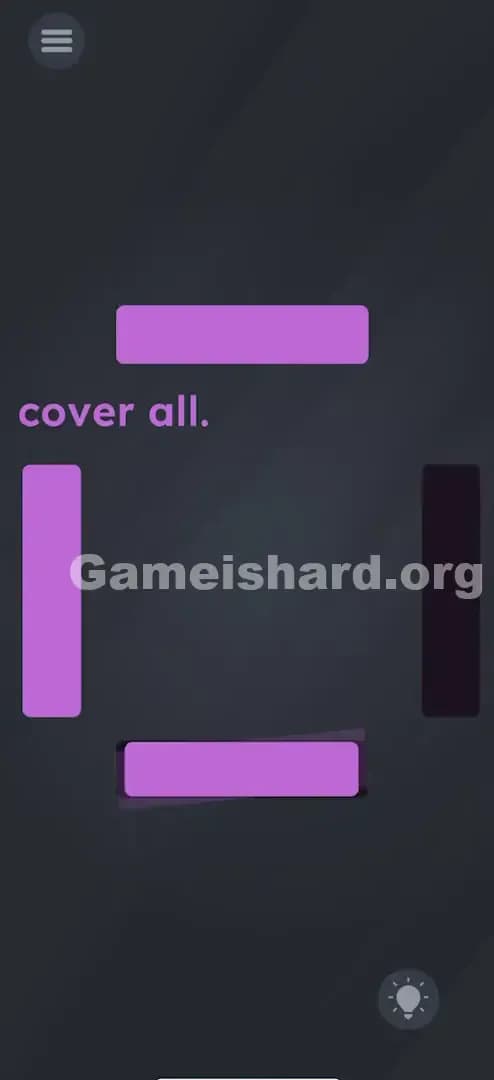
- The Prompt: Just two words: "cover all." It sits right in the middle-left of the screen.
- The Black Gaps: There are four black rectangular outlines (or "holes") arranged loosely in a square pattern.
- Top one is horizontal.
- Bottom one is horizontal.
- Right one is vertical.
- Left one is vertical (but seemingly filled already? No, wait, look closer).
- The Purple Bars: You have three moveable purple rectangles.
- One is standing vertically on the top right.
- One is standing vertically on the bottom center.
- One is standing vertically on the far left.
- The Mismatch: The top and bottom gaps are horizontal, but all your "ammo" (the purple bars) are vertical. If you drag them over the gaps, they form a cross shape. They don't fit.
What’s Tricking People in Game is hard Level 15
The Trap of Game is hard Level 15
The primary trap here is "Uniformity Bias." You see three identical-looking purple bars. You assume they all work the same way. You also assume that since they are vertical, they must stay vertical. Most players try to drag the bars onto the horizontal gaps hoping the game will auto-rotate them. It won't.
The Wrong Instincts in Game is hard Level 15
- Spam Dragging: You drag the vertical bar over the horizontal hole repeatedly, hoping it "snaps" into place.
- Searching for the 4th Bar: You assume a fourth bar is hidden off-screen, so you swipe violently from the edges or shake the phone.
- Ignoring Rotation: Mobile games have trained us to tap or drag. We forget that multi-touch (pinching/rotating) is a core mechanic.
My Reaction
I spent a solid two minutes trying to stretch the bars. I put two fingers on one bar and pulled apart, thinking I could make it long enough to cover two holes at once. Nope. Then I felt silly when I realized my fingers slipped and accidentally spun one of them.
Game is hard Level 15 Step-by-Step Walkthrough
The Setup of Game is hard Level 15
Focus on the top and bottom sections first. These are the hardest because the shapes don't match. You have vertical bars and horizontal holes.
The Action in Game is hard Level 15
- Step 1 (The Top): Place two fingers on the top-right purple bar. Rotate your fingers to turn the bar 90 degrees so it is horizontal. Drag it onto the top black horizontal gap. It should cover it perfectly.
- Step 2 (The Bottom): Repeat this for the bottom bar. Two fingers on the bottom-center purple bar. Rotate it until it's flat. Drag it onto the bottom black horizontal gap.
- Step 3 (The Sides): Now you have one vertical bar left (on the left side) and one vertical gap left (on the right side).
- Step 4 (The Slide): Grab the remaining vertical bar on the left. Simply drag it all the way across the screen to the right side and drop it on the final black vertical gap.
Verification
Once the last gap is covered, the level completes instantly. The "cover all" text might flash or disappear, signaling victory.
Troubleshooting at Game is hard Level 15
- Rotation stuck? Sometimes the touch detection is finicky. Make sure your two fingers are far enough apart on the bar to register a "twist" motion, not a pinch.
- Bar won't move? If you are trying to drag the left bar to the right and it won't go, try lifting your finger and tapping it once before dragging. Ensure you aren't accidentally rotating it.
Micro-Details That Make the Move Register in Game is hard Level 15
Precision matters here, but the game is forgiving if you know how to move.
- The Snap Zone: You don't need pixel-perfect placement. As long as the purple bar covers about 80% or more of the black gap, the game accepts it.
- Rotation Tolerance: You don't need a perfect 90-degree angle. If it's slightly tilted (like 85 degrees or 95 degrees), it usually still counts as "covering" the hole.
- The Drag Speed: Dragging the left bar to the right doesn't need to be slow. You can flick it. The game physics aren't "heavy."
I fixed it by: Realizing that the left bar doesn't need to be rotated. I tried rotating all three at first, which made the final vertical hole impossible to fill. Only rotate the ones that need to change orientation.
The Logic Behind Game is Hard Level 15
This level is a classic test of "Input Literacy."
Most puzzle games restrict you to one type of input per level (e.g., this is a dragging level, this is a shaking level). Game is hard Level 15 combines mechanics without telling you.
- Object Permance: It teaches you that objects are independent. Just because bar #1 rotates doesn't mean bar #3 has to.
- Visual Matching: It forces you to manipulate the tool to fit the problem (rotating the key to fit the lock), rather than finding a tool that already fits.
The game is testing if you can break your "single-finger" habit. We navigate phones mostly with one thumb. This level demands the "pincer" grip or a two-finger twist.
Pro Tip for Game is Hard Level 15
If you are speed-running or replaying this later:
- Twist Top & Bottom: Immediately use two fingers to rotate the top and bottom bars. Don't wait.
- Park them: Slap them onto their respective horizontal gaps.
- Swipe Right: Flick the left bar to the right gap.
- Ignore the text: The text "cover all" is not an interactive object in this specific level; don't waste time trying to move the words.
Alternative Attempts of Game is hard Level 15 (What Doesn’t Work, and Why)
Here is a graveyard of bad ideas I tried so you don't have to:
- Dragging the text "cover all" into a hole.
- Why: In some levels, text is an object. Here, it is static UI. It won't move.
- Shaking the device to make bars fall.
- Why: Gravity sensors are turned off for this specific puzzle.
- Tapping the gaps to "fill" them.
- Why: This isn't a coloring book mechanic; it's a physics object mechanic.
- Pinching to resize the bars.
- Why: The bars have a fixed size; they only support rotation (X/Y axis change), not scaling.
- Trying to cut a bar in half.
- Why: There is no swipe-to-cut mechanic here (unlike some Fruit Ninja style levels).
Common Mistakes for Game is Hard Level 15
- The "One Finger" Rotation: Trying to rotate by dragging one corner in a circle. This rarely works. You need two distinct touch points to trigger rotation.
- Over-rotating: Spinning the bar 180 degrees. While technically horizontal, sometimes the game gets confused if you spin it too much. Just do a clean 90-degree turn.
- The "Fourth Bar" fallacy: wasting time looking for a hidden object behind the menu icon or under the prompt. The solution only uses the three visible bars.
- Mixing up the bars: Trying to use the left bar for the top hole. While possible if you rotate it, it's inefficient. Use the bar closest to the hole to minimize travel distance.
Pattern Recognition: How to Spot This Trick in Future Game is Hard Levels
The Tell
Whenever you see a shape that is the "wrong" orientation for its target (e.g., a square peg for a round hole, or a vertical key for a horizontal slot), assume Rotation is the answer.
The Habit
The Two-Finger Test. If dragging doesn't work, immediately put two fingers on the object and try to twist it. If tapping doesn't work, try to zoom in/out (pinch). The game hides mechanics in standard multi-touch gestures. If you see shapes that don't fit, don't look for new shapes—change the shape you have.
Game is hard Level 15 FAQ (Short, Useful)
Q: Can I rotate the left bar in Game is hard Level 15? A: Yes, you can rotate any of them, but you shouldn't rotate the left one. The target gap on the right is vertical, so keep that bar vertical.
Q: My bar keeps snapping back to vertical in Game is hard Level 15! A: You aren't completing the rotation. Make sure you twist it a full 90 degrees until it looks flat, then let go. If you let go at 45 degrees, it might reset.
Q: Do I have to do it in a specific order in Game is hard Level 15? A: No. You can cover the right vertical gap first if you want. However, doing the rotations first usually clears up screen space, making it easier to see what you're doing.
Q: Is there a hidden button on Game is hard Level 15? A: No hidden buttons on Game is hard Level 15. It is purely a drag-and-rotate puzzle.
Get more level walkthrough on Gameishard.org
That covers everything for Game is hard Level 15. If you found this rotation trick helpful, we have guides for the rest of the levels where the physics get even weirder. We keep these walkthroughs fast, searchable, and fluff-free because we know you just want to beat the level and move on. Share this with your friends if they are stuck trying to find that "missing" fourth bar!