Game Is Hard Level 50 Solution Walkthrough & Answer
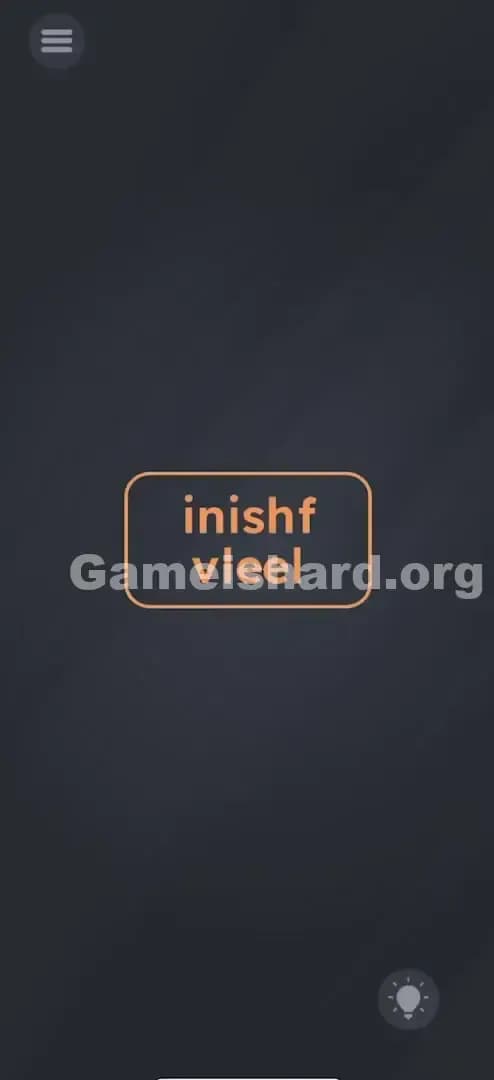
How to solve Game Is Hard level 50? Get instant solution & answer for Game Is Hard level 50: "inishf vieel"
Doesn't look like your level?
App updates can sometimes shuffle the order of puzzles. If this level 50 walkthrough doesn't match your screen, don't worry! You can browse our All Levels guide to find your exact puzzle by its picture.



Quick Answer for Game is hard Level 50 (Do This)
Solution: Tilt your phone left and right to let gravity slide the letters f and v into their correct positions to spell finish level, then tap the button.
Make sure you tilt gently so the letters don't bounce back out of place before you hit the button.
Game is Hard Level 50 Overview
The Hook of Game is hard Level 50
You load into the level and it looks broken. Like, actually broken. We aren't talking about a tricky riddle or a hidden object this time. You are staring at a button that seems to have suffered a serious rendering error. The text is garbled. It says "inishf" on the top line and "vieel" on the bottom. It looks like the developer fell asleep on the keyboard or the assets didn't load correctly. It’s annoying. You want to fix it. But tapping the screen just feels dead.
The Objective in Game is hard Level 50
Your goal is simple: You need to press the finish level button. The problem? That button doesn't technically exist yet. The game code won't register the button press until the text on the button label is semantically correct. You have to repair the UI itself before you can use it. You aren't answering a question; you are performing maintenance on the game interface.
Mechanics Involved in Game is hard Level 50
This level stops being a quiz and starts being a physics toy. Here is what is actually happening under the hood:
- Gyroscope / Accelerometer Control: The game is reading the physical orientation of your device.
- Physics Objects: The letters aren't just font renders; they are loose physical items with mass and collision detection.
- UI Drag (via Gravity): You can't touch the letters with your finger, but "gravity" can touch them.
- State Change: The button is inactive (orange/neutral) until the text string matches the win condition.
It’s not a typo. It’s a physics puzzle disguised as bad spelling.
What You See on Screen in Game is hard Level 50
Let's break down the visual layout so you know you are looking at the right puzzle. The screen is stark.
- The Background: It's that familiar, dark grey slate texture standard to the game.
- The Centerpiece: There is a single, large, rounded rectangular button in the middle of the screen. It has an orange outline.
- The Text: Inside the button, the text is split into two lines.
- Top line: inishf
- Bottom line: vieel
- The Anomaly: If you look closely, the spacing is weird. The f at the end of the top line looks lonely. The v at the start of the bottom line looks out of place. They don't look "glued" down like standard font.
- The Interface: There are no other inputs. No keyboard. No multiple-choice answers. Just that one jumbled button.
What’s Tricking People in Game is hard Level 50
The Trap of Game is hard Level 50
The trap here is "Touchscreen Bias." We are conditioned to solve everything on a smartphone by touching the glass. You see a letter out of place? Your brain screams, "Drag it!" You try to put your thumb on the f and slide it to the front. Nothing happens. You try to tap the v. Nothing happens. You assume the game is glitching or that you aren't tapping precisely enough. You aren't failing because you don't know the word is "finish"; you are failing because you are using the wrong tool (your finger) to move the object.
The Wrong Instincts in Game is hard Level 50
I watched a friend play this, and they spent two solid minutes trying to shake the phone violently. Shaking is a common mechanic in this game, but shaking is chaotic. It resets positions or randomizes things. Here, shaking just rattles the letters without solving the order. Another bad instinct is treating the button like a "Confirm" button immediately. Tapping "inishf" does absolutely nothing. The game is checking the string "finish level" on every frame. If the string isn't exact, the tap event is void.
My Reaction to Game is hard Level 50
I stared at this for way too long. I thought it was an anagram puzzle. I was mentally trying to rearrange "inishf" into something else. Then I accidentally shifted on my couch, tilting my phone slightly to the left. I saw the f slide a millimeter. That was the facepalm moment. The game wasn't asking for my brain; it was asking for my wrist.
Game is hard Level 50 Step-by-Step Walkthrough
The Setup of Game is hard Level 50
Sit up straight or hold your phone flat in your hand (parallel to the floor). This gives you the best control over the simulated "gravity." If you are lying in bed sideways, your phone's sensors might already think you are tilting, jamming the letters against the wall.
The Action in Game is hard Level 50
- Analyze the text: You need the f (currently at the end of line 1) to move to the start of line 1. You need the v (currently at the start of line 2) to move to the middle of line 2. Wait, actually, let's look closer. The word is level. The v is likely just loose.
- Tilt Left: Slowly tilt your phone to the left. Watch the letter f slide all the way from the right side of the word to the left side. It should settle before inish to form finish.
- Adjust for the V: Simultaneously, watch the letter v. Depending on how the physics engine initialized, the v in vieel needs to settle into level. You might need to tilt right slightly to nudge it, or just let it settle. Usually, the f is the main traveler.
- Verify the color: Once the letters slide into the correct spots, the text will clearly read finish level. In many versions of this puzzle, the button instantly changes color (usually to green) to indicate it is now active.
- Tap the Button: Once the word is legible and the button looks active, tap it immediately.
Troubleshooting in Game is hard Level 50
- Letters stuck? Sometimes the physics engine falls asleep. Give the phone a tiny, sharp jiggle (not a shake) to wake up the rigid bodies, then resume tilting.
- Overshooting: If you tilt too hard, the letters might slide past their target or bunch up weirdly. Tilt gently. Treat the letters like water droplets.
- Not registering? Ensure your screen rotation lock isn't messing with the game's sensors (though usually, games override this). More likely, you just haven't tilted enough. Go full 90 degrees if you have to.
Micro-Details That Make the Move Register
Precision is key here. The game uses "snap zones" for these letters. They aren't completely free-roaming physics objects; they are on a rail (a horizontal track).
- The Rail: The f can only move left and right on the top line. It cannot fall to the bottom line.
- The Snap: You don't need pixel-perfect precision. Once the letter gets close enough to the correct gap, it usually "magnetizes" or snaps into place.
- The Hold: Don't tap while the letters are still sliding. Wait for them to stop moving. If you tap while the f is currently drifting past the i, the click won't register.
I fixed my own struggle by realizing I was tilting back and forth too quickly. I had to tilt left and hold the tilt for a second to let the slow-moving letter travel the full distance.
The Logic Behind Game is Hard Level 50
This level is teaching you about Object Permanence and User Interface Deconstruction. Usually, text in a UI is static. It's information. In Game is hard, text is often a physical game object. By detaching the letters from the word, the developers are breaking the "fourth wall" of the user interface. They are telling you: "Nothing on this screen is safe. Everything can be moved."
The logic relies on the phone's accelerometer. The game code constantly monitors the X and Y axis of your device. It applies force vectors to the specific letter sprites (f and v) based on that data. The rest of the letters (inish and eel) have their "physics" toggled off—they are static. This selective physics is what makes the puzzle confusing; you expect all letters to move or none of them.
Pro Tip for Game is Hard Level 50
If you are speedrunning or just want to get past this instantly:
- Unlock rotation: Just in case your phone settings are aggressive.
- Lay flat: Start flat on a table.
- Hard tilt: Tilt the left side of your phone down 45 degrees.
- Wait 1 second: Let the animation finish.
- Tap: Don't hesitate.
Do not waste time trying to drag the letters with your finger. It will never work, and you'll just smudge your screen.
Alternative Attempts of Game is hard Level 50 (What Doesn’t Work, and Why)
Here are the things I tried that failed miserably, so you don't have to:
- Swiping the letters: I tried to swipe the f to the left. The game interpreted this as a swipe input, not a drag, and did nothing.
- Shaking the phone: This just resets the physics or rattles the letters in place without directional purpose.
- Turning the phone upside down: I thought maybe gravity would make them fall off the button? Nope, they are locked to the horizontal axis.
- Tapping the "Hint" bulb: The hint usually just says "Tilt the phone." Save your currency. You don't need it now.
- Volume Buttons: Sometimes this game uses volume keys to "move" things. Not here. This is purely motion control.
- Voice Commands: Yelling "Finish!" at the microphone does not force the level to end. (Though it did startle my cat).
Common Mistakes for Game is Hard Level 50
- Assuming it's a touch puzzle: 90% of players fail initially because they never try tilting.
- Tilting the wrong axis: Tilting the phone forward/backward (pitch) won't move letters sideways (roll). You need to roll the phone left/right.
- Tapping too early: You tap when the f is half-way there. The button text reads "fiinish" or something similar, and the game rejects the input.
- Screen Orientation Lock: Rare, but on some older devices, having rotation locked prevents the browser/app from accessing accelerometer data correctly.
- Ignoring the 'v': Everyone focuses on the f in finish. Make sure the bottom line spells level correctly too. If the v is misaligned, the button remains dead.
Pattern Recognition: How to Spot This Trick in Future Game is Hard Levels
The tell
Whenever you see text that looks "messy," "jumbled," or has bad kerning (spacing between letters), assume it is a physics object. Static text is usually perfectly aligned. Misaligned text is almost always a clue that gravity or touch-dragging is involved.
The habit
When you are stuck on a level with no obvious answer:
- Tilt your phone in all four directions.
- Shake your phone gently.
- Turn your phone upside down. Before you start tapping randomly, check if the world has physics enabled. This habit saves you on at least 10 other levels in this game.
Game is hard Level 50 FAQ (Short, Useful)
Q: The letters aren't moving when I tilt in Game is hard Level 50! A: Check if your phone's "Auto-rotate" or sensors are working. Sometimes exiting the app and reopening it recalibrates the sensors.
Q: Can I just drag the letters with my finger in Game is hard Level 50? A: No. In this specific level, touch input is disabled for the letters. Only the gyroscope (tilt) affects them.
Q: The button says "finish level" but it won't click in Game is hard Level 50. A: The alignment might be slightly off. Tilt a little bit more to ensure the letters hit the "snap" zone, then try tapping the center of the button, not the letters themselves.
Q: Is there a hidden object I need to find in Game is hard Level 50? A: No hidden objects here. The solution is entirely contained within the text on the central button.
Get more level walkthrough on Gameishard.org
Stuck on the next puzzle? We have guides for every single level of Game is hard. We skip the fluff and get straight to the solution so you can keep your win streak alive. If this guide helped you fix your broken buttons, share it with your friends who are probably still trying to drag that "F" with their thumb. Good luck on Game is hard Level 34!