Game Is Hard Level 74 Solution Walkthrough & Answer
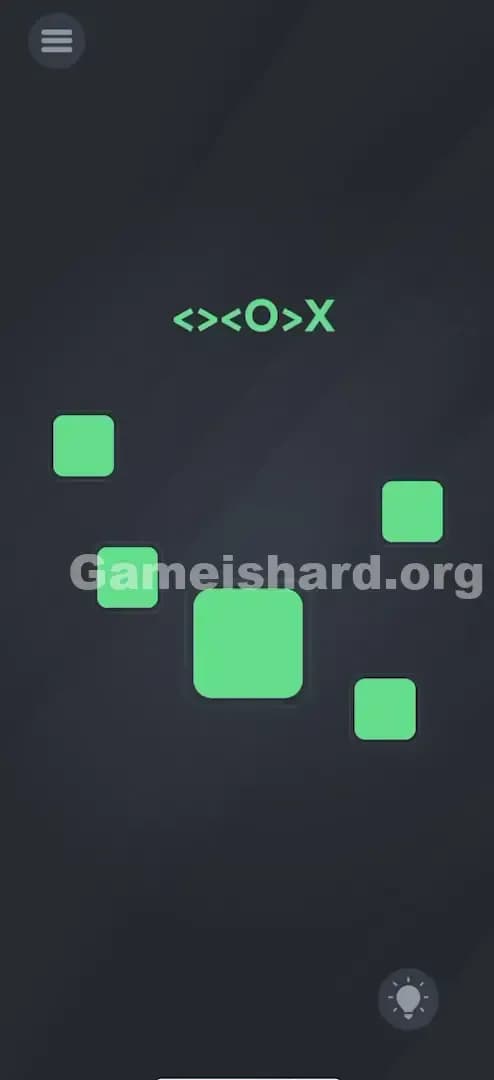
How to solve Game Is Hard level 74? Get instant solution & answer for Game Is Hard level 74: "<><O>X"
Doesn't look like your level?
App updates can sometimes shuffle the order of puzzles. If this level 74 walkthrough doesn't match your screen, don't worry! You can browse our All Levels guide to find your exact puzzle by its picture.
Quick Answer for Game is hard Level 74 (Do This)
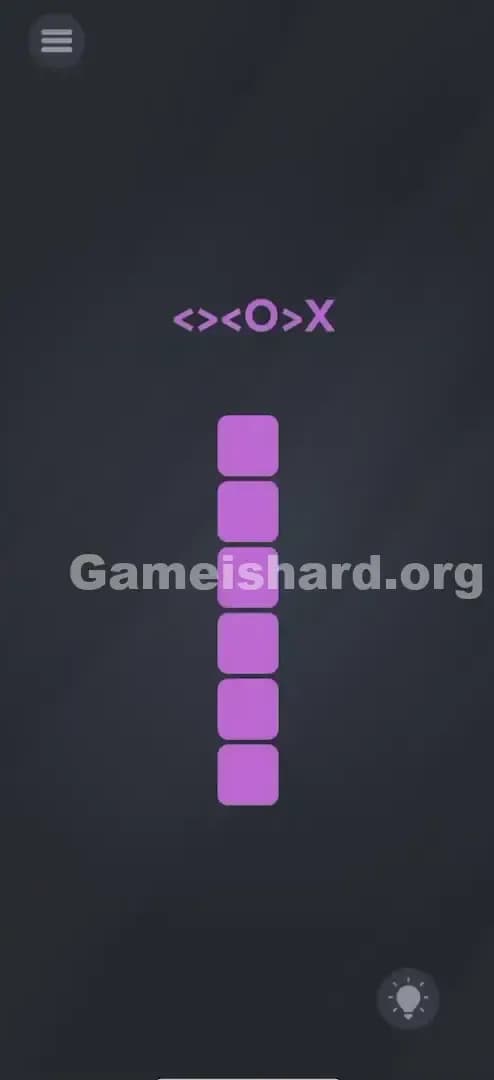
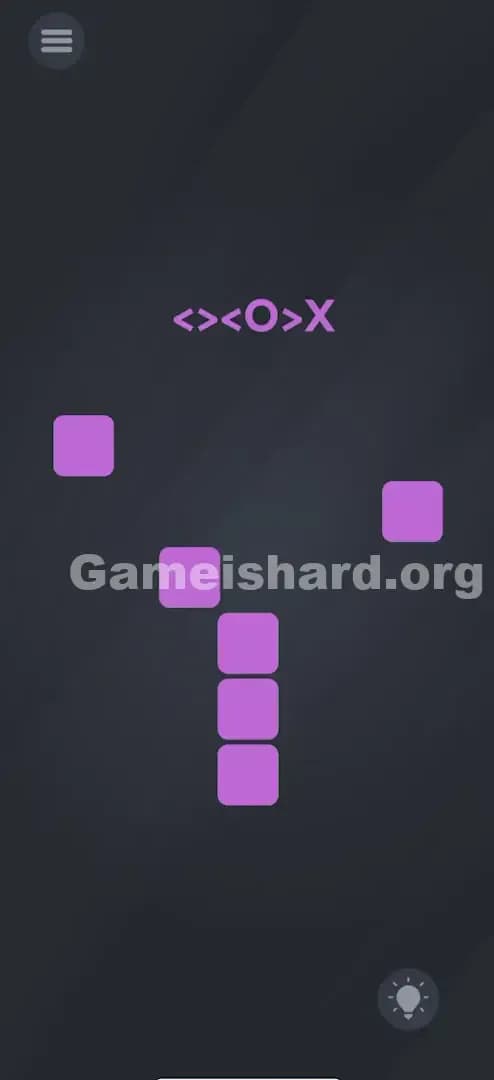
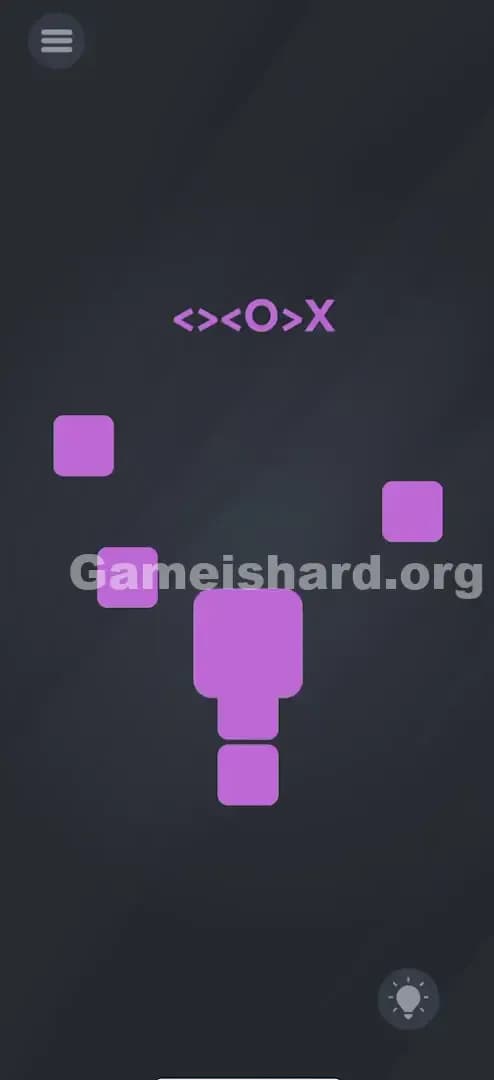
Solution: Follow the code <><O>X from top to bottom on the 6 purple boxes: Drag the 1st Left, 2nd Right, 3rd Left, pinch the 4th with two fingers to enlarge it (O), drag the 5th Right, and swipe the 6th hard off the screen so it disappears (X).
Make sure you do the actions on the boxes in order, starting from the top box and working down.
Game is Hard Level 74 Overview
The Hook of Game is Hard Level 74
You stare at the screen. There are just purple boxes stacked like a weird totem pole and a cryptic string of symbols above them: <><O>X. It feels less like a riddle and more like cheat codes from the 90s. The game gives zero context. Are you supposed to tap them? Rearrange them? The frustration sets in immediately because standard "tapping" does nothing but make the box wobble slightly.
The Objective in Game is Hard Level 74
Your goal isn't to solve a math problem or find a hidden object. It is to translate the symbols into physical gestures. The game is treating your touchscreen like a controller input test. You have to perform a specific action on each box corresponding to the symbol directly above the stack.
Key Mechanics of Game is Hard Level 74
- Directional Swiping: Understanding arrows as instructions, not just decorations.
- Multi-touch (Pinch Zoom): Using two fingers to manipulate a single UI element.
- Object Physics: Treating a UI element (the box) as a physical object that can be thrown away.
- Sequential Logic: Following a top-to-bottom order.
This level is pure "Game is Hard" logic. It’s not a typo. It’s a command prompt for your fingers.
What You See on Screen in Game is hard Level 74
Imagine looking at your phone right now. The background is the standard dark grey.
- Top Center: A string of purple text symbols: <><O>X.
- Center: A vertical stack of 6 purple squares (boxes) with rounded corners. They look like buttons, but they don't have labels.
- Bottom Right: The hint bulb (which we are trying to avoid using).
- Top Left: The menu icon.
That's it. It’s minimalist. The layout is suspicious because of the alignment. The text is centered exactly above the stack, implying a relationship. The number of symbols (6 characters) perfectly matches the number of boxes (6 boxes). That is your biggest clue.
What’s Tricking People in Game is hard Level 74
The Trap of Game is Hard Level 74
The biggest trap here is symbol interpretation. Most players see the O and think "tap" or "circle." They see the X and think "don't touch" or "wrong answer." We are trained by other apps that X means stop. Here, X is an action, not a warning.
The Wrong Instincts in Game is Hard Level 74
- Tapping furiously: Everyone tries tapping the boxes in the order of the symbols. Nothing happens.
- Dragging the text: In previous levels, you often dragged the text itself. Here, the text is just the instruction manual; the boxes are the tools.
- Rearranging the stack: I tried dragging the bottom box to the top to see if order mattered. It doesn't work like a tower of Hanoi.
My Reaction to Game is Hard Level 74
I spent a good two minutes staring at the O. I thought it meant "Open." I tried tapping it. I tried shaking the phone. When I realized "O" meant "make a circle" or "expand," I felt stupid. It's so obvious in hindsight, but in the moment, your brain refuses to see gestures in text.
Game is hard Level 74 Step-by-Step Walkthrough
The Setup of Game is Hard Level 74
Focus entirely on the vertical stack of 6 purple boxes. Mentally assign each symbol from the top code <><O>X to a box, starting from the top box going down.
- Box 1 = <
- Box 2 = >
- Box 3 = <
- Box 4 = O
- Box 5 = >
- Box 6 = X
The Action in Game is Hard Level 74
Execute these moves precisely.
- Top Box (<): Touch the first box and drag it to the LEFT. It should fly off or settle on the left.
- Second Box (>): Touch the second box and drag it to the RIGHT.
- Third Box (<): Touch the third box and drag it to the LEFT.
- Fourth Box (O): This is the tricky one. Place two fingers on this box and pinch out (spread fingers apart) to make it bigger. It will expand.
- Fifth Box (>): Touch the fifth box and drag it to the RIGHT.
- Bottom Box (X): Treat this like garbage. Swipe it hard/fast to the side (left or right doesn't matter, just get it off screen) until it disappears completely. Basically, "close" or "delete" it.
Verification
As you complete each correct action, the box usually disappears or settles into its "solved" state (the O box stays big). Once the final box is swiped away (X), the level completes instantly.
Troubleshooting at Game is Hard Level 74
If the O (4th box) isn't working: Ensure both fingers start inside the purple box before spreading. If you start outside, the game might register it as a general screen zoom or miss the input entirely.
Micro-Details That Make the Move Register in Game is Hard Level 74
Precision matters here, especially for the X and O.
- For the Swipe (</>): You don't need to throw it off the screen. Just a distinct drag in that direction is enough. It feels like unlocking a phone slide.
- For the O: The pinch-out needs to be deliberate. Don't be too fast. Expand your fingers until the box visibly changes size.
- For the X: This requires velocity. If you drag it slowly, it might just rubber-band back. Flick it like you are scrolling fast through a bad playlist.
I fixed a stuck attempt by focusing on the 4th box first. Sometimes doing the complex gesture (The O) first helps ensure the game is reading inputs correctly, though the intended solution is top-to-bottom.
The Logic Behind Game is Hard Level 74
This level is a masterclass in symbolic mapping. The game creates a language where ASCII characters represent physical kinetic actions.
- < and > are directional vectors.
- O represents expansion/shape.
- X represents negation or deletion.
The recurring pattern in Game is hard is that text is rarely just text; it's a map. The level removes all standard UI buttons (like "Submit" or "Check") forcing you to interact directly with the game objects. It teaches you that you are the engine. Nothing happens until you physically manipulate the environment.
Pro Tip for Game is Hard Level 74
If you are speed-running or replaying, keep this mental cheat sheet ready:
- Left
- Right
- Left
- Zoom (Pinch Out)
- Right
- Yeet (Throw away)
Do not waste time trying to tap the symbols at the top. They are completely static and non-interactive.
Alternative Attempts on Game is Hard Level 74 (What Doesn’t Work, and Why)
Here is a list of things I tried that failed miserably, so you don't have to:
- Tapping the boxes in rhythm: Does nothing. Tapping is not a valid input for this puzzle.
- Drawing the shapes: I tried tracing an "O" on the 4th box. The game doesn't recognize drawing gestures, only multi-touch.
- Shaking the phone for X: Often X means "shake" in other riddle games. Here, the accelerometer is off. It's a swipe gesture.
- Dragging the text onto the boxes: A classic trick in other levels, but here the text is glued to the background.
- Waiting: Sometimes doing nothing is the answer. Not here. You can stare at this for an hour and you'll still be on Level 74.
- Pinching IN on the O: Pinching "in" (to make it smaller) doesn't work. An O is big and round; it implies expansion.
Common Mistakes for Game is Hard Level 74
- Misinterpreting the X: Most people leave the last box alone because X usually means "bad." You must aggressively swipe it.
- Lazy Dragging: If you don't drag the
<or>boxes far enough, they snap back to the center. Commit to the swipe. - Wrong Finger Placement: Trying to do the pinch-zoom with one finger and a thumb from the same hand often leads to accidental swiping. Use two index fingers for better control.
- Order Confusion: While some users report order doesn't matter, the safest bet is Top-Down. Skipping around can sometimes glitch the physics engine.
- Ignoring the Arrows: Some players think
<and>are brackets enclosing the puzzle. They are active instructions for the first and last boxes of that group.
Pattern Recognition: How to Spot This Trick in Future Game is Hard Levels
The Tell
Whenever you see a string of non-word characters (arrows, math symbols, shapes) aligned with game objects, assume it is a Gesture Map.
The Habit
Stop reading. Start matching. Look at the number of characters vs. the number of objects. If they match (1:1 ratio), simply perform the action the character looks like on the object below it.
- Arrow = Swipe.
- Circle = Expand/Rotate.
- X = Delete/Close.
- Line = Cut/Swipe Through.
Game is Hard Level 74 FAQ (Short, Useful)
Q: Does the order of the boxes matter in Game is Hard Level 74? A: Technically, usually no, but the game physics can get weird if you do the middle ones first. It's safest to go top to bottom (1 through 6).
Q: My "O" box won't expand in Game is Hard Level 74. Why? A: You are likely just swiping it by accident. Make sure two fingers touch the screen simultaneously on the box before you spread them apart.
Q: What does the X actually mean in Game is Hard Level 74? A: In this context, X stands for "eliminate" or "cross out." The gesture equivalent of crossing something out is swiping it off your workspace.
Q: Can I use the shake feature in Game is Hard Level 74? A: No. Shake is not enabled for Level 74. All inputs must be touch-based drags or gestures.
Get more level walkthrough on Gameishard.org
If you’re stuck on another level, check the main index. These guides are written to be fast, cheat-sheet style helpers without the fluff. We focus on the "Aha!" moment so you can get back to feeling like a genius. Share this guide with your friends if they are stuck staring at purple boxes!