Game Is Hard Level 19 Solution Walkthrough & Answer
How to solve Game Is Hard level 19? Get instant solution & answer for Game Is Hard level 19: "complete their journey."
Doesn't look like your level?
App updates can sometimes shuffle the order of puzzles. If this level 19 walkthrough doesn't match your screen, don't worry! You can browse our All Levels guide to find your exact puzzle by its picture.
Quick Answer for Game is hard Level 19 (Do This)
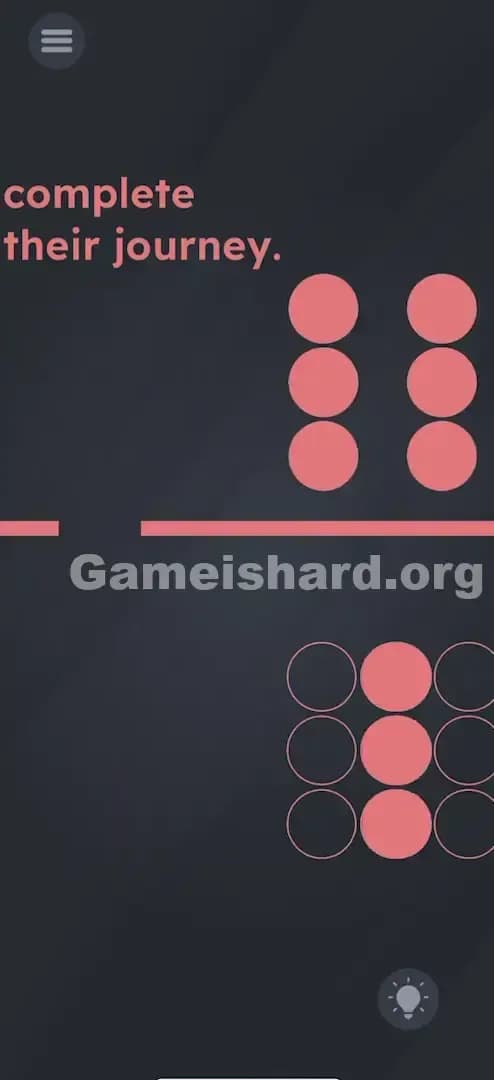
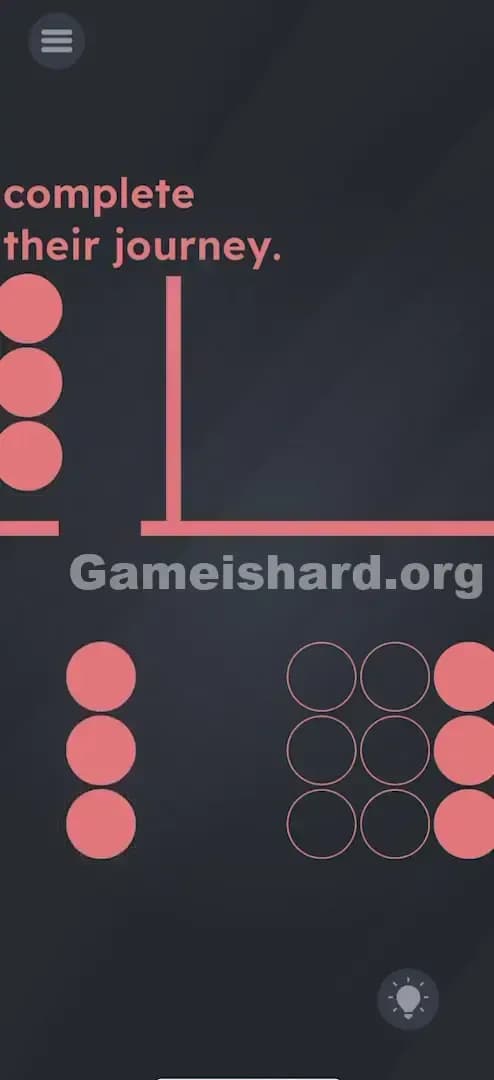
Solution: Drag the top cluster of pink balls to the left until a single vertical column aligns with the gap in the line, then drag that column down through the gap and into the bottom grid.
Repeat this process two more times for the remaining columns until the bottom outline is completely filled.
Game is Hard Level 19 Overview
The Hook of Game is hard Level 19
You are staring at a traffic jam. That’s what this feels like. You have a solid block of shapes, a solid wall, and a tiny exit ramp that looks way too small for the cargo you’re carrying. Most players instantly try to smash the entire block through the wall. It doesn't work. The game is lying to you about the physics of the object. It looks like one big square. It isn't.
The Objective in Game is hard Level 19
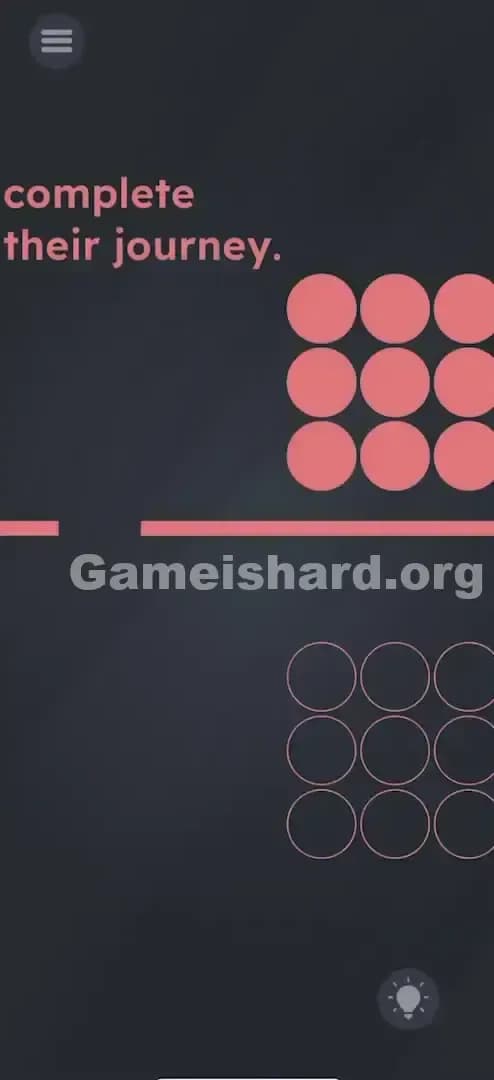
Your goal is deceptively simple: move the filled pink circles from the top area into the outlined circles at the bottom. The prompt "complete their journey" is a hint about movement and pathfinding. You aren't answering a riddle here; you are performing a logistics operation. You need to transport goods from Point A to Point B, but there is a massive roadblock in the center of the screen with a very narrow gate.
Mechanics Involved
- Drag & Drop: This is the primary interaction. You are moving assets manually.
- Collision Detection: The red line in the middle is a solid wall. Objects cannot pass through it unless there is an opening.
- Object Segmentation: This is the hidden mechanic. The game treats the 3x3 grid not as a single sticker, but as a collection of parts that can be separated under specific conditions.
- Precision Alignment: You can’t just swipe vaguely. The game requires you to line up geometry perfectly with the gap.
It’s not a typo. It’s a filtration system.
What You See on Screen in Game is hard Level 19
Let's break down the layout because the visual hierarchy here is important for understanding the solution.
At the top left, you have the prompt text: "complete their journey." It sits there innocently, but it sets the stage.
To the right of the text, occupying the top-right quadrant, is a 3x3 grid of solid pink circles. They look fused together. They move together when you touch the center of the group.
In the middle of the screen, cutting horizontally across, is a thick pink line. It acts as a floor for the top section and a ceiling for the bottom. Crucially, on the far left side of this line, there is a small gap. The gap is exactly the width of one vertical column of circles.
In the bottom-right quadrant, mirroring the top group, is a 3x3 grid of empty outlines. These are the parking spots. They are waiting for the pink circles.
The screen is dark, the elements are minimal, and the only obvious path is that tiny choke point on the left.
What’s Tricking People in Game is hard Level 19
The Trap of Game is hard Level 19
The primary trap here is "Rigid Body Assumption." In almost every other video game or puzzle, a block of objects that moves together is a single object. If you played Tetris, you know a square block stays a square block. Game is hard Level 19 subverts this. It presents the top balls as a unified 3x3 block. When you drag them, they all move in unison. This trains your brain to think, "I need to fit this big square through that small hole."
The Wrong Instincts in Game is hard Level 19
Your brain does the math: "Hole size = 1. Block size = 3. Impossible." So you stop thinking about the gap. You start looking for other solutions.
- You try to Shake the phone to break the balls apart.
- You try to Tilt the screen to make them fall.
- You try to Tap individual balls to teleport them.
- You try to drag the Outline up to the balls (which usually doesn't work).
None of these work because the solution isn't about breaking the game's physics; it's about understanding the specific rules of this object.
My Reaction to Game is hard Level 19
I spent a solid two minutes trying to drag the bottom outline up. I figured, "Hey, if the mountain won't come to Muhammad, Muhammad must go to the mountain." I dragged the bottom grid all over the screen. It didn't budge. Then I tried to smash the top block through the solid line repeatedly, hoping it was breakable glass. Nope. Just a solid wall. I felt pretty silly when I realized the block was essentially sliced bread.
Game is hard Level 19 Step-by-Step Walkthrough
The Setup of Game is hard Level 19
Ignore the bottom grid for a second. Focus entirely on the top 3x3 block of pink circles and the gap in the line on the left. Your job is to feed the block into the gap, piece by piece.
The Action in Game is hard Level 19
Step 1: Tap and hold the 3x3 block of pink circles. Drag the entire group all the way to the left. Do not try to go down yet. Just go left.
Step 2: Align the leftmost vertical column of 3 balls exactly over the gap in the line.
Step 3: Once aligned, pull your finger down. You will see that only the single column slides through the gap, separating itself from the main block. The other 6 balls stay upstairs.
Step 4: Drag that separated column to the right and place it into the corresponding column of the bottom outline grid.
Step 5: Go back to the top. Drag the remaining 2x3 block to the left again. Align the new leftmost column with the gap.
Step 6: Drag it down through the hole and park it in the bottom grid.
Step 7: Repeat for the final column. Once all 9 circles are in the bottom outlines, the level clears.
Troubleshooting at Game is hard Level 19
- The column won't go down: You aren't aligned perfectly. Wiggle the block left and right slightly while pulling down. The hitbox for the gap is strict.
- The balls act stuck: Ensure you are dragging the top balls. If you try to drag from the bottom of the column while it's still above the line, sometimes the game registers it as hitting the wall. Drag from the top ball of the column.
- UI Bug: If the balls separate but won't snap into the bottom grid, just drop them close to the outline. They usually snap into place automatically if they are close enough.
The Logic Behind Game is Hard Level 19
This level is a test of Deconstruction.
The game presents a "Gestalt" image—a whole that looks greater than the sum of its parts. You see a square. The game engine, however, sees three vertical rectangles standing next to each other. The logic trap is assuming the visual connection implies a physical connection.
By forcing you to use a gap that is only 1-unit wide, the developers are screaming the solution at you: "The answer is 1 unit wide." Therefore, the object must be divisible.
This ties into a recurring pattern in Game is hard: The UI is flexible. Objects that look solid are often liquid, stackable, or separable. Text can be moved. Shapes can be broken. Nothing is as rigid as it appears.
Pro Tip for Game is Hard Level 19
If you are replaying or just want to feel like a speedrunner:
- Grab the block, slam it left to the wall.
- Drag down immediately (the first column usually auto-aligns with the wall edge).
- Flick it right towards the bottom grid.
- Don't wait for the animation to finish; grab the next top chunk immediately.
Time Saver: You don't have to place the columns in the specific "Left, Middle, Right" order in the bottom grid. You can dump the first column into the far right slot if you want. It doesn't matter, as long as they fit.
Game is hard Level 19 FAQ (Short, Useful)
Why won't the balls go through the hole on Game is hard Level 19? You are likely slightly misaligned. The gap is narrow. Move the block slowly left or right until you find the exact pixel where it slides down freely.
Can I move the bottom circles up on Game is hard Level 19? No. The bottom outlines are static. You must bring the top circles down to them.
Do I have to put them in a specific order in Game is hard Level 19? No. You can put the first column you pull down into any of the three slots in the bottom grid. The game just checks for "Filled," not "Order."
My game is bugged, the balls are stuck at Game is hard Level 19! It's rare, but physics glitches happen. If a ball gets stuck inside the wall line, force close the app and restart the level. It’s faster than trying to wiggle it out.
Get more level walkthrough on Gameishard.org
This guide was written to get you unstuck fast, without the fluff. If you found this breakdown of Game is hard Level 19 helpful, share it with your friends who are stuck raging at their screens. We break down the logic, not just the answer, so you actually get better at the game.