Game Is Hard Level 76 Solution Walkthrough & Answer
How to solve Game Is Hard level 76? Get instant solution & answer for Game Is Hard level 76: "turn them on."
Doesn't look like your level?
App updates can sometimes shuffle the order of puzzles. If this level 76 walkthrough doesn't match your screen, don't worry! You can browse our All Levels guide to find your exact puzzle by its picture.
Quick Answer for Game is hard Level 76 (Do This)
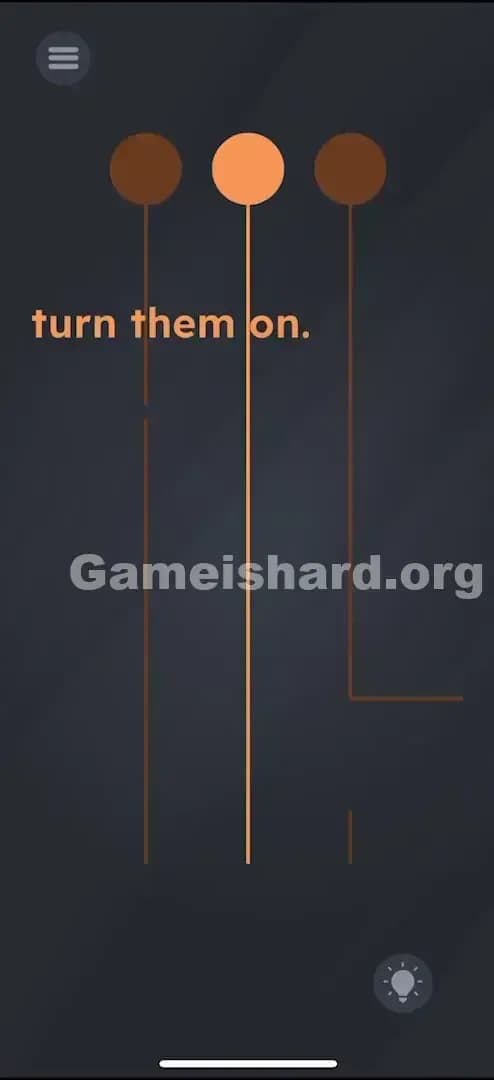
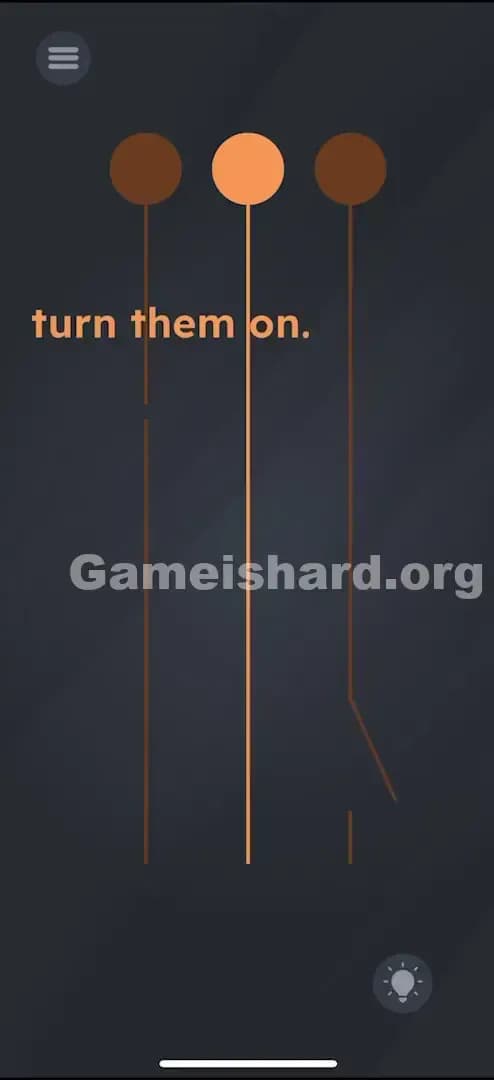
Solution: Drag the lamps upward to find the broken wire pieces, then rotate the L-shaped piece to fix the right wire and slide the small straight piece to fix the left wire gap.
Target the dark area below the visible wires to find the loose parts.
Game is Hard Level 76 Overview
The Hook of Game is hard Level 76
It’s dark. You have three lamps. Only the middle one is working. The prompt says "turn them on," but tapping the bulbs does absolutely nothing. You feel like an idiot tapping glass that refuses to glow. It’s classic Game is hard misdirection: the problem isn't the bulb; it's the infrastructure.
The Objective of Game is hard Level 76
You need to repair the electrical connection for the left and right lamps. The game hides the "tools" you need just off-screen or disguised within the environment. This isn't a logic puzzle; it's a hidden object repair job.
Mechanics Involved in Game is hard Level 76
- Hidden Object: Critical parts are obscured until you move the main objects.
- Drag & Drop: You must physically move components to new locations.
- Rotation: One piece requires a specific orientation to "snap" into place.
- Precision Snapping: The wire fragments need to be placed exactly over the gaps.
It’s not a typo. It’s a circuit board disguised as a simple drawing.
What You See on Screen in Game is hard Level 76
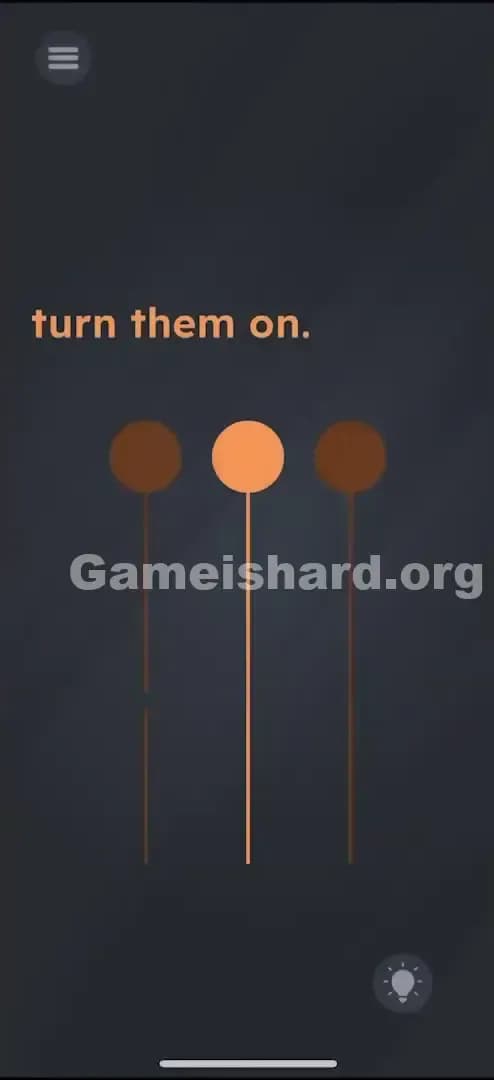
Let's break down the scene. You are looking at a dark grey background with the text "turn them on." at the top.
Below the text, three pendant lights hang from the ceiling on long, thin wires.
- The Left Lamp: Dark (unlit). The wire looks mostly intact but suspiciously thin or faint near the bottom.
- The Middle Lamp: Bright orange (lit). This is your control group; it works perfectly.
- The Right Lamp: Dark (unlit). Similar to the left one, but maybe the wire looks a bit short?
There are no switches. No buttons. Just gravity and wires.
What’s Tricking People in Game is hard Level 76
The Trap of Game is hard Level 76
"UI Blindness" strikes again. Most players assume the view is static. You see three lights, so you assume you just need to interact with the lights (tap them, shake the phone to rattle the filament, etc.). The game tricks you into thinking the "frame" of the picture is fixed. It isn't. The solution is literally out of frame.
The Wrong Instincts in Game is hard Level 76
- Tapping the Bulbs: Everyone does this first. You tap the left one. Nothing. You tap the right one. Nothing.
- Shaking the Device: Usually a good guess for "broken" things, but shaking won't fix a severed wire.
- Tilting: You might think gravity will swing the lit bulb into the others to light them up. Good physics logic, but wrong game logic.
My Reaction to Game is hard Level 76
I spent a good minute trying to drag the light from the middle bulb to the others, thinking I could "share" the electricity. I felt pretty clever until absolutely nothing happened. Then I accidentally dragged the screen up and saw a loose piece of wire sitting there like a Lego brick I forgot to clean up. Facepalm city.
Game is hard Level 76 Step-by-Step Walkthrough
The Setup of Game is hard Level 76
Ignore the bulbs for a second. The issue is connectivity. You need to expose the bottom of the screen where the "floor" would be.
The Action of Game is hard Level 76
- Drag Up: Place your finger on the background or near the lights and drag the entire scene upward. You aren't moving the lights; you are scrolling the view down.
- Locate the Parts: Once you scroll down, you will see disconnected wire segments lying at the bottom of the strings.
- There is a small, straight segment under the left light.
- There is an L-shaped (or slightly bent) segment near the right light.
- Fix the Left Wire: Tap and drag the small straight vertical piece. Move it up to the gap in the left wire. It should snap into place, closing the circuit. The left light will turn on immediately.
- Fix the Right Wire: Tap the L-shaped segment.
- Crucial Step: Tap it once or twice to rotate it until it aligns vertically with the wire above.
- Drag it up to connect the gap in the right wire.
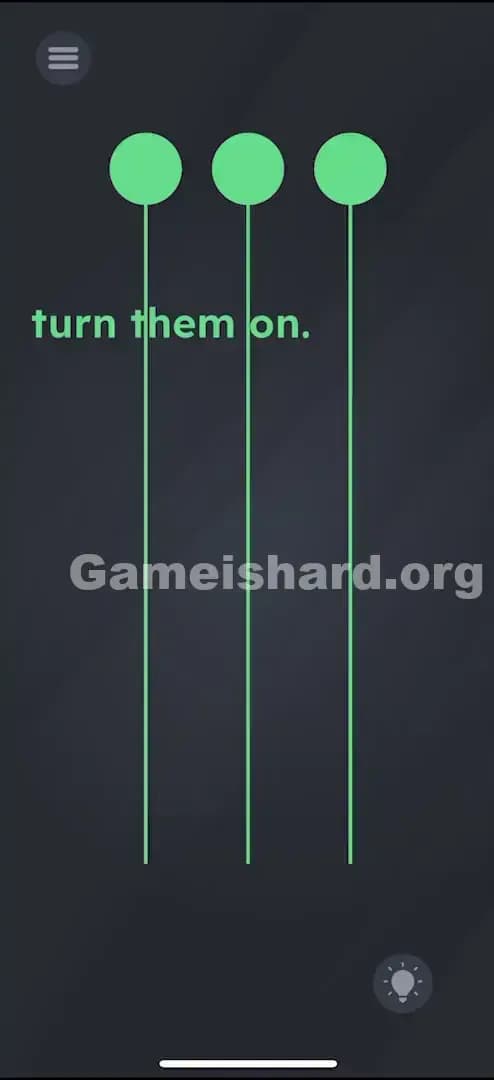
- Verification: Once both gaps are bridged, electricity flows, and all three bulbs will glow bright orange. Level Clear.
Troubleshooting at Game is hard Level 76
- Can't find the pieces? You didn't drag the scene up high enough. Pull the lights almost to the top of the screen.
- Right wire won't fix? The rotation is likely wrong. The piece needs to look like a straight extension of the wire, not a jagged elbow. Tap it to spin it.
Micro-Details That Make the Move Register in Game is hard Level 76
Precision matters here. The "hitbox" for the wire repair is small.
- The Snap: You don't need pixel-perfect precision, but you need to be close. The game uses a "magnetic" snap effect. If you drop the piece near the gap, it should suck itself into place.
- The Left Piece: It's tiny. Make sure your finger isn't covering the gap you are trying to fill, or you won't see when it snaps.
- Drag Speed: Drag slowly. If you fling the pieces, they might bounce off the screen or get lost behind the UI.
I fixed it by zooming in (mentally) and treating it like threading a needle. Don't rush the drop.
The Logic Behind Game is Hard Level 76
This level is a test of spatial awareness and object permanence.
- Hidden Workspace: The game teaches you that the puzzle area is larger than your screen. Just because you can't see the bottom of the wire doesn't mean it isn't there.
- Component Assembly: Unlike previous levels where you just tap or swipe, this requires assembly. You are taking distinct objects and combining them to change the state of a third object (the lamp).
It ties back to the core Game is hard philosophy: The environment is interactive, even the parts you can't see yet.
Pro Tip for Game is Hard Level 76
If you are speed-running or just want this over with:
- Swipe Up immediately to reveal the floor.
- Tap the Right Piece to rotate it upright (vertical).
- Drag Right Piece to the right wire gap.
- Drag Left Piece (tiny dot) to the left wire gap.
- Done.
Don't bother tapping the bulbs. They are output indicators, not inputs.
Alternative Attempts on Game is hard Level 76 (What Doesn’t Work, and Why)
Here is a graveyard of ideas that failed so you don't have to try them:
- Dragging the lit bulb to the others: This isn't a candle. You can't transfer the flame.
- Multitouching all three bulbs: Holding them all down doesn't force a reset or a "power surge."
- Cutting the middle wire: I tried swiping across the middle wire to see if I could distribute the power. Nope, the wires aren't breakable by you.
- Shaking for loose connections: The wires are physically broken, not loose. Shaking creates zero progress.
- Typing "ON": Sometimes you can edit text. Here, the text is just instructions, not an input field.
- Turning up screen brightness: A clever meta-attempt, but the game doesn't read your system brightness settings for this solution.
Common Mistakes for Game is Hard Level 76
- Giving up on the Right Piece: Players often drag the L-shape to the gap without rotating it. It bounces off. They assume it's the wrong piece. Fix: Tap to rotate.
- Missing the Left Piece: The segment for the left wire is very small. It’s easy to miss if you don't scroll all the way down.
- Dragging the Bulbs: Users try to drag the bulbs down to meet the broken wire. The bulbs are fixed to the ceiling; the wire must come to them.
- Assuming it's a Timing Puzzle: Waiting for the light to blink or flash. It never will. It's a static state until you fix it.
- Thinking the "L" is a Decoy: Because it looks bent, people think it's trash and look for a straight piece. The game forces you to make it straight.
Pattern Recognition: How to Spot This Trick in Future Game is Hard Levels
The Tell
Whenever you see objects hanging from the top of the screen or protruding from the sides, check the "off-screen" space. If a wire, string, or pipe goes off the edge of the visible area, drag the screen to chase it.
The Habit
Always check the boundaries. When a level loads, drag in all four directions (Up, Down, Left, Right) to see if the camera is locked or if there is hidden real estate. If the screen moves, the solution is usually hiding in that new space.
Game is hard Level 76 FAQ (Short, Useful)
Q: I can't find the wire pieces in Game is hard Level 76! A: Drag the background upward firmly. They are hiding "below" the screen edge.
Q: The right wire piece won't stick in Game is hard Level 76. A: It is likely rotated wrong. Tap it once or twice so it aligns vertically with the hanging wire, then drag it to the gap.
Q: Can I fix the wires in any order in Game is hard Level 76? A: Yes. You can fix the left or right one first; it makes no difference to the final success trigger.
Q: Is there a trick to the middle light in Game is hard Level 76? A: No. The middle light exists solely to show you what a "working" light looks like. It is a hint, not a puzzle piece.
Get more level walkthrough on Gameishard.org
That’s the fix for the broken lights in Game is hard Level 76. The game loves to hide the most important pieces just outside your peripheral vision. If this guide helped you reconnect the circuit without throwing your phone, share it with your friends who are stuck tapping dark lightbulbs. We keep our guides direct, fast, and frustration-free. Check out the main page for the next solution when the game decides to trick you again!