Game Is Hard Level 296 Solution Walkthrough & Answer
How to solve Game Is Hard level 296? Get instant solution & answer for Game Is Hard level 296: "How to get better coverage?"
Doesn't look like your level?
App updates can sometimes shuffle the order of puzzles. If this level 296 walkthrough doesn't match your screen, don't worry! You can browse our All Levels guide to find your exact puzzle by its picture.
Quick Answer for Game is hard Level 296 (Do This)
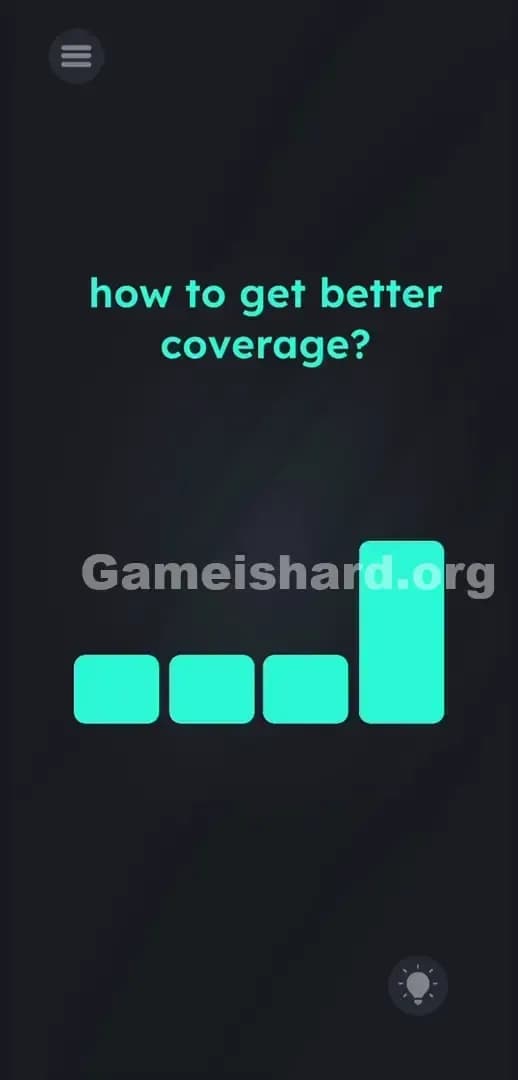
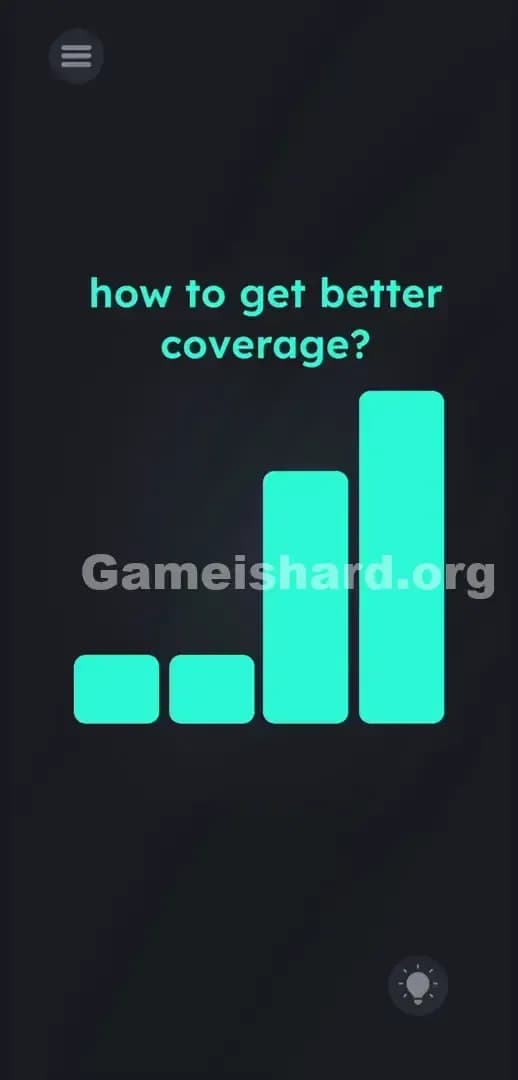
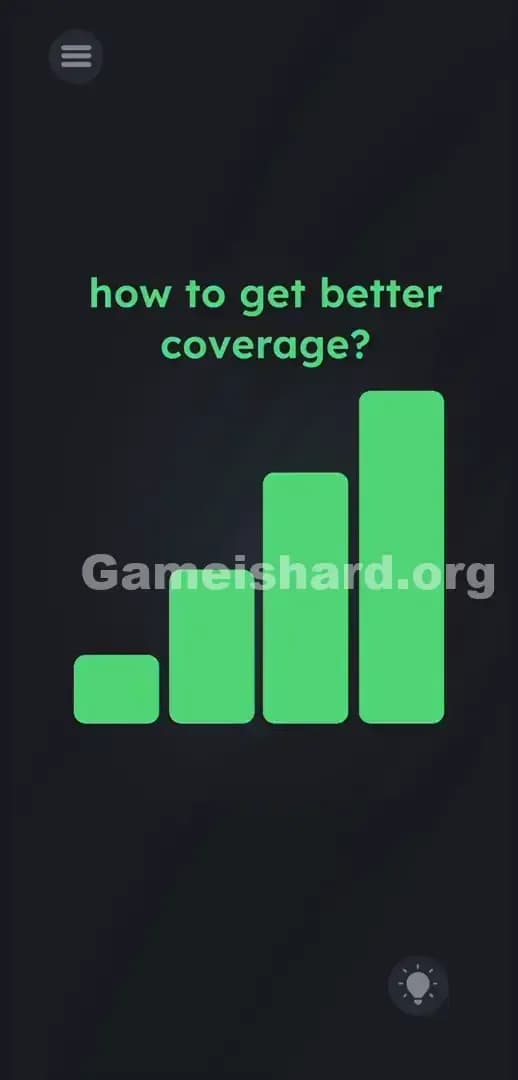
Solution: Drag the four cyan blocks upward to create a cell phone network icon, making the 4th block the tallest, the 3rd block slightly shorter, and the 2nd block shorter still.
Target the row of squares directly under the text and stretch them vertically to draw the answer.
Game is Hard Level 296 Overview
The Hook
You stare at the screen. The game asks a simple question about cell service. You look around the screen for an antenna to move, a phone to tap, or a satellite to spin. Nothing. Just four identical, dumb little squares staring back at you. Game is hard Level 296 plays completely dirty by hiding the answer in plain sight. The game lies to you about how its interface works. You think you are looking at buttons. You are actually looking at raw materials.
The Objective
The goal here isn't to find a hidden router or fix a broken wire. You need to physically build the answer to the question using the available UI elements. The prompt wants "better coverage." You have to give it the universal symbol for better coverage.
- UI drag: Static shapes are actually stretchable objects.
- Visual puzzle logic: The solution is a drawing, not a word.
- Proportional scaling: Heights matter relative to each other.
- Button trick: Ignoring the standard rules of mobile app design.
It’s not a typo. It’s ammo.
What You See on Screen in Game is hard Level 296
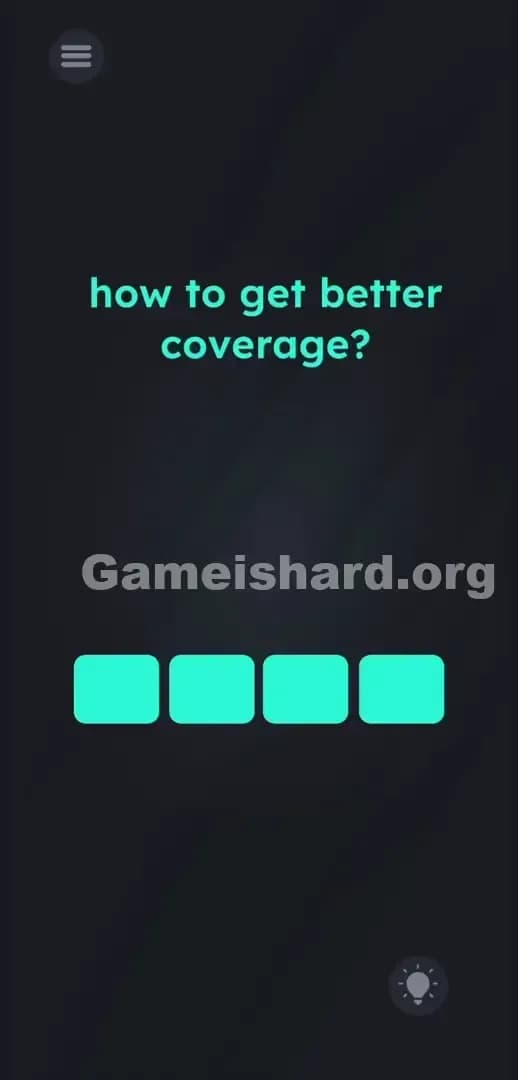
Let's break down the board. The background is a dark, moody gray. Dead center, in a bright teal font, sits the prompt text: how to get better coverage?
Directly below that text, four identical cyan blocks sit perfectly aligned in a horizontal row. They look exactly like blank input fields for a password. Or maybe multiple-choice buttons waiting for text to load.
Tucked up in the top left corner is the standard hamburger menu icon. Down in the bottom right corner sits the hint bulb. The spacing is oddly barren. There is massive negative space above the text and between the prompt and the blocks. That empty space is highly suspicious. It is a canvas waiting to be filled.
What’s Tricking People in Game is hard Level 296
The Trap
Pure UI blindness strikes again. We are conditioned by thousands of hours of phone usage to treat colored blocks at the bottom of a screen as buttons. We expect to tap them. We expect them to spell a word, trigger an event, or flash red to tell us we are wrong. We definitely do not expect them to act like raw clay waiting to be stretched. Game is hard Level 296 exploits your muscle memory. You see a square; you tap a square. The developer knows this and uses it against you.
The Wrong Instincts
Tapping the cyan blocks repeatedly does absolutely nothing. They don't highlight. Swiping the empty space looking for a hidden phone signal fails completely. I even tried tilting my actual phone in the air to see if gravity or the gyroscope would magically give me "better coverage." Nope. Utter dead end. The microphone trick doesn't work here either. Shouting "five G" at your screen just annoys your roommates.
My Reaction
I spent a solid five minutes angrily mashing the screen. I tried dragging the text better coverage down into the blocks. I tapped the hint bulb out of pure spite, then backed out. It wasn't until I accidentally dragged my thumb across one of the squares and watched it stretch like taffy that the logic clicked. Absolute facepalm moment. The blocks aren't buttons. They are a bar graph.
Game is hard Level 296 Step-by-Step Walkthrough
The Setup
Stop tapping. Ignore the words on the screen entirely. Target the four cyan blocks sitting horizontally across the lower middle of your display.
The Action
- Press and hold your finger on the 4th cyan block (the one furthest to the right).
- Drag it straight up toward the text until it forms a tall vertical bar. Stop just below the words.
- Grab the 3rd cyan block and drag it up. Stop dragging when it is distinctly lower than the 4th block.
- Press and drag the 2nd cyan block upward. Keep this one shorter than the 3rd block.
- Leave the 1st cyan block exactly where it is. It serves as your baseline lowest signal bar.
- Release your finger. The game will register the classic "four-bar" cell signal shape and pass you.
Troubleshooting
If the level doesn't trigger the victory screen immediately, your proportions are off. The game's hitboxes for this shape require a clear, recognizable slope.
- Make sure the 4th block is distinctly the tallest. If it is too close in height to the third, the game reads it as a mistake.
- Ensure the 1st block is distinctly the shortest. If you accidentally dragged it up earlier, drag it back down to a perfect square.
- Verify the slope is a steady, recognizable staircase pattern from left to right. Force close the app if the blocks freeze or the UI bugs out from too much frantic swiping.
The Logic Behind Game is Hard Level 296
This puzzle forces a massive perspective shift. The game breaks the fourth wall of basic app design. It takes static, non-interactive-looking shapes and assigns them hidden physics properties. The instructions ask a question, but the answer isn't textual. It's strictly graphic.
The question asks about "coverage" in a telecommunications sense. Think about your phone's status bar. The universal symbol for good coverage is the ascending bar graph. Game is hard Level 296 tests your ability to stop treating the screen as a digital interface and start treating it as a literal canvas. The instructions are bait; the UI is the real puzzle. You aren't answering a trivia question. You are illustrating the concept. The level treats shapes like puzzle pieces, demanding you build the punchline yourself.
Pro Tip for Game is Hard Level 296
Do not try to build this left to right. Your brain will struggle to guess the correct maximum height. Follow this exact order to clear it in five seconds flat.
- Start on the far right. Drag the 4th block as high as it will go without touching the text. This sets your scale.
- Work backward to the left. Drag the 3rd block up to roughly 75% of the height of the fourth.
- Drag the 2nd block to 50% height.
- Do not touch the 1st block.
Working right to left guarantees you nail the visual staircase pattern on the first try. Don't waste time looking for hidden words.
FAQ (Short, Useful)
Why aren't my cyan blocks moving when I touch them? You need to press, hold, and drag deliberately. A quick tap won't register. Treat the block like a volume slider on a soundboard. Press firmly and slide your finger vertically.
Does the exact height of each block matter? Yes. It needs to be a clear ascending staircase. If blocks two and three are too similar in height, the game won't recognize the shape. Make the steps obvious.
Do I need to interact with the prompt text at all? No. The text how to get better coverage? is completely static on this level. Focus solely on manipulating the four blocks at the bottom.
Can I make the first block tall and the last block short? No. A descending staircase indicates losing coverage. The level specifically asks how to get better coverage, which visually translates to the bars going up from left to right.
Get more level walkthrough on Gameishard.org
Stuck on the next puzzle? We keep our guides fast, aggressive, and completely free of filler. You want the answer, we give you the exact steps to crush the level. Share this guide with your friends on Discord so they stop rage-quitting over simple UI traps. Keep pushing forward. You've got this.