Game Is Hard Level 21 Solution Walkthrough & Answer
How to solve Game Is Hard level 21? Get instant solution & answer for Game Is Hard level 21: "say cheese!"
Doesn't look like your level?
App updates can sometimes shuffle the order of puzzles. If this level 21 walkthrough doesn't match your screen, don't worry! You can browse our All Levels guide to find your exact puzzle by its picture.

Quick Answer for Game is hard Level 21 (Do This)
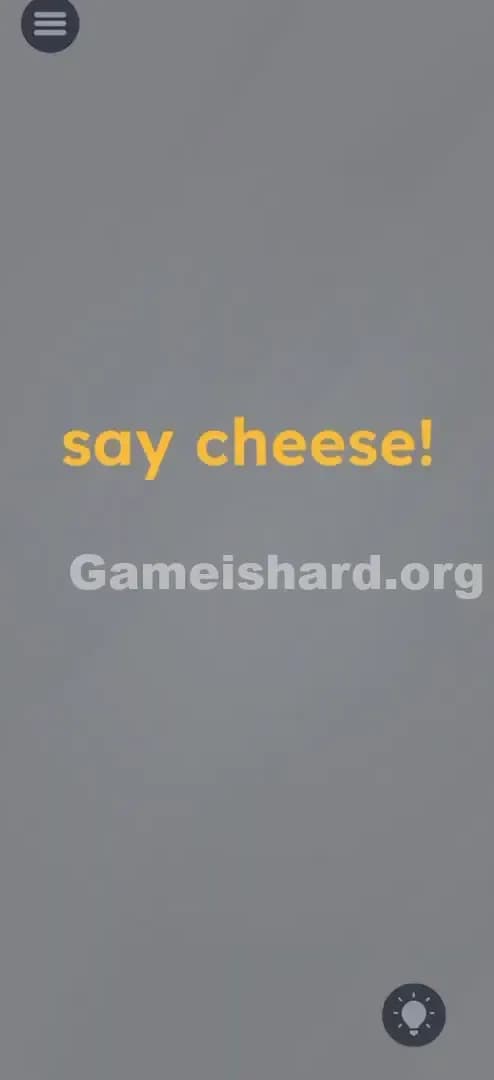
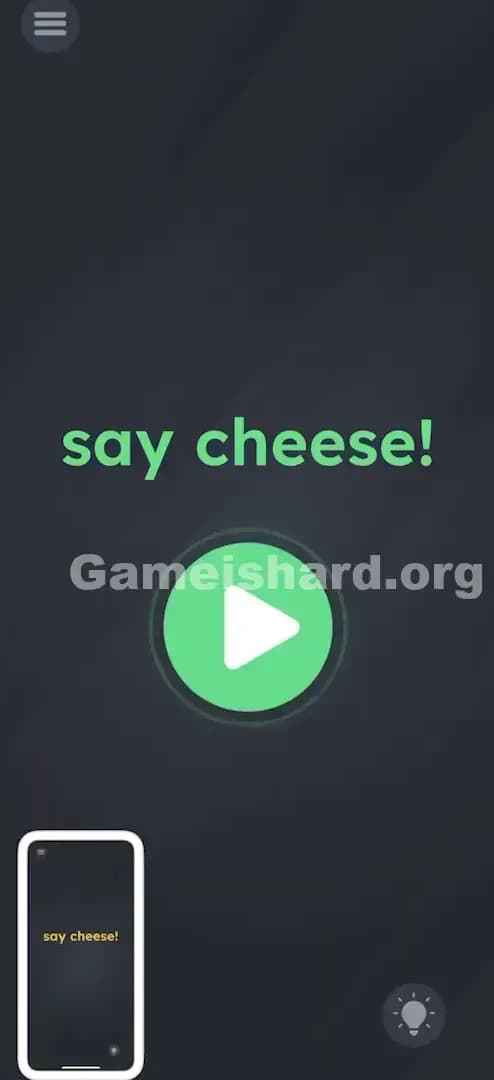
Solution: Manually take a screenshot using your device's physical buttons (usually Power + Volume Down), then tap the green Play button that appears.
Wait for the system to register the screenshot, and the new button will pop up directly under the text.
Game is Hard Level 21 Overview
The Hook of Game is hard Level 21
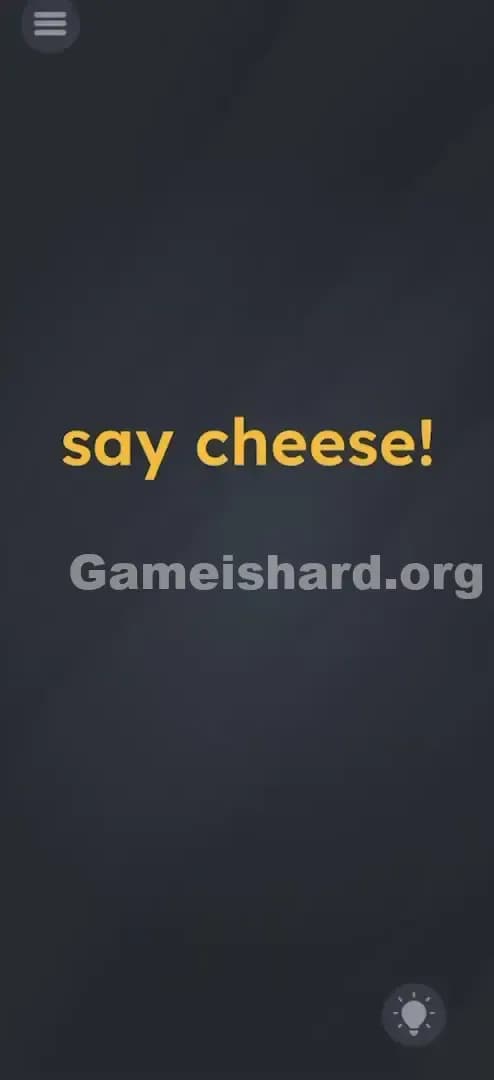
You are staring at a mostly black screen. It says "say cheese!" in bright yellow letters. And that is it. There is nothing else. No camera icon. No shutter button. No microphone input. You might try shouting "Cheese!" at your phone like a maniac, but nothing happens. The game is trolling you by hiding the interface entirely outside of the app's boundaries. It’s asking you to perform an action that feels illegal—interacting with your phone's OS, not the game itself.
The Objective in Game is hard Level 21
The goal here isn't to solve a riddle inside the app. The goal is to prove you understand the phrase "say cheese!" literally. In our culture, that phrase precedes a photo. The game wants a photo. Specifically, it wants a screenshot of itself. You have to trigger your phone’s native screenshot function to "capture" the moment.
Key Mechanics involved in Game is hard Level 21
- System-Level Interaction: This is the big one. Most levels keep you inside the "magic circle" of the game. This one demands you use hardware buttons.
- Hidden UI: The "next" or "success" button doesn't exist until you trigger the condition.
- Lateral Thinking: You have to associate the idiom "say cheese" with the mechanical act of taking a picture.
- OS Detection: The app is listening for the specific operating system event that signals a screen capture.
It’s not a riddle. It’s a hardware test.
What You See on Screen in Game is hard Level 21
Let's break down the visual landscape, which is deceptively simple. If you just tabbed back into the game, here is what you are looking at:
The background is the standard dark, slate-grey texture used throughout the game. It’s clean, minimal, and usually hides objects well, but here, it’s mostly empty space.
Centered in the upper-middle portion of the screen is the text: say cheese! The font is the standard sans-serif, colored in the game's signature yellow. The exclamation point suggests excitement or a command.
There is a Settings/Menu icon in the top left corner (the three horizontal lines). There is a Hint bulb icon in the bottom right corner.
That is literally it. No hidden sliders. No faint outlines of boxes. No other text. The emptiness is the puzzle. The lack of a "camera" button is the biggest clue that the camera is you.
What’s Tricking People in Game is hard Level 21
The Trap of Game is hard Level 21
The trap is "App Containment." We are trained to believe that games live inside their window. We tap, swipe, and drag things on the glass. We rarely think about the buttons on the side of the phone as part of the gameplay. When you see "say cheese," your brain goes to:
- Is there a microphone? (Should I speak?)
- Is there a hidden camera button? (Should I tap the dark space?)
- Is the text draggable? (Can I move 'cheese' somewhere?)
You waste time interacting with the software when the solution is hardware.
The Wrong Instincts in Game is hard Level 21
I have watched friends play this level. Their first instinct is almost always the microphone. They enable permissions, they yell "CHEESE," they whisper it, they try "SMILE." Nothing. The second instinct is usually dragging the words around. Does "say" fit into "cheese"? No. Does the lightbulb do anything other than ask for ad views? No. The game is silent, and that silence builds frustration.
My Reaction to Game is hard Level 21
I stared at this for a solid two minutes. I tapped every pixel of the black background hoping to find a hidden shutter button. I eventually put my phone down, accidentally hit the volume rocker, and realized I was overthinking the software. When I finally snapped the screenshot and saw the green button appear, I felt stupid. It was so obvious in hindsight. "Say cheese" = Photo. Photo on a phone screen = Screenshot.
Game is hard Level 21 Step-by-Step Walkthrough
The Setup of Game is hard Level 21
Get your hands in position. You need to access your phone's physical buttons. Stop touching the screen. Stop trying to drag the text. Hold your phone securely so you can press multiple buttons at once without dropping it.
The Action in Game is hard Level 21
- Identify your Screenshot Buttons: On most modern Androids and iPhones without a home button, this is Power + Volume Down pressed simultaneously. On older iPhones with a home button, it is Power + Home.
- Press and Hold Briefly: Squeeze those buttons until your screen flashes white or makes a camera shutter sound. You have taken a screenshot.
- Wait for the UI: Immediately after the screenshot animation finishes, a bright Green Play Button will appear right in the center of the screen, below the text.
- Tap to Win: Tap that green button to finish the level.
Troubleshooting in Game is hard Level 21
- "I took a screenshot but nothing happened": Wait 2-3 seconds. Sometimes the app takes a moment to register the OS event.
- "The screenshot menu is covering the game": If your phone opens a "edit screenshot" overlay, swipe it away or close it immediately so you can see the game screen again. The green button should be there.
- "I'm on a tablet/emulator": If you are on an emulator like BlueStacks, look for the "Screenshot" camera icon in the emulator's sidebar. It works the same way.
Micro-Details That Make the Move Register in Game is hard Level 21
The game is listening for a specific trigger. It isn't actually analyzing the image you took; it is listening for the system log that says SCREENSHOT_TAKEN.
- Timing: You don't need to be frame-perfect. Just take the shot.
- Permission: The app does not usually need camera permission for this, but it does need to be the active window. If you pull down your notification shade and take a screenshot of that, it might not register.
- The Green Button: This button is not a "Next Level" arrow. It is a "Play" symbol. This is a subtle nod to "viewing the video/photo" you just took. It’s a nice touch.
- My Fix: On one device, my volume button was sticky. I had to take three screenshots before one "counted" because the OS wasn't registering the button press cleanly. If your hardware is beat up, press firmly.
The Logic Behind Game is Hard Level 21
This level is a classic example of breaking the fourth wall.
In video game design, the "Fourth Wall" is the screen itself. Most games pretend the screen is a window into a fantasy world. Game is hard breaks that wall by acknowledging it is an app running on a piece of plastic and glass.
The logic chain is:
- Prompt: "Say Cheese!" -> Cultural association with photography.
- Constraint: No camera UI exists within the game.
- Deduction: The player must provide the camera.
- Execution: The only way to "photograph" an app screen is a screenshot.
It’s testing your ability to utilize the device as a tool, not just the app as a playground. It forces you to realize that the phone itself is the controller, not just the touchscreen. This mechanic is rare but always memorable when it appears (similar to closing a Nintendo DS to stamp a map in Zelda).
Pro Tip for Game is Hard Level 21
If you are speedrunning or replaying this, here is the fastest method:
- Don't read the text.
- Immediately Screenshot as soon as the level loads.
- Tap the Green Button the millisecond it spawns.
- Ignore the "Share your screenshot" pop-up if your phone generates one.
Do Not Waste Time On:
- Shaking the phone (this is for accelerometer levels).
- Turning the volume up/down (unless you accidentally trigger the screenshot combo).
- Tapping the letters individually.
Alternative Attempts of Game is hard Level 21 (What Doesn’t Work, and Why)
Here is a graveyard of ideas that players usually try before figuring it out. None of these work.
- Dragging "Cheese" to the "Say": Logical for a word puzzle, but this is a hardware puzzle. The text is static.
- Covering the front camera: Some games use light sensors. This one does not. Darkening the room won't help.
- Speaking into the Mic: Despite "Say" being the verb, the game doesn't use voice recognition here.
- Tapping the screen rapidly: There are no invisible hitboxes. You’ll just get fingerprints on your screen.
- Waiting: Some levels require patience (doing nothing). This isn't one of them. You can wait forever, and the green button will never appear.
- Tilting the phone upside down: Usually a good trick for gravity puzzles, but orientation is irrelevant here.
- Opening the Settings Menu: The solution is never inside the actual settings menu of the game; it’s always on the gameplay canvas or the hardware.
Common Mistakes for Game is Hard Level 21
- Mistake: Taking a photo of your phone with another phone.
- Why: The game can't see the outside world. It needs the internal trigger.
- Mistake: Using a screen recorder video instead of a screenshot.
- Why: The trigger is specifically the static capture event, not video capture.
- Mistake: Thinking the game crashed.
- Why: Because there is zero UI, people think the level didn't load. It loaded fine; it’s just empty.
- Mistake: Tapping the text "Say Cheese" repeatedly.
- Why: Players hope it acts like a button. It is inert.
- Mistake: Pressing the wrong button combo (e.g., Power + Volume Up).
- Why: This usually just turns up your volume or resets the phone, disrupting the level.
Pattern Recognition: How to Spot This Trick in Future Game is Hard Levels
You will see this mechanic again, or variations of it. Here is how to spot it early.
The Tell
The tell is Total UI Absence. When a level loads and there are:
- No moveable objects.
- No input fields.
- No buttons.
- A prompt that implies an action the phone can do natively (charging, sleeping, volume, photography).
...it is always a hardware trigger.
The Habit
When the screen is unresponsive to touch, stop touching it. Look at your phone's bezel.
- Does the text imply sound? Check volume buttons.
- Does the text imply power/sleep? Check the power button.
- Does the text imply movement? Check the accelerometer (shake/tilt).
- Does the text imply sight? Check the screenshot function.
Game is hard Level 21 teaches you that your hands are the controller, not just your fingertips.
Game is hard Level 21 FAQ (Short, Useful)
Q: Does this level require camera permissions in Game is hard Level 21? A: No. Taking a screenshot is a system-level function that overlays the app. The app just listens for the event; it doesn't need to access your physical camera lens.
Q: I took a screenshot and nothing happened in Game is hard Level 21. Why? A: You likely didn't press the buttons simultaneously, or you are on a device with a unique gesture (like a three-finger swipe) that the game isn't recognizing. Stick to the physical buttons.
Q: Can I skip this level? A: You can usually watch an ad to skip, but this is one of the fastest levels to solve once you know the trick. It takes 2 seconds. Save your skips for the math puzzles.
Q: What if my buttons are broken in Game is hard Level 21? A: Use your phone's "Accessibility" or "Assistive Touch" on-screen menu to trigger a screenshot via software. The game will still recognize it.
Get more level walkthrough on Gameishard.org
If you found this guide helpful, we have the complete solutions for every single level of the game. We write these guides for gamers who hate fluff and just want the answer so they can keep progressing. Good luck, and keep snapping!