Game Is Hard Level 22 Solution Walkthrough & Answer
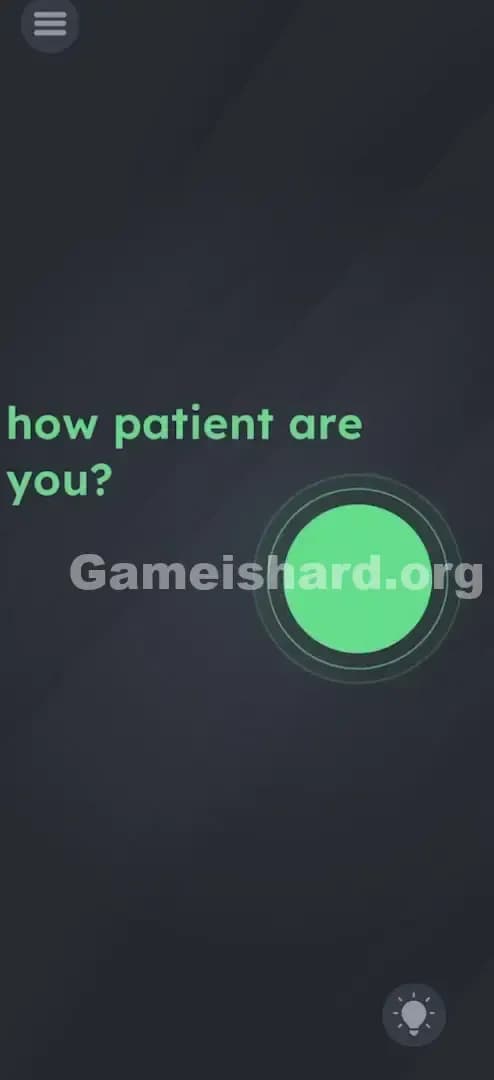
How to solve Game Is Hard level 22? Get instant solution & answer for Game Is Hard level 22: "how patient are you?"
Doesn't look like your level?
App updates can sometimes shuffle the order of puzzles. If this level 22 walkthrough doesn't match your screen, don't worry! You can browse our All Levels guide to find your exact puzzle by its picture.



Quick Answer for Game is hard Level 22 (Do This)
Solution: Press your finger firmly on the red circle button and hold it down without lifting until it completely changes color to green.
Target: You must keep steady pressure on the circle; do not tap it rapidly or slide your finger off the edge.
Game is Hard Level 22 Overview
The Hook of Game is hard Level 22
You load into Game is hard Level 22 and you see a button. Instinct takes over immediately. You want to tap it. You tap it once, nothing happens. You tap it twice, still nothing. Panic sets in. Is the game frozen? Did the touch input die? This level is a masterclass in gaslighting the player. It asks a philosophical question and demands a physical answer that goes against every reflex you have built up playing mobile games.
The Objective in Game is hard Level 22
The text reads how patient are you?, and that is not just flavor text; it is the entire instruction manual. Your goal isn't to solve a riddle or find a hidden object. Your goal is to prove you can sit still. You need to turn the red indicator green, but the trigger isn't a "click"—it’s a duration.
Key Mechanics
- Long Press / Hold: The primary interaction isn't a tap; it's a sustained touch.
- Time-Based Trigger: The win condition is tied to a timer that only ticks while input is active.
- Psychological Trap: The game relies on you getting bored or thinking the game is broken before the timer runs out.
- Visual Feedback Lag: The button doesn't react instantly, causing you to doubt your action.
It’s not a typo or a glitch. It’s a test of nerves.
What You See on Screen in Game is hard Level 22
The layout is stark, almost aggressively simple. The background is the standard dark, moody gray used throughout the app.
In the upper third of the screen, you have the text in a soft red/pink font: how patient are you?
Below that, roughly in the center-right of the screen, sits a large, flat red circle. It has a faint, glowing aura around it, suggesting it is active and interactable. It looks exactly like a "Record" button or a "Stop" button you might see in a utility app.
There are no other distractions. No hidden numbers, no math equations, no odd geometric shapes tucked in the corners. It’s just you, the question, and the button. The minimalist design is part of the difficulty—it makes you feel like you are missing something obvious because there is so little to interact with.
What’s Tricking People in Game is hard Level 22
The Trap: The Tapper's Instinct
Mobile gamers are conditioned for speed. We play rhythm games, shooters, and platformers where a millisecond of delay means failure. When we see a button, we tap it. If it doesn't work, we tap it harder and faster. Game is hard Level 22 punishes this instinct. If you tap, the internal timer resets to zero immediately. You are essentially restarting the level 50 times in a row without realizing it.
The Wrong Instincts in Game is hard Level 22
Because tapping doesn't work, players immediately start overthinking.
- "Maybe I need to wait without touching anything?" (Nope, nothing happens).
- "Maybe I need to shake the phone to charge it?" (No gyro mechanics here).
- "Maybe the text is draggable?" (The text is static this time).
My Reaction to Game is hard Level 22
I spent a solid minute just staring at the screen, waiting for the button to change on its own. I thought, "Oh, it asks how patient I am, so I'll just put the phone down." I waited. And waited. Nothing. Then I tried tapping it like a maniac. Nothing. It was only when I put my thumb down to drag the button away (thinking it was covering something) that I noticed a slight flicker. That was the "Aha!" moment.
Game is hard Level 22 Step-by-Step Walkthrough
The Setup of Game is hard Level 22
Clear your mind. Stop trying to "beat" the level with speed. Position your hand so your thumb or index finger can cover the center of the red circle comfortably without obscuring the edges (so you can see the color change).
The Action in Game is hard Level 22
- Place your finger directly in the center of the red circle.
- Hold it there. Do not move. Do not lift. Do not wiggle your finger.
- Wait. Count to roughly 5 or 6 seconds. Ignore the urge to lift your finger to check if it's working.
- Watch the edges. You will see the red color abruptly switch to green.
- Release. Once the circle is green, you can let go. The level completes.
Troubleshooting in Game is hard Level 22
If you are holding it and nothing is happening after 10 seconds:
- You might be sliding your finger slightly. The "hit box" for the button is decent, but if you slide out of bounds, the timer resets.
- Your screen might have sweat or oil causing "ghost touches," which breaks the continuous hold. Wipe your screen and try again.
- Ensure you aren't accidentally touching the screen with your palm at the same time (multi-touch can confuse the input).
Micro-Details That Make the Move Register in Game is hard Level 22
Precision matters more here than you think. While it looks like a big target, the game logic requires a continuous, unbroken signal.
- The "Wiggle" Factor: Modern touchscreens are sensitive. If you press too lightly, your phone might register it as a series of micro-taps rather than a hold. Press firmly. You want the digitizer to read "Touch Down" and stay there.
- The Visual Cue: The change isn't gradual. It doesn't fade from red to orange to yellow to green. It is a hard snap from Red to Green. This is why you need to watch the edges. If your thumb covers the whole button, you won't know when to let go.
- Time Requirement: Based on my testing, the required hold time is approximately 5 seconds. It feels longer because you are doing nothing, but counting "One Mississippi, Two Mississippi..." helps keep you grounded.
I fixed it by: using my index finger instead of my thumb. My thumb was too flat and kept shifting pressure; my index finger point was more precise and kept the input steady.
The Logic Behind Game is Hard Level 22
This level is a classic example of Input Duration Logic. Most puzzles in this genre rely on Input Coordinates (where you touch) or Input Vector (where you drag). This one ignores where you are (as long as you are on the button) and focuses entirely on how long you are there.
The game is deconstructing the word "Patient."
- Literal Interpretation: To be patient means to wait or endure.
- Mechanical Translation: Waiting in a video game usually means "Hold."
It’s a trust exercise. The UI gives you zero feedback for the first 4.9 seconds. Usually, games give you a progress bar, a filling circle, or a sound effect to tell you "Good job, keep holding!" Game is hard Level 22 deliberately withholds that feedback to make you doubt yourself. The puzzle is managing your own doubt.
Pro Tip for Game is Hard Level 22
If you are speed-running or replaying:
- Don't even read the text.
- The moment the level fades in, clamp your finger on the red dot.
- Do not look away; lag can sometimes vary the timer.
Do not: waste time trying to drag the text "patient" onto the button. In other levels, dragging text is the solution. Here, it is bait.
Alternative Attempts of Game is hard Level 22 (What Doesn’t Work, and Why)
Here is a graveyard of ideas I tried that failed miserably:
- Tapping "Patient": I thought maybe touching the word itself was the key. It isn't interactable.
- Dragging the Button: I tried to drag the red circle to the side, thinking it was covering a green button underneath. It’s glued to the spot.
- Doing Literally Nothing: I put the phone on the table and waited 60 seconds. The game does not detect "passive" patience; it requires "active" patience (the hold).
- Rubbing the Button: I tried scrubbing my finger back and forth to "polish" it. The movement breaks the "hold" command.
- Shaking the Device: I thought maybe shaking it would change the color. The accelerometer is not active for this level.
- Volume Keys: Sometimes physical buttons bypass the screen. Not here.
Common Mistakes for Game is Hard Level 22
- The "Pulse" Tap: Players hold for 1 second, lift, hold for 1 second, lift. This resets the counter every time.
- The "Peek" Lift: Lifting your finger to see if the button changed color underneath. You have to trust the edges.
- Drifting Finger: Letting your finger slide off the graphic while looking at the timer or text.
- Anticipation Release: Letting go right at the 4-second mark because you think it's been long enough.
- Covering the Screen: Using a whole hand or palm that triggers other touch inputs, cancelling the button press.
Pattern Recognition: How to Spot This Trick in Future Game is Hard Levels
The Tell
Whenever you see words like Wait, Stop, Patient, Slow, or Hold, stop tapping immediately. The game is telegraphing a "Long Press" mechanic. Also, look for UI elements that look like buttons but don't click. If a button doesn't animate when you tap it, it usually means it needs to be held or dragged.
The Habit
When a new level loads and tapping doesn't work, the very next thing you should try is a Long Press on every object on the screen. It is the second most common interaction after tapping. If tapping fails, hold. If holding fails, drag.
Game is hard Level 22 FAQ (Short, Useful)
Q: I've been holding it for a minute and nothing happened in Game is hard Level 22! A: You likely shifted your finger slightly or your screen lost contact. Lift, wipe the screen, and press firmly again without moving.
Q: Do I need to tap the word "patient" first in Game is hard Level 22? A: No. The text is purely instructional. Ignore it and focus on the red circle.
Q: Can I use multiple fingers in Game is hard Level 22? A: It's risky. Multi-touch might confuse the app. Use one single finger for the best results.
Q: Is there a specific spot on the button I need to press in Game is hard Level 22? A: Aim for dead center. The edges can be finicky if your finger slips onto the background.
Get more level walkthrough on Gameishard.org
If you are stuck on another puzzle, don't bang your head against the wall. We have guides for every single level that cut straight to the point. No 10-minute videos, just the solution you need. Share this with your friends who are probably still tapping that red button like maniacs. Keep gaming, and stay patient!