Game Is Hard Level 298 Solution Walkthrough & Answer
How to solve Game Is Hard level 298? Get instant solution & answer for Game Is Hard level 298: "Two rectangles please."
Doesn't look like your level?
App updates can sometimes shuffle the order of puzzles. If this level 298 walkthrough doesn't match your screen, don't worry! You can browse our All Levels guide to find your exact puzzle by its picture.
Quick Answer for Game is hard Level 298 (Do This)
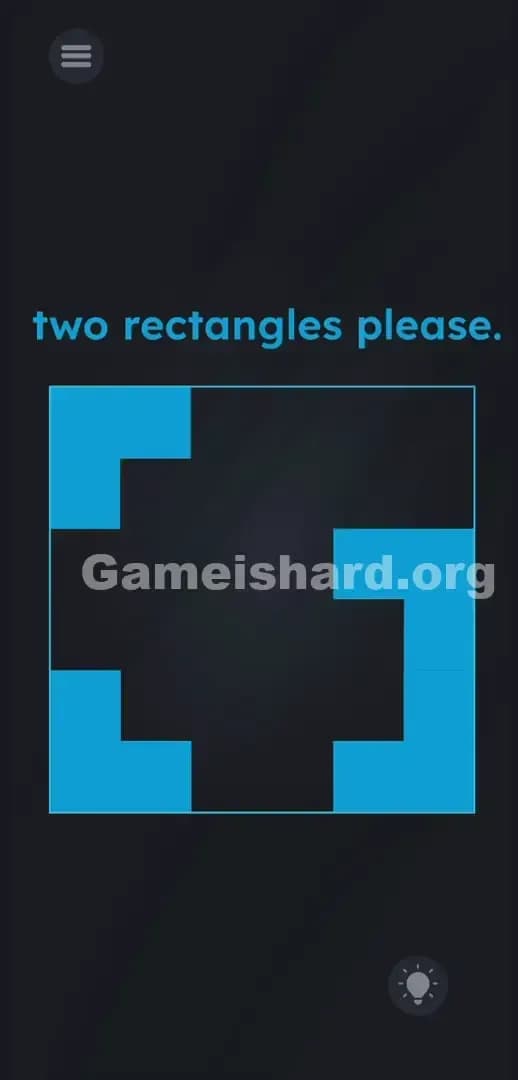
Solution: Slide the blue corner pieces directly into each other to form two solid rectangles.
Grab the top-right block and drag it into the top-left block, then repeat the exact same motion with the bottom blocks to clear the stage.
Game is Hard Level 298 Overview
The Hook
You load up the stage and immediately stare at a weird geometric mess. It looks like a broken puzzle or a missing texture file. The prompt politely asks for something you clearly do not have. You might even try tapping the text. Nothing happens. You try to draw shapes on the screen with your finger. Nothing. The game is blatantly lying to you about how its interface works.
The Objective
The game demands exactly what the text says: two rectangles please. The problem is that the screen only gives you four disjointed corner pieces. You are not answering a trivia question here. You are not looking for a hidden object. Your job is to physically force those awkward shapes to become what the prompt demands by tearing apart the layout.
Here is exactly what the game is testing you on:
- UI drag / shape sliding: The interface itself is movable.
- Gestalt psychology: Your brain groups the corners into a single "border."
- Multi-touch logic: Objects snap together when colliding.
- Lateral thinking: Ignoring the massive black void in the center of the screen.
It’s not a typo. It’s ammo.
What You See on Screen in Game is hard Level 298
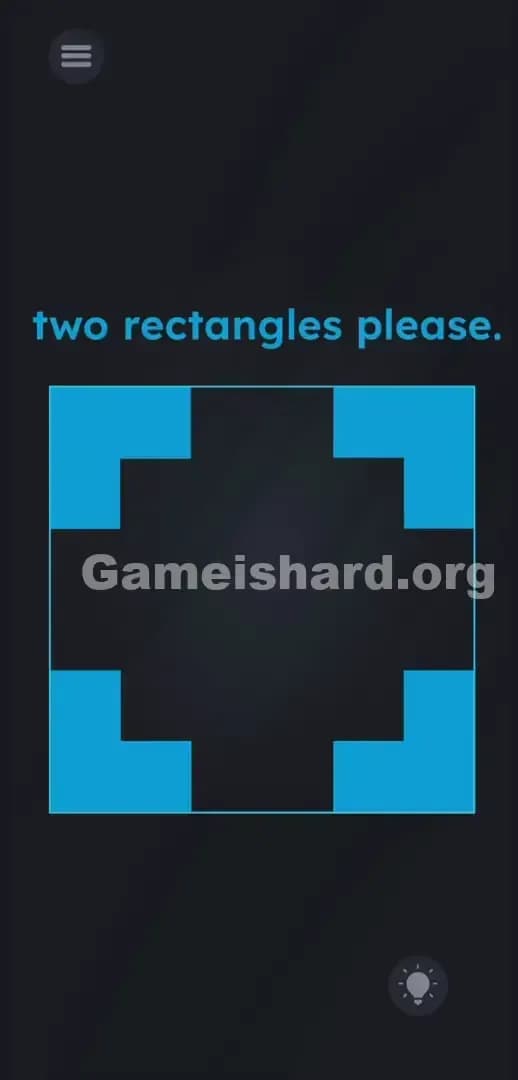
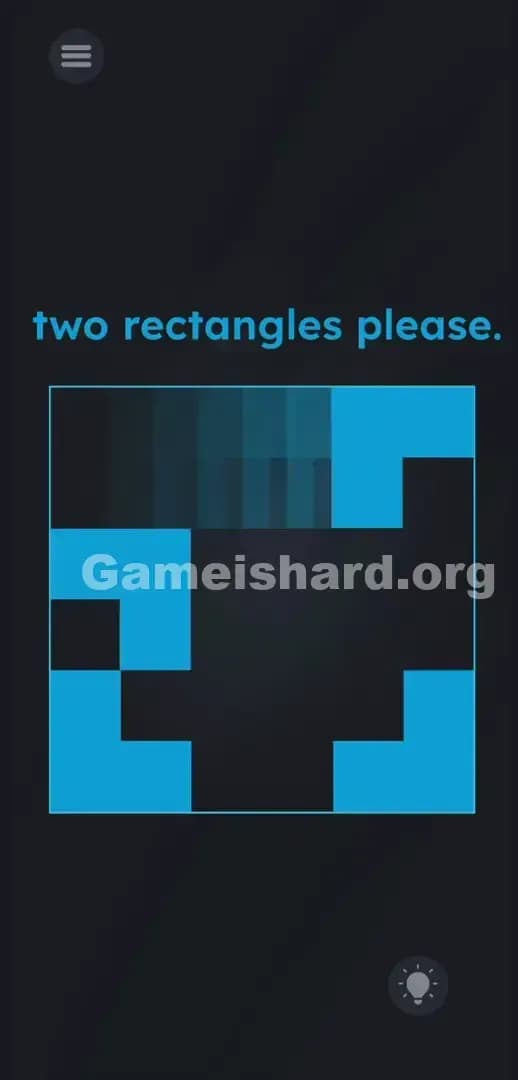
Let’s break down the layout. The entire background is dark. At the very top, the prompt two rectangles please. sits neatly in bright cyan text.
Below the text, dominating the center of your screen, is a massive square boundary. Inside this square, things get weird. The negative space is completely black, forming a chunky cross or plus-sign shape.
In the four corners of this square area, there are four light blue, L-shaped blocks. Think of them like the crop marks you see when editing a photo on your phone, or the brackets on a camera's viewfinder. They frame the black space perfectly.
Up in the top-left corner, you have your standard gray hamburger menu button. Down in the bottom-right corner, the circular lightbulb icon sits waiting in case you want to waste a hint. Everything looks entirely static. The blue corners look like a permanent decorative border framing a void.
What’s Tricking People in Game is hard Level 298
The Trap
UI Blindness strikes again with a vengeance. We are trained by thousands of apps to treat borders, frames, and margins as dead space. When we see four blue corners neatly aligned perfectly on a grid, our brain groups them together as a single, unmovable container. The trap in Game is hard Level 298 relies on you assuming those blue blocks are structural. You read the prompt asking for rectangles and immediately assume the answer is hidden inside the frame. You look at the black cross. You look at the words. You ignore the frame entirely.
The Wrong Instincts
I fell for this hard. I assumed the black void was the puzzle. I tried to pinch and zoom the black cross to stretch it into a rectangle. I tried double-tapping the empty space. I even tried physically tilting my phone to see if the blue corners would fall off the screen like loose change. None of that works. I tried dragging the text rectangles down into the box. Complete failure. The game wants literal shapes, and it wants you to build them.
My Reaction
I spent three minutes treating those blue corners like a solid wall. Total facepalm when I accidentally swiped my thumb across the screen in frustration and saw one of the massive blue corners detach and slide across the glass. The border was a lie.
Game is hard Level 298 Step-by-Step Walkthrough
The Setup
Stop looking at the text. Stop looking at the black cross in the middle of the screen. Shift your focus entirely to the four blue L-shaped corner pieces. Treat them as heavy puzzle blocks sitting on a table.
The Action
- Press and hold your finger firmly on the top-right blue L-shape.
- Drag that blue shape directly to the left, straight toward the top-left blue shape.
- Smash them together. The two L-shapes will instantly snap into a single, solid blue rectangle.
- Now, press and hold the bottom-right blue L-shape.
- Drag it left, slamming it directly into the bottom-left piece.
- The second solid blue rectangle is formed. The level immediately clears.
Troubleshooting
What if you swipe and nothing happens? You need to make sure your finger starts exactly on the colored pixels of the blue shape. If you grab the black space next to it, the game will ignore your input. Swipe with purpose. Drag the piece all the way across the gap until it makes physical contact with the opposite piece. If a block gets stuck halfway, just pick it up again and finish the drag. Do not drag them diagonally. Straight horizontal movements work best.
The Logic Behind Game is Hard Level 298
This stage relies on a classic visual trick: object permanence versus UI design. The rule the game is testing is simple physical interaction. The developer knows human beings rely on patterns. We see a framing element and categorize it as "background noise."
By forcing you to interact with the border, Game is hard Level 298 proves a recurring rule in this specific title: nothing on your screen is safe. The level treats interface borders exactly like puzzle pieces. The instructions are completely literal, but the visual presentation is pure bait. The puzzle exists solely to make you realize the prison bars holding you in are actually the keys.
Pro Tip for Game is Hard Level 298
If you are rushing through a replay or trying to beat your friend's time, do not overthink the mechanics. You do not need precision.
- Ignore the prompt entirely.
- Grab the right-side blocks immediately upon loading.
- Swipe left violently.
- Do not bother trying to move the left-side blocks. Keep your thumb on the right side of the glass.
- Waste absolutely zero time tapping the negative black space.
FAQ
Why won't the blue blocks move when I tap them? Tapping does absolutely nothing in this level. You must press, hold, and drag the blocks across the screen. Treat them like heavy sliding doors.
Do I need to combine all four pieces into one giant rectangle? No. The prompt asks for two rectangles please. Combining the top two creates one. Combining the bottom two creates the second. The stage ends the millisecond the second rectangle is formed.
Does it matter which block I drag? Technically, no. You can drag the left blocks to the right, or the right blocks to the left. Sliding the top blocks together, followed by the bottom blocks, is simply the fastest and most ergonomic way to clear the screen.
Can I drag the text in this specific level? Not here. While other stages in this game rely heavily on dragging words or letters into the play area, the text in Level 298 is completely static. The blue corners are your only interactive objects.
Get more level walkthrough on Gameishard.org
Our guides skip the fluff and get straight to the exact inputs you need. We know you hate wasting time on vague hints when a game decides to break its own rules. Share this guide with your friends on Discord if they get stuck swiping at dead space. Keep pushing forward. Destroy the interface. Next level.