Game Is Hard Level 4 Solution Walkthrough & Answer
How to solve Game Is Hard level 4? Get instant solution & answer for Game Is Hard level 4: "This box is too empty..."
Doesn't look like your level?
App updates can sometimes shuffle the order of puzzles. If this level 4 walkthrough doesn't match your screen, don't worry! You can browse our All Levels guide to find your exact puzzle by its picture.

Quick Answer for Game is hard Level 4 (Do This)
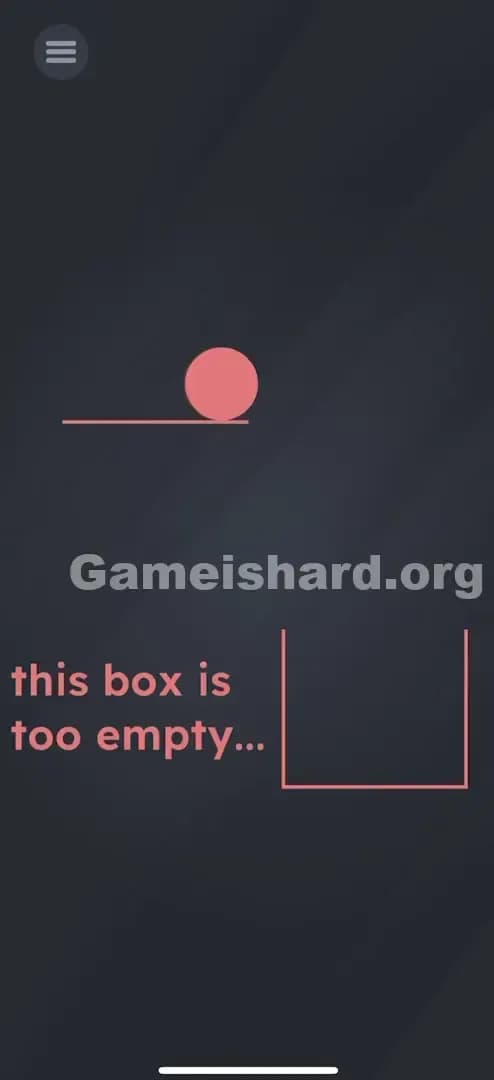
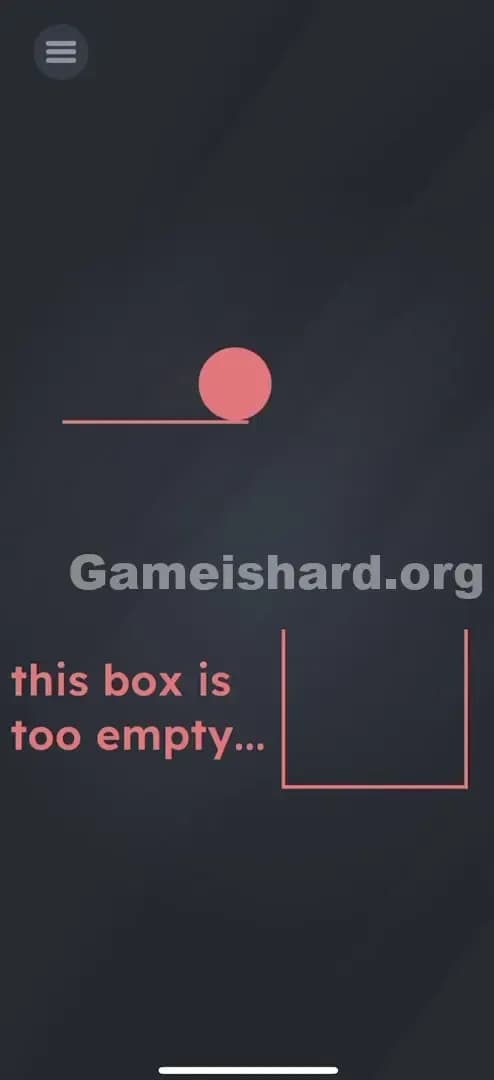
Solution: Physically tilt your device to the right so the pink ball rolls off the ledge and falls into the square box below. You need to use your phone's gyroscope, not your finger.
Game is Hard Level 4 Overview
The Hook of Game is hard Level 4
You open the level and see a ball stranded on a tiny ledge. You try tapping it. Nothing. You try dragging it with your finger. It doesn't budge. It feels like the touch screen is broken or the game has frozen. This is classic "Game is hard" design: the interface is lying to you about how you control the world. The frustration is immediate because the solution seems obvious visually (put ball in box), but the standard inputs fail you.
The Objective
The goal is extremely simple physics: move object A (the pink ball) into container B (the empty box). The complexity comes from figuring out how to apply force to the ball when your fingers are powerless. You aren't solving a riddle; you are solving a mechanical problem using hardware sensors.
Key Mechanics in Game is hard Level 4
- Tilt / Gyroscope Control: The game accesses your phone's internal sensors.
- Physics Simulation: The ball has weight and momentum.
- Gravity: The "down" direction changes based on how you hold your device.
- No Touch Input: Touching the screen is a red herring.
It’s not a glitch. It’s physics.
What You See on Screen in Game is hard Level 4
Let's break down the visual layout so you know exactly what components matters. The screen is dark gray and minimalist.
- Top Left: A small menu icon (three horizontal lines). Ignore this.
- Upper Center-Left: A small horizontal pink line (the ledge) with a solid pink circle (the ball) resting on it.
- Lower Center-Right: A large, open, pink square outline (the box).
- The Text: To the left of the box, the words "this box is too empty..." appear in pink.
- The Void: The rest of the screen is empty space where the ball will travel.
There are no buttons. No arrows. Just a ball, a ledge, and a box.
What’s Tricking People in Game is hard Level 4
The Trap of Game is hard Level 4
The biggest trap here is "Touch Screen Conditioning." We are trained by thousands of apps to believe that if something is on a screen, we must touch it to interact with it. We tap, swipe, pinch, and drag. When those don't work, we assume we are doing it wrong or the game is bugged. Game is hard Level 4 punishes you for relying on your fingers. It forces you to treat your phone as a physical object, not just a display.
The Wrong Instincts
- Dragging the ball: You see a ball, you want to drag it to the box. It won't move.
- Tapping the ball: You might think tapping it will "nudge" it. Nope.
- Shaking the phone: While this uses sensors, shaking is chaotic. The ball might bounce, but it won't go where you want it.
- Dragging the text: In previous levels, text was movable. Here, the text is just a hint ("too empty"). It’s not the solution.
My Reaction to Game is hard Level 4
I spent a solid minute trying to "flick" the ball with my thumb, thinking my screen was greasy or unresponsive. I even tried dragging the box up to the ball. Then I accidentally leaned back in my chair, the phone tilted, and the ball started rolling. I felt ridiculous. The solution was in my hands the whole time.
Game is hard Level 4 Step-by-Step Walkthrough
The Setup of Game is hard Level 4
Hold your phone flat or comfortably vertical. Ensure screen rotation isn't locked (though usually, game sensors work regardless of system rotation lock, it's good practice). Locate the pink ball on the top ledge and the target box below.
The Action in Game is hard Level 4
- Stop touching the screen. Lift your thumbs off the glass. This is crucial.
- Tilt your phone to the right. Imagine the phone is a physical tray and the ball is a marble.
- Watch gravity work. The pink ball will roll to the right edge of its ledge.
- Correct the path. Once the ball falls off the ledge, quickly tilt the phone back to the left or keep it steady so the ball drops straight down into the box. If you tilt too hard to the right, the ball might overshoot the box.
Troubleshooting in Game is hard Level 4
- Ball stuck? If the ball is stuck against a wall, tilt the phone the opposite way to reset it, then try again gently.
- Overshot the box? If the ball flew past the box and fell off the screen, the level should reset. If not, hit the menu and restart the level.
- Sensors not working? Ensure your phone case isn't interfering with movement (rare) or that you aren't playing on an emulator without sensor mapping.
Micro-Details That Make the Move Register in Game is hard Level 4
Physics engines in these games can be finicky. The ball doesn't just need to touch the box; it usually needs to settle inside or at least pass through the opening top.
- Speed Matters: If you tilt aggressively, the ball gains horizontal velocity. It might fly right over the box. A gentle tilt (about 30-45 degrees) is safer than a sharp 90-degree turn.
- The "Catch": As the ball leaves the ledge, it enters freefall. You have a split second to adjust your tilt. If you keep holding the phone tilted right, the ball follows a curved trajectory (parabola). If you level the phone out immediately after it drops, it falls straight down.
- My Fix: I found that tilting slowly until the ball just barely creeps over the edge gave me the most control. It dropped straight down like a stone, swish, nothing but net.
The Logic Behind Game is Hard Level 4
This level is a hardware test. It validates that the game has permission to access your accelerometer/gyroscope and that the player understands "Fourth Wall" mechanics.
The logic is simple: Digital Objects obey Physical Laws. The game is teaching you that the boundaries of the puzzle extend to your wrists. The screen is a window into a box, and you are holding the box. This mechanic will return in later levels where you might need to shake things, turn the phone upside down, or balance objects. It’s breaking the barrier between the software and the hardware.
Pro Tip for Game is Hard Level 4
If you are speedrunning or just want to clear this instantly:
- Start the level with your phone already tilted slightly left (so the ball stays safe).
- Quickly jerk the phone right, then immediately flat.
- This minimizes the "roll time" and drops the ball faster.
- Do NOT tap anything.
Alternative Attempts of Game is hard Level 4 (What Doesn’t Work, and Why)
- Swiping the ball: The game does not register touch inputs on the ball sprite. It has no "drag" listener code.
- Tilting the phone upside down: This sends the ball to the "ceiling" of the screen. While funny, it won't get it in the box.
- Dragging the box: The box is a static background element. It cannot be moved to catch the ball.
- Yelling at the microphone: Voice commands are a mechanic in some levels, but not this one. The ball is deaf.
- Waiting: The ball will sit on that ledge until the heat death of the universe if you don't tilt. There is no time-based trigger.
- Tapping the "Too Empty" text: This is purely flavor text to define the objective. It is not interactive.
Common Mistakes for Game is hard Level 4
- Touching the screen while tilting: Sometimes multi-touch inputs can confuse the game engine or block the physics update depending on the device. Hands off!
- Violent Shaking: Shaking the phone creates random velocity vectors. The ball will bounce off the walls, miss the box, and frustrate you. Controlled tilt is better than random shaking.
- Playing flat on a table: If you are playing with the phone laying flat on a desk, you cannot beat this level. Pick it up.
- Assuming the ledge is sticky: Players often tilt a little, see no movement, and assume it requires touch. You need to tilt enough to overcome the friction friction value in the physics engine.
- Screen Rotation Lock Confusion: You do not need to turn off your phone's portrait orientation lock. Game sensors operate independently of the UI rotation.
Pattern Recognition: How to Spot This Trick in Future Game is Hard Levels
The tell
Look for objects that look affected by gravity (balls, liquids, dangling strings). If you see a physics object and touch doesn't work, your next immediate instinct should be hardware manipulation.
The habit
The "Wiggle Test." Whenever you start a new level in Game is hard and touch fails, give your phone a little wiggle. Watch the screen closely. Did anything shift slightly? Did a background layer move (parallax)? Did an object sway? If yes, you are in a sensor level. Stop tapping and start moving.
FAQ (Short, Useful)
Q: Does this work on PC/Emulators in Game is hard Level 4? A: Only if you can map a key to "Tilt Right." Most standard mouse-clicks won't work here. You need to simulate the sensor data.
Q: The ball moves but won't go in the box in Game is hard Level 4. A: You are likely tilting too aggressively. The ball is gaining too much speed and flying over the target. Tilt gently, then level out the phone once the ball is airborne.
Q: Can I skip this level in Game is hard Level 4? A: Usually you have to watch an ad or pay for hints to skip. But this is a tutorial-style level for the tilt mechanic, so it's better to learn it now. You'll need it later.
Q: Is there a hidden trick in Game is hard Level 4? A: No. Level 4 is honest. It just changes the input method from "Touch" to "Tilt."
Get more level walkthrough on Gameishard.org
That’s the solution for Game is hard Level 4. We keep these guides direct because nobody wants to read a novel when they are stuck on a puzzle. If this helped you stop poking your screen aggressively, share it with a friend who is probably stuck on the same level. Good luck with Game is hard Level 5—it gets weirder from here.