Game Is Hard Level 11 Solution Walkthrough & Answer
How to solve Game Is Hard level 11? Get instant solution & answer for Game Is Hard level 11: "Are you a multitasker?"
Doesn't look like your level?
App updates can sometimes shuffle the order of puzzles. If this level 11 walkthrough doesn't match your screen, don't worry! You can browse our All Levels guide to find your exact puzzle by its picture.


Quick Answer for Game is hard Level 11 (Do This)
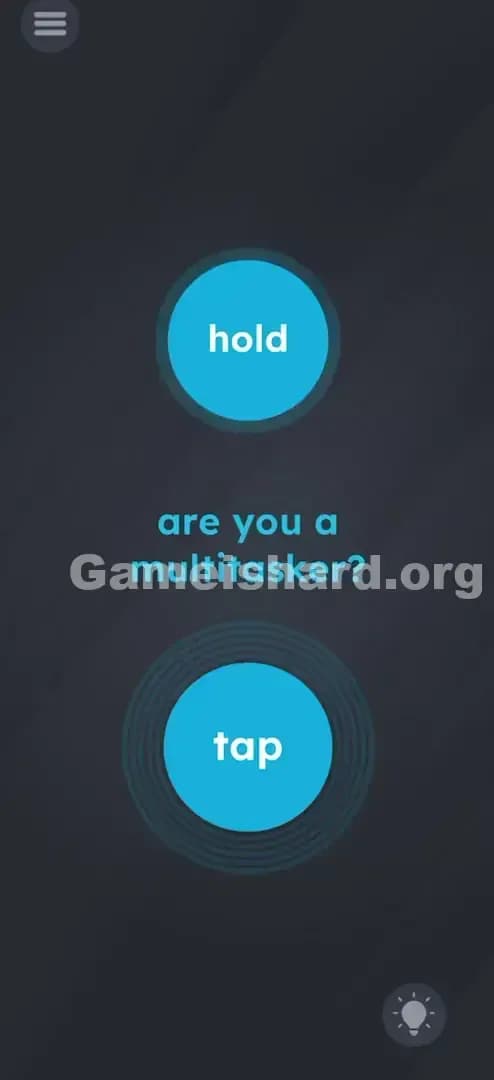
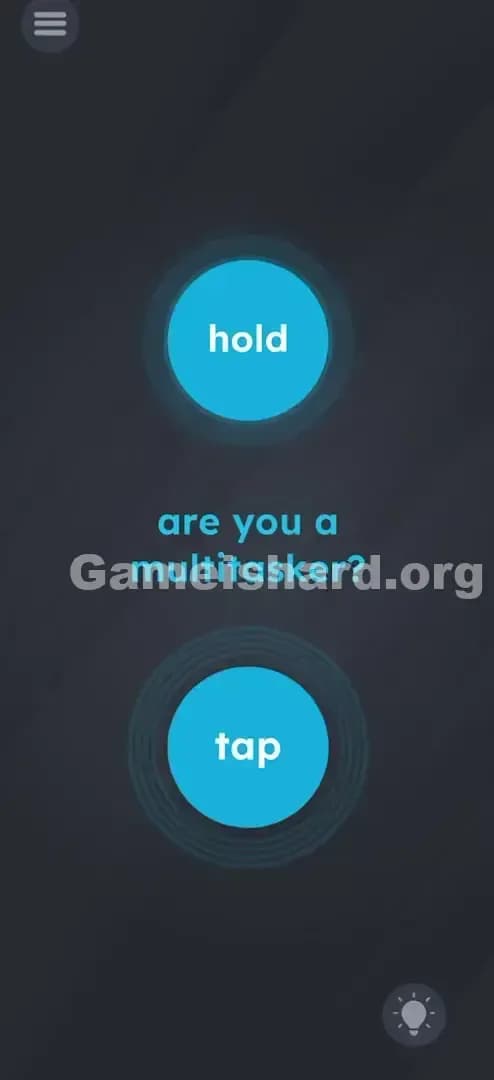
Solution: Press and keep holding the top button with one finger, then use a second finger to rapidly tap the bottom button.
Where to target: You need two fingers on the screen simultaneously; don’t let go of the top button until the level clears.
Game is Hard Level 11 Overview
The Hook of Game is hard Level 11
You open the level and see a simple question: "are you a multitasker?" It feels like a personality test, but your phone isn't asking for your resume. It’s asking for your dexterity. This level is one of the first major "coordination checks" in the game. It stops being about lateral thinking for a second and shifts entirely to mechanics. If you’ve been playing with just your thumb while lying on the couch, you’re about to have a bad time. Sit up. You need two hands (or at least two very coordinated fingers).
The Objective of Game is hard Level 11
The game wants to verify that your device supports multi-touch and that your brain can handle two simultaneous instructions. Most puzzle games train you to do one thing at a time—tap here, slide there. Game is hard Level 11 breaks that rhythm. The goal isn't to solve a riddle; it's to execute a physical command exactly as the buttons describe. It is a literal interpretation of the text on the buttons.
Key Mechanics involved in Game is hard Level 11
- Multi-touch: This is the big one. The game engine is checking for two distinct input points on the digitized grid of your screen.
- Hold vs. Tap logic: Discriminating between a long press (hold) and a short press (tap) simultaneously.
- UI Literalism: The buttons do exactly what they say. No hidden meaning.
- Timing: If you release the hold too early, the taps don't count.
This level isn't trying to trick you with wordplay. It’s testing your hardware.
What You See on Screen in Game is hard Level 11
When the level loads, you are presented with a very clean, symmetrical interface. It’s deceptively simple, which usually means the physical execution is the tricky part.
- Top Button: A large, round, cyan-blue button labeled hold in white lowercase text. It sits in the upper third of the screen.
- Middle Text: In the dead center, floating between the interactive elements, is the question: are you a multitasker?
- Bottom Button: Identical in shape and color to the top one, but labeled tap. It sits in the lower third of the screen.
- Background: The standard dark, slate-grey background of the game.
- Menu/Hint UI: The usual hamburger menu top-left and the lightbulb hint icon bottom-right.
Everything looks standard. No letters are falling off. No colors are weird. It’s just two buttons and a question.
What’s Tricking People in Game is hard Level 11
The Trap of Game is hard Level 11
The primary trap here is "Sequential Thinking." We are programmed by thousands of apps and websites to click one thing, wait for a load, and then click the next thing. You might try holding the top button, letting go, and then tapping the bottom one. Or you might tap the bottom one furiously while ignoring the top one. The trap is assuming these are two separate tasks. They are one combined event.
The Wrong Instincts in Game is hard Level 11
- The "Safety" Hold: Many players touch the hold button, get scared they are doing it wrong, and lift their finger to check the bottom button.
- The "Double Tap": Some people try to tap both buttons at the same time. The top button explicitly says hold, not tap.
- The "Shake": Because "multitasking" sounds chaotic, some players instinctively shake the phone. That won't work here.
My Reaction to Game is hard Level 11
I stared at this for a solid minute thinking, "Okay, surely it's a trick." I tried dragging the word "hold" onto the word "tap." I tried dragging the buttons together. I overthought it completely. It wasn't until I actually just obeyed the buttons blindly that it clicked. I felt stupid for trying to be a genius when the game just wanted me to be a robot.
Game is hard Level 11 Step-by-Step Walkthrough
The Setup of Game is hard Level 11
Place your phone on a flat surface if you have shaky hands, or hold it firmly in one hand so you can use your index finger and thumb (or index fingers of both hands). You need stability.
The Action in Game is hard Level 11
- Place Finger 1: Put your index finger (or thumb) on the top button labeled hold.
- Sustain the Hold: Keep that finger pressing down. Do not lift it. Do not slide it. Just press and stay.
- Place Finger 2: With your other hand (or another finger), locate the bottom button labeled tap.
- Execute the Taps: While still holding the top button, start tapping the bottom button repeatedly.
- Finish: Keep tapping until the level completion screen appears. Usually, it takes 3-5 quick taps.
Troubleshooting in Game is hard Level 11
- If nothing happens: You likely lifted your "hold" finger slightly when you started tapping. The screen's digitizer might have gotten confused. Press harder on the "hold" button.
- If the buttons don't react: Clean your screen. Sweat or grease can mess up multi-touch registration.
- Button mashing: Don't tap so fast that the phone thinks you are swiping. Distinct, clear taps are better than a blur of motion.
Micro-Details That Make the Move Register in Game is hard Level 11
This level relies on the standard Android/iOS touch API. Here is the nitty-gritty of why you might fail even if you think you are doing it right:
- The "Ghost" Touch: Sometimes, if your fingers are too close together or your palm is resting on the edge of the screen, the phone registers a third touch point and cancels the action. Keep your grip clean.
- The Release Trigger: The game code likely has a check that says:
IF (Button1 is Pressed) AND (Button2 counts > 0) THEN Win. IfButton1state changes to "Released" for even a millisecond, theButton2count resets. - Snap Zones: You don't have to be pixel-perfect on the center of the circle, but you must be within the button's graphic boundary. If your "hold" finger drifts off the blue circle, the logic breaks.
I fixed my issue by actually using two hands. Trying to do this one-handed with a thumb and index finger caused my hand to cramp and the screen to wobble.
The Logic Behind Game is Hard Level 11
This level is a classic example of Hardware Verification Puzzles. The game isn't testing your logic; it's testing the limits of the interface.
"Game is hard" loves to remind you that the screen is a physical object. By forcing you to obscure two parts of the screen at once, it breaks the "fourth wall" of gaming where you usually act as a detached observer. You are physically interacting with the device now.
It also introduces the concept of Simultaneity. Up until now, most levels were linear. Level 11 establishes a rule for future levels: Things can happen at the same time. This is a crucial lesson for harder puzzles down the road where you might need to hold a door open while dragging a character through it.
Pro Tip for Game is Hard Level 11
If you are speedrunning or just replaying:
- Use your left thumb to hold the top.
- Use your right thumb to tap the bottom.
- Do not look at the text; look at your fingers.
- Don't stop tapping until the "Level Passed" animation fully starts.
What NOT to do: Do not try to use one finger to quickly switch between them. It is mathematically impossible to beat the level that way.
Alternative Attempts of Game is hard Level 11 (What Doesn’t Work, and Why)
Here are the things I tried that failed miserably, so you don't have to waste your time:
- Dragging the buttons: I tried to drag the hold button down to the tap button to merge them. They are locked in place.
- Tapping the text: I tapped the words "are you a multitasker?" thinking the text was the button. It is purely decorative.
- Volume Keys: I tried holding the Volume Up button (physical hardware) while tapping the screen. The game doesn't read hardware keys for this level.
- Holding both: If you hold the bottom button instead of tapping it, nothing happens. The trigger is the "Tap" event (down-up motion), not the "Press" event.
- Tilting: Turning the phone upside down to see if the buttons swap gravity. They don't.
- Using the Hint: The hint just tells you exactly what the buttons say. It’s a waste of coins (or an ad watch).
Common Mistakes for Game is Hard Level 11
- Lifting the Hold: The most common error. As soon as your brain focuses on the tapping finger, your holding finger relaxes and lifts slightly.
- Tapping too slow: If you tap once every 5 seconds, the game might not register it as a "multitask" effort.
- Wrong Buttons: Trying to tap the top and hold the bottom (reversing the instructions). Read carefully. Top is hold. Bottom is tap.
- Screen Protectors: If you have a really thick or cracked screen protector, multi-touch can be finicky. Press harder.
- Sweaty Hands: Moisture conducts electricity and can cause "phantom touches" that interrupt the hold signal.
- Giving up too soon: You usually need about 3 to 5 taps. Don't tap once and stop.
Pattern Recognition: How to Spot This Trick in Future Game is Hard Levels
The Tell
Whenever you see two distinct interactive elements separated by significant space on the screen, suspect a Multi-touch puzzle. If the text instructions contain verbs like "Hold," "Secure," "Keep," or "Stay," it is almost always a requirement to keep a finger on the screen while doing something else.
The Habit
Develop the "Anchor Finger." In future levels, if dragging an object doesn't work or a door keeps closing, try holding the object in place with one finger (anchoring it) and then using a second finger to interact with the rest of the puzzle. This mechanic repeats frequently in Game is hard.
FAQ of Game is hard Level 11 (Short, Useful)
Q: Can I skip Game is hard Level 11? A: You can usually watch an ad to skip, but this is a mechanics tutorial level. You really should master it because later levels use this same trick but make it harder.
Q: Why isn't my tap registering in Game is hard Level 11? A: You might be tapping outside the blue circle. The hit-box is strictly on the button. Try to hit the dead center of the "tap" circle.
Q: Does it matter which fingers I use in Game is hard Level 11? A: No. The phone doesn't know if it's a thumb, index finger, or your nose. As long as there are two distinct touch points, it works.
Q: Is there a timing limit in Game is hard Level 11? A: There isn't a visible timer, but if you hold for too long without tapping, nothing happens. The action needs to be relatively simultaneous.
Get more level walkthrough on Gameishard.org We write these guides to be fast, precise, and devoid of the fluff you find on other recipe-blog-style gaming sites. If this helped you stop raging at your screen, verify your hardware, and pass the level, share the link with your discord group. Good luck on Game is hard Level 12!