Game Is Hard Level 33 Solution Walkthrough & Answer
How to solve Game Is Hard level 33? Get instant solution & answer for Game Is Hard level 33: "painting time!"
Doesn't look like your level?
App updates can sometimes shuffle the order of puzzles. If this level 33 walkthrough doesn't match your screen, don't worry! You can browse our All Levels guide to find your exact puzzle by its picture.
Quick Answer for Game is hard Level 33 (Do This)
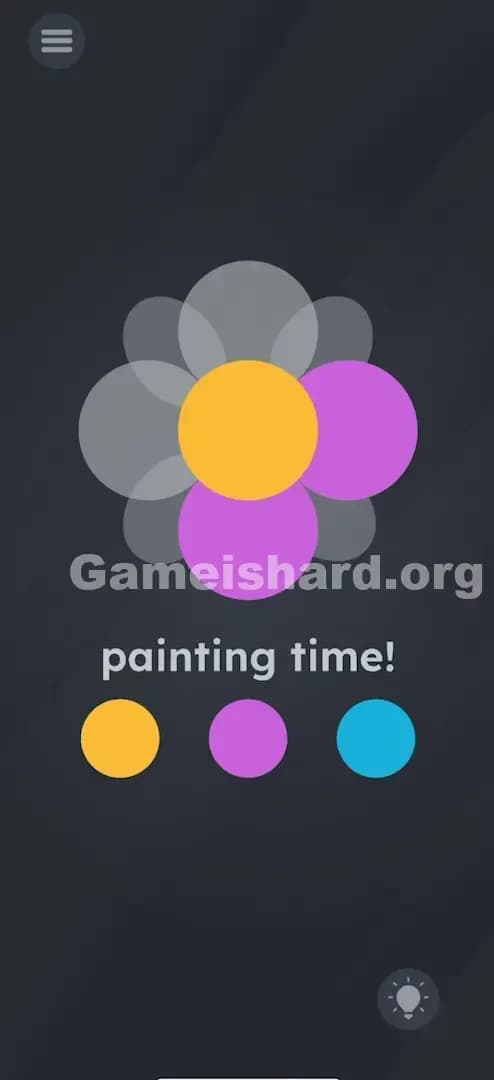
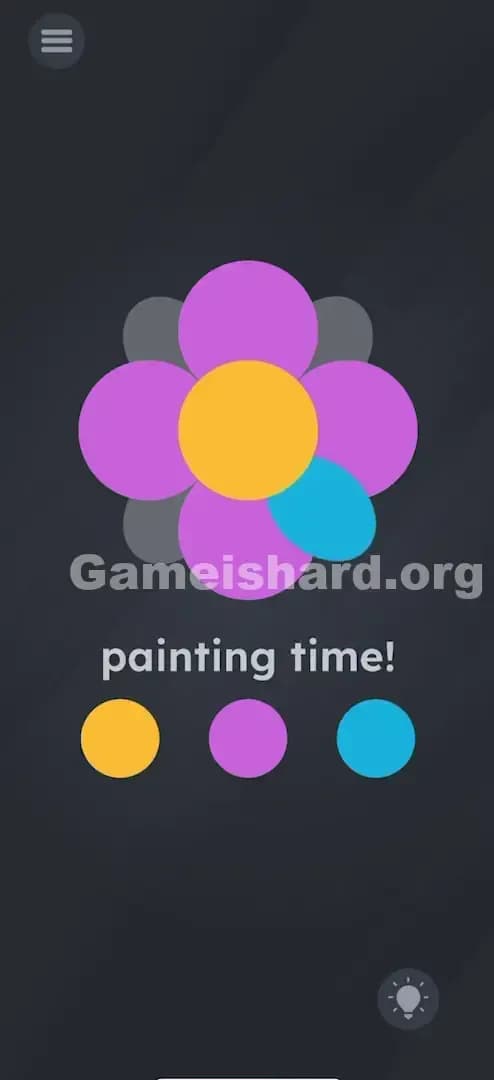
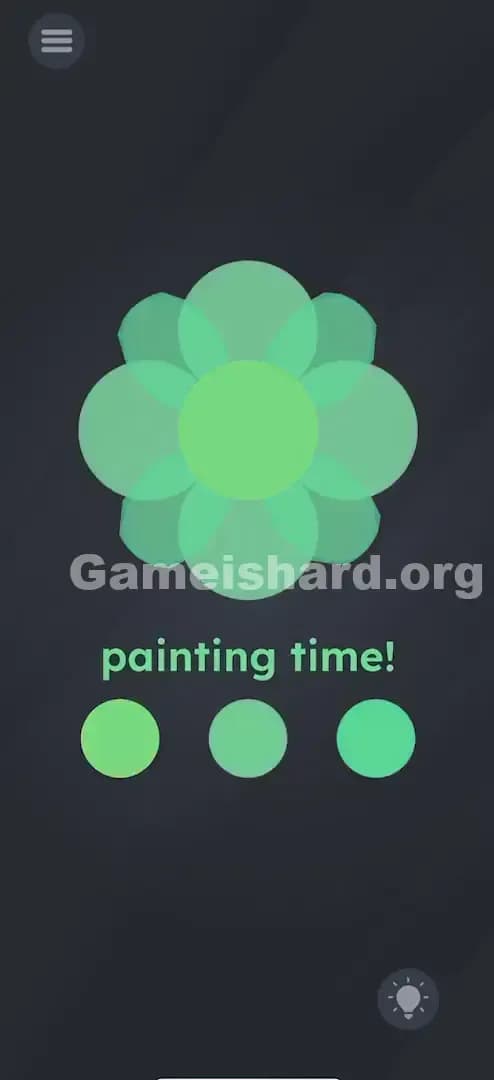
Solution: Drag the Yellow dot to the center circle, drag the Purple dot to the four main petals (top, bottom, left, right), and drag the Blue dot to the four diagonal petals.
Note: The specific colors don't matter as much as using three DISTINCT colors for the three different sections (center, main cross, diagonal cross).
Game is Hard Level 33 Overview
The Hook of Game is hard Level 33
You open Game is hard Level 33 and see a grey, lifeless blob that vaguely resembles a flower. The text says "painting time!", but tapping the colors does absolutely nothing. You tap the flower. Nothing. You tap the text. Nothing. It feels like the touch screen is broken. It’s not a glitch; the game is just refusing to explain the rules of its own coloring book.
The Objective in Game is hard Level 33
The goal is to color in the flower completely. However, unlike a standard coloring app where you tap a color and then tap a region to fill it, this level treats the paint buckets as physical objects you have to move. You need to identify the three distinct "layers" of the flower and assign a unique color to each layer.
- Mechanic 1: Drag and Drop UI. The colored circles aren't buttons; they are draggable items.
- Mechanic 2: Region Detection. You have to drop the color precisely on the specific petal types, not just anywhere on the flower.
- Mechanic 3: Logic Puzzle. You have to realize the flower isn't one object; it's a composite of a center, a cross (+), and an X shape.
It’s not a typo. It’s ammo. The game wants you to stop clicking and start dragging.
What You See on Screen in Game is hard Level 33
Let's break down the visual layout so we are on the same page. When the level loads, you are looking at a dark grey background.
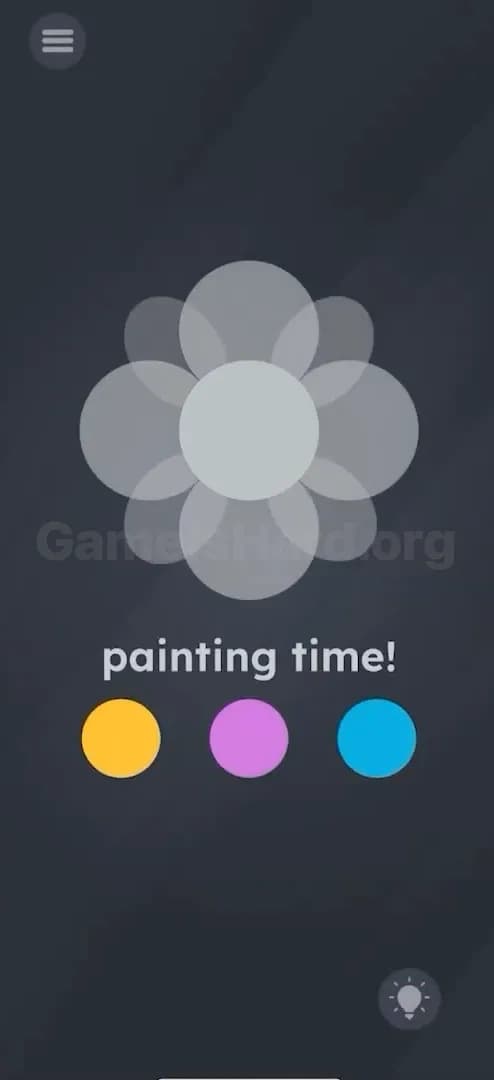
- The Flower: In the upper-middle section, there is a large, translucent grey flower. It looks like a Venn diagram gone wrong. It has a central circle, four petals sticking out at 12, 3, 6, and 9 o'clock, and four smaller petals tucked diagonally between them.
- The Text: Below the flower, simple white text reads "painting time!"
- The Palette: At the bottom, you have three colored circles arranged horizontally: Yellow, Purple, and Blue.
- The Tools: Standard menu icon top left, hint bulb bottom right.
There are no brushes. There are no lines indicating where one petal stops and another starts. It looks like a flat image, but it's actually a stack of shapes.
What’s Tricking People in Game is hard Level 33
The Trap of Game is hard Level 33
The primary trap here is UI Blindness combined with Genre Confusion. We are trained by hundreds of other apps that coloring works by "Select Color -> Tap Zone." That is the universal language of digital art. Game is hard Level 33 breaks that rule without telling you. Players tap the yellow dot, see it pulse slightly, and assume they have "selected" it. Then they tap the flower and get frustrated when it stays grey.
The Wrong Instincts in Game is hard Level 33
- Rapid Tapping: I watched a buddy tap the screen about 50 times in ten seconds, thinking he just wasn't hitting the "hitbox" correctly.
- Mixing Colors: Some players try dragging the yellow onto the blue to make green, thinking they need to create new colors. That's overthinking it.
- Shaking the Phone: Because previous levels used the accelerometer, many players start shaking their device hoping to "spill" the paint.
My Reaction to Game is hard Level 33
When I first hit this level, I thought the game had frozen. I tapped the yellow dot, then tapped the flower. Nothing. I tapped harder. Nothing. I eventually tried to "throw" the paint dot out of frustration, and suddenly the center of the flower turned yellow. I felt like an idiot. The answer was literally at my fingertips the whole time.
Game is hard Level 33 Step-by-Step Walkthrough
The Setup of Game is hard Level 33
Stop tapping. Put your finger on one of the colored dots at the bottom of the screen. You need to treat these dots like stickers you are peeling off and placing onto the flower.
The Action in Game is hard Level 33
- Color the Center: Tap and hold the Yellow dot. Drag it upward and release it directly on top of the center circle of the flower. The center should turn solid yellow.
- Color the "Plus" Sign: Tap and hold the Purple dot. Drag it up and drop it onto the top petal. Notice that the top, bottom, left, and right petals all turn purple instantly. (You only need to drag it to one of them, and the game fills all four).
- Color the "X" Sign: Tap and hold the Blue dot. Drag it to one of the diagonal petals (the ones pointing to the corners). Drop it there. The remaining four diagonal petals will turn blue.
Note: You can swap these colors around (e.g., Blue center, Yellow petals). The game just checks that all three regions are colored.
Verification
Once the final color is dropped, the flower will be fully opaque and multi-colored. The "Success" screen will trigger immediately. If parts of the flower are still grey, you missed a spot.
Troubleshooting in Game is hard Level 33
- "It won't color!" Make sure you are dropping the color on the shape, not near it.
- "I colored the whole thing one color!" If you drag the same color to all sections, the game might not register it as "complete" depending on the version. Try to use all three colors to be safe.
- "The dot snaps back." If you let go too early or miss the hitbox, the colored dot snaps back to the bottom. Drag it again, but move slower and watch for the fill.
Micro-Details That Make the Move Register in Game is hard Level 33
Precision matters in Game is hard Level 33. The hitboxes on the flower petals are surprisingly specific.
- The Center is Small: The central circle is the smallest target. If you have large fingers, aim slightly above where you think the center is so you can see underneath your fingertip.
- The "Plus" vs. "X" Petals: The petals overlap significantly. If you are trying to color the diagonal petals but drop the paint too close to the main vertical petal, the game will think you are trying to recolor the "Plus" section. Aim for the very tip of the petal to ensure you hit the right layer.
- I fixed it by... dragging the color to the topmost petal for the "Plus" shape and the bottom-right petal for the diagonal shape. These seemed to have the cleanest detection zones away from the crowded center.
The Logic Behind Game is Hard Level 33
This level is a classic lesson in Object Permanence and Pattern Interruption.
- Pattern Interruption: The game knows you expect a "Paint Bucket" tool. It deliberately denies you that tool to force you to experiment with the interface.
- Object layering: The flower isn't a single image; it's constructed of three separate vector layers (Center, Cross, Diagonal). The puzzle is realizing that these layers are independent of each other.
- Drag-and-Drop: This is a recurring theme in Game is Hard. If tapping doesn't work, dragging is almost always the answer. The game treats text and UI elements as physical, movable matter.
Pro Tip for Game is Hard Level 33
If you are speed-running or replaying this level, follow this exact order to minimize mistakes:
- Center First: Drag the middle color to the center first. It's the hardest target to hit once the other petals are colored and visual clutter increases.
- Cardinals Second: Drag the left color to the top petal.
- Diagonals Last: Drag the right color to a corner petal.
- Ignore the Text: Don't touch the words "painting time!"—they are just decoration in this specific level.
Alternative Attempts of Game is hard Level 33 (What Doesn’t Work, and Why)
- Tapping the colors: This selects nothing. The UI is drag-based, not click-based.
- Tapping the flower: The flower is a receptacle, not a button.
- Dragging the text onto the flower: In other levels, dragging the text works. Here, the text is static.
- Mixing colors on the palette: You cannot drag the Blue dot onto the Yellow dot to make Green. The dots will just overlap or snap back.
- Using one color for everything: While some versions might accept this, generally the logic requires distinct differentiation between the flower parts.
- Rubbing the screen: You aren't "coloring" with a crayon motion. You are dropping a fill bucket.
Common Mistakes for Game is Hard Level 33
- Assuming the flower is one piece: Players try to color the whole thing with one drop.
- Dragging to the gaps: Dropping the color in the empty space between petals does nothing.
- Releasing too early: If you don't hold the drag until you are over the target, the color resets.
- Ignoring the diagonal petals: It’s easy to miss the smaller diagonal petals if the main cross petals are colored a dark color (like Blue) because they blend in.
- Waiting for a brush: Sitting there waiting for a tool to appear will result in a timeout or just wasted time.
- Overlapping mistakes: Trying to color the diagonal petals but accidentally dropping the paint on the already-colored main petals, overwriting your previous work.
Pattern Recognition: How to Spot This Trick in Future Game is Hard Levels
The Tell
Whenever you see a level with multiple distinct items at the bottom (like these color dots) and a central object that looks incomplete or empty, suspect a drag-and-drop puzzle immediately. If tapping an item gives a tiny animation (like a pulse) but no action, it usually means "I am interactable, but you're doing the wrong interaction."
The Habit
"Tap fails? Drag it." This is the golden rule of Game is Hard. If a simple tap doesn't solve the puzzle, your very next instinct should be to tap, hold, and drag every single element on the screen. Drag the numbers. Drag the text. Drag the images. Drag the background. One of them is likely movable.
Game is hard Level 33 FAQ (Short, Useful)
Q: Does the order of colors matter in Game is hard Level 33? A: No. You can put Blue in the center and Yellow on the petals. As long as all three sections (Center, Plus, Cross) are colored, you win.
Q: I dragged the color but it snapped back in Game is hard Level 33! A: You likely missed the "hitbox" of the petal. Try dragging it to the very tip of the petal rather than the base near the center.
Q: Can I mix colors to make green or orange in Game is hard Level 33? A: No. This level does not support color mixing. Stick to the three primary colors provided.
Q: Why isn't the Game is hard Level 33 finishing after I colored it? A: Look closely at the diagonal petals. Are they colored? Sometimes the grey background makes it look like they are colored when they are actually empty.
Get more level walkthrough on Gameishard.org
That’s the breakdown for Game is hard Level 33. We write these guides to be fast, searchable, and fluff-free because we know you just want to clear the level and move on. If this helped you unstick your brain, share the link with a friend who is probably stuck on the same screen right now. Good luck with Game is hard Level 51!