Game Is Hard Level 30 Solution Walkthrough & Answer
How to solve Game Is Hard level 30? Get instant solution & answer for Game Is Hard level 30: "a star is calling you from far away."
Doesn't look like your level?
App updates can sometimes shuffle the order of puzzles. If this level 30 walkthrough doesn't match your screen, don't worry! You can browse our All Levels guide to find your exact puzzle by its picture.



Quick Answer for Game is hard Level 30 (Do This)
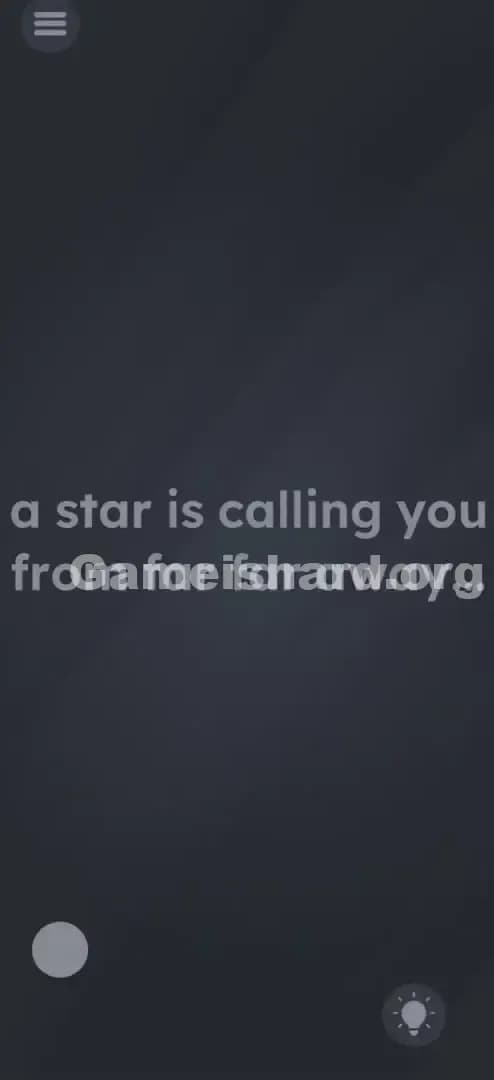
Solution: Scroll the entire screen up until the original grey dot disappears, reveal a new grey dot at the bottom-left, swipe right to push that dot off-screen, and tap the hidden star that appears on the left. (Target the empty space on the screen to scroll, like scrolling a long webpage.)
Game is Hard Level 30 Overview
The Hook of Game is hard Level 30
You open the level and it looks eerily empty. Just some text about a "star calling you from far away" and a lonely grey dot. You tap the dot. Nothing. You tap the text. Nothing. You shake the phone. Still nothing. The frustration here isn't a complex puzzle; it's that the game interface feels dead. It feels broken. But it’s not broken—it’s just extremely tall and wide.
The Objective in Game is hard Level 30
The goal is simply to find and tap a star. However, the star isn't on the screen you start with. It’s hiding in "off-screen" space that the game doesn't tell you exists. You have to treat the level like a giant map that you need to scroll through to find the treasure.
Mechanics Involved in Game is hard Level 30
- Off-screen space: The play area is larger than your phone screen.
- Scrolling/Panning: You need to drag the background, not just objects.
- Hidden Object: The target is invisible until you move the "camera."
- UI Blindness: We assume the edges of the phone are the edges of the world. They aren't.
It’s not a glitch. It’s exploration.
What You See on Screen in Game is hard Level 30
When you load up Level 30, the scene is deceptively simple.
- Top: A standard menu/pause button.
- Center Text: The phrase "a star is calling you from far away." sits right in the middle.
- Bottom Left: A single, somewhat large grey dot (circle).
- Bottom Right: A lightbulb icon (hints).
- Background: A dark, moody gradient.
Everything looks static. There are no arrows indicating you can move. There are no scroll bars. It looks like a single-screen puzzle where you have to manipulate the existing items. That is the primary lie of this level.
What’s Tricking People in Game is hard Level 30
The Trap of Game is hard Level 30
The biggest trap here is the concept of "The Frame." In almost every mobile game, the action happens within the visible pixels of your device. If something is off-screen, there’s usually a big arrow pointing to it. Game is hard Level 30 gives you zero indicators. You assume you need to interact with the text or the visible dot because that's all that exists in your reality.
The Wrong Instincts in Game is hard Level 30
- Tapping the grey dot: It looks like a button. It acts like nothing.
- Dragging the text: Since previous levels taught you text is movable, you probably tried dragging the word "star." It moves slightly but snaps back or does nothing useful.
- Zooming out: You might try to pinch-to-zoom to see more area. This mechanic isn't supported, leading you to believe the screen is fixed.
My Reaction to Game is hard Level 30
I spent a solid five minutes tapping every single letter in the sentence "a star is calling you." I thought maybe the dot on the 'i' in "is" was the star. Nope. I felt pretty silly when I accidentally swiped the background and saw the whole world move.
Game is hard Level 30 Step-by-Step Walkthrough
The Setup of Game is hard Level 30
Ignore the text. Ignore the grey dot currently visible on the screen. Place your thumb in the middle of the empty dark background. Imagine you are reading a very long PDF document and you need to get to the bottom of the page.
The Action in Game is hard Level 30
- Swipe Up (Scroll Down): Drag your finger from the bottom of the screen to the top to scroll the view down. Actually, wait—the solution is to go "far away." So, place your finger in the middle of the screen and swipe UP repeatedly. You are trying to scroll the view down (or scroll the content up, depending on how your brain works). Basically, keep scrolling until the original text and dot are gone.
- Find the Second Dot: Keep scrolling until you see a new grey dot appear, likely near the bottom-left area of this new section of the "map."
- Swipe Right: Once you see that new bottom dot, put your finger on the background and swipe RIGHT (drag from left to right). This pushes the view to the left.
- Tap the Star: As you swipe right, a bright yellow star will slide into view from the left side. Tap it.
Troubleshooting in Game is hard Level 30
- Did you scroll far enough? The distance is significant. It’s not a tiny nudge. Give it two or three big swipes.
- Did you swipe the wrong way? The game wants you to feel like the star is "far away." Usually, this implies scrolling down or to the side. If swiping up doesn't work, try swiping left immediately. The spatial layout can sometimes vary slightly based on screen resolution, but generally, it's: Scroll Down -> Scroll Right.
Micro-Details That Make the Move Register in Game is hard Level 30
Precision matters less here than persistence.
- No "Snapping": The screen doesn't snap to the star. You have to hold the scroll or leave it there.
- Background Drag: Ensure you aren't starting your swipe on top of the text or the lightbulb. Start your swipe in "dead space."
- Inertia: The scroll has a bit of inertia. Swipe hard and let it glide.
- I fixed it by... purely accidental swiping. I dropped my phone, grabbed it by the screen, and saw the text move off-center. That broke the illusion that the screen was locked.
The Logic Behind Game is Hard Level 30
This level is a classic implementation of "Thinking Outside the Box"—literally. The box is your phone screen. The puzzle exists outside of it.
- Spatial Awareness: The game wants you to realize the digital world is larger than the physical window you are looking through.
- Literal Interpretation: The text says the star is "far away." In gaming terms, "far away" usually means you have to travel to get there. Since your avatar can't walk, the camera must move.
Pro Tip for Game is Hard Level 30
If you are speed-running or just want to get it over with:
- Swipe UP aggressively twice immediately upon loading.
- Swipe RIGHT aggressively twice immediately after.
- Tap the yellow shape.
- Don't even read the text. The text is a distraction.
Alternative Attempts of Game is hard Level 30 (What Doesn’t Work, and Why)
Here is a graveyard of bad ideas I tried so you don't have to:
- Waiting: Sitting there for 60 seconds thinking the star will travel to me. (It doesn't. You have to go to it.)
- Shaking the phone: Thinking the star would fall from the "sky" (top of the screen). (Gravity sensors are not active in Level 30.)
- Tapping the word "Star": Logical, but too easy for this game. The word is just a hint, not the object.
- Dragging the grey dot to the text: Trying to combine them. (The dot is just a visual anchor to show you that the screen is moving; it has no function.)
- Turning the brightness up: "Far away" stars are dim, right? (Clever, but the game doesn't read your system brightness settings.)
- Volume Keys: Sometimes keys move things. (Not this time.)
Common Mistakes for Game is Hard Level 30
- Assuming the screen is locked. Most puzzle games lock the camera. This one unbinds it.
- Giving up after one swipe. You have to scroll quite a bit. One small swipe might not reveal the star.
- Focusing on the text. The text is the biggest red herring. It draws your eye to the center, keeping you from looking at the edges.
- Swiping the wrong direction. If you swipe down (to look up), you just see more empty space. You specifically need to go down and left (by swiping up and right).
- Tapping the hint too early. The hint usually just says "Look around," which is frustratingly vague. Save your hint credits.
Pattern Recognition: How to Spot This Trick in Future Game is Hard Levels
The Tell
If a level has very few objects, lots of empty negative space, and the interactive elements (like the text or dots) don't respond to taps or drags individually, check the background.
The Habit
The "Canvas Check." Whenever you start a new level that seems stuck or empty, immediately try to drag the entire background in all four directions (Up, Down, Left, Right). See if the UI moves. If the text shifts position relative to the frame of your phone, you know you are dealing with a "Large Map" puzzle.
FAQ of Game is hard Level 30 (Short, Useful)
Q: Can I pinch to zoom out to see the star in Game is hard Level 30? A: No. The game engine for Game is hard generally doesn't support multi-touch zooming for camera control. You have to scroll manually.
Q: Is the star always in the same place in Game is hard Level 30? A: Yes. For Level 30, it is consistently located "South-West" relative to your starting position.
Q: I see the star but can't tap it in Game is hard Level 30. Why? A: You might not have scrolled it fully onto the screen. Drag it to the center of your view before tapping to ensure the touch registers.
Q: Does the "far away" text mean I have to walk with my phone in Game is hard Level 30? A: No GPS required. "Far away" is purely virtual distance within the game's coordinate system.
Get more level walkthrough on Gameishard.org
Stuck on the next one? We’ve got the answer key for every single trick this game throws at you. These guides cut the fluff so you can get back to feeling like a genius. Share this with your friends who are still tapping the grey dot like maniacs!