Game Is Hard Level 86 Solution Walkthrough & Answer
How to solve Game Is Hard level 86? Get instant solution & answer for Game Is Hard level 86: "X"
Doesn't look like your level?
App updates can sometimes shuffle the order of puzzles. If this level 86 walkthrough doesn't match your screen, don't worry! You can browse our All Levels guide to find your exact puzzle by its picture.
Quick Answer for Game is hard Level 86 (Do This)
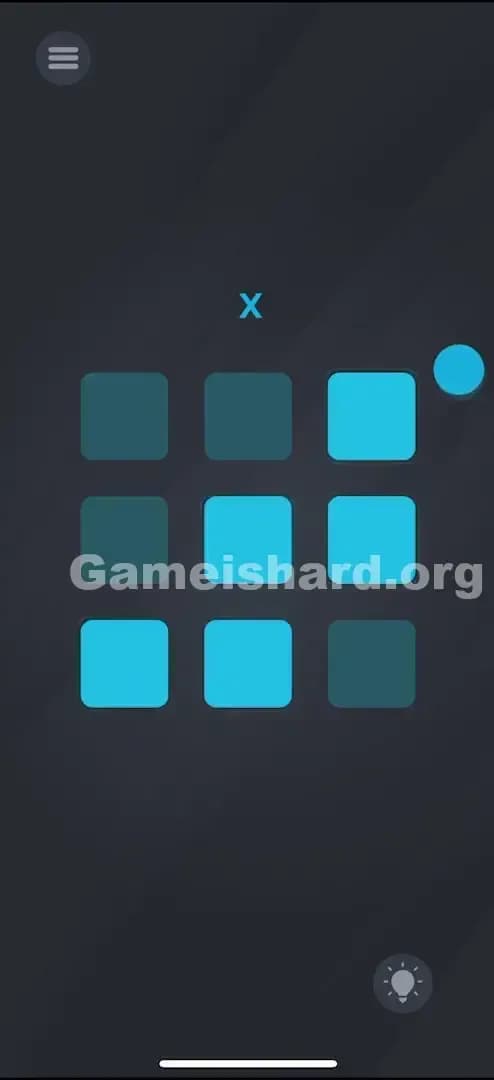
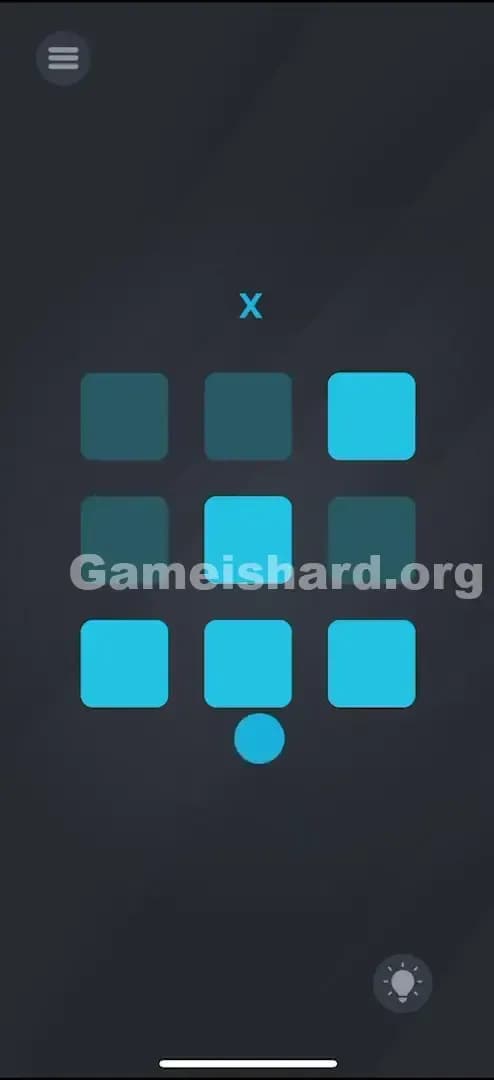
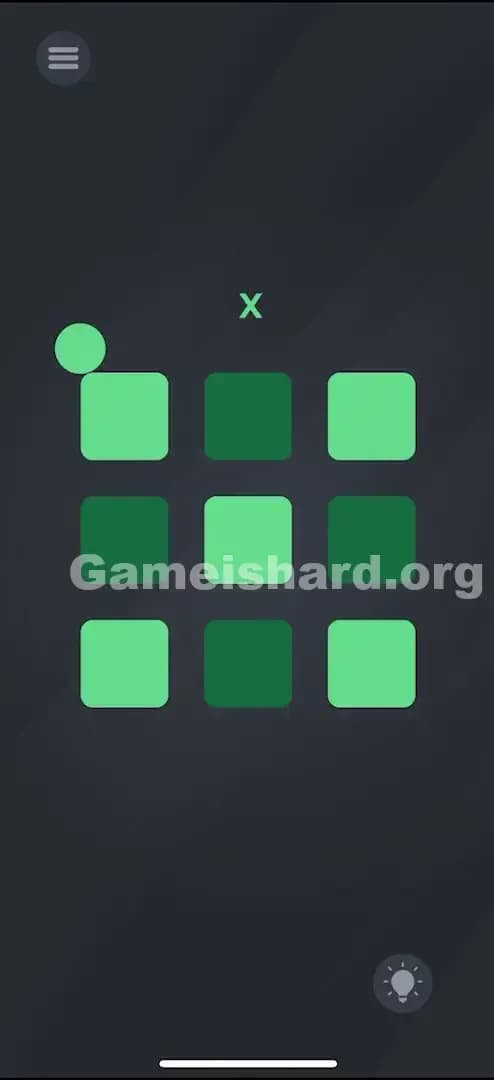
Solution: Tilt your phone physically to roll the blue ball over specific squares, tapping each square the ball touches to toggle its light until you form an “X” pattern.
You need to light up the top-left, top-right, center, bottom-left, and bottom-right squares while keeping the others dark.
Game is Hard Level 86 Overview
The Hook of Game is hard Level 86
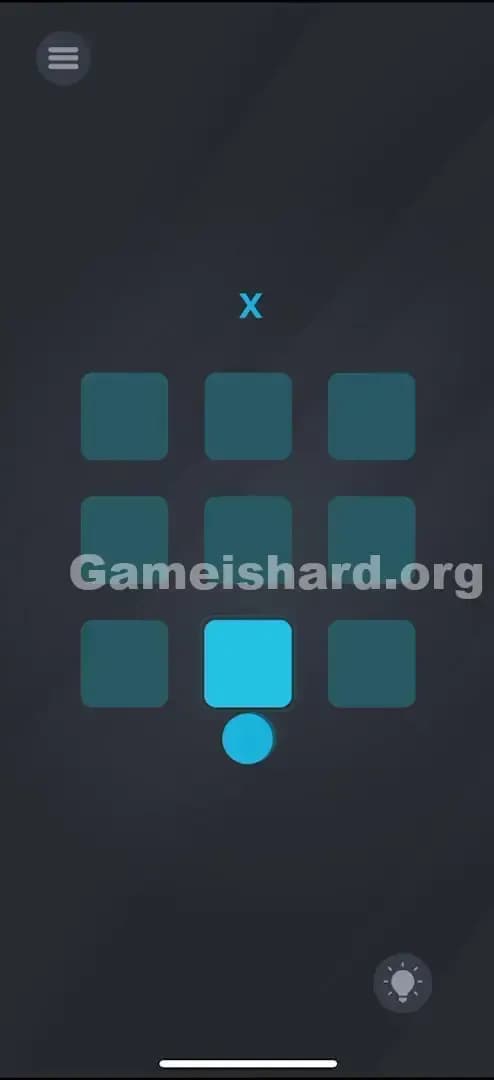
You stare at a grid. Nine dark squares. One blue ball sitting there, mocking you. You tap a square—nothing happens. You drag the ball—it doesn't move. It feels broken. Most puzzle games train you to just tap the thing you want to activate, but Game is hard Level 86 decides that’s too easy. The interface isn't just a touch screen anymore; it's a physical balancing act.
The Objective in Game is hard Level 86
The goal here is visual replication. You see a small blue letter "X" floating above the grid. That is your blueprint. You need to manipulate the 3x3 grid of squares below it so that the lit-up (bright blue) squares form that exact "X" shape. It’s not about answering a question; it’s about painting with light. But the "paintbrush" is a ball that obeys gravity, not your finger.
Mechanics Involved in Game is hard Level 86
- Tilt / Gyroscope Sensors: The ball moves based on how you tilt your device, not touch inputs.
- Physics Interaction: The ball has momentum and weight.
- Toggle Logic: Squares turn ON or OFF only when the ball is on them and you tap.
- Pattern Recognition: You must match the visual clue at the top.
It’s not a glitch. It’s a labyrinth.
What You See on Screen in Game is hard Level 86
Let's break down the scene so we are on the same page.
At the very top, centered, is a small, light-blue letter "X". This is your only instruction. It’s small, easy to miss if you are rushing, but it dictates the entire puzzle.
Below that is the main play area: a 3x3 grid of rounded squares. By default, they are usually dark (off), though you might have accidentally lit one up while fumbling around.
Sitting heavily at the bottom, or rolling around if your hands aren't steady, is a solid blue ball. It looks like a pinball. It interacts with the edges of the screen and the grid squares.
There is no "submit" button. There is no keyboard. Just the grid, the ball, and gravity.
What’s Tricking People in Game is hard Level 86
The Trap of Game is hard Level 86
The primary trap here is "Touch Expectation." We see a button (or a square that looks like a button), and our brain screams, "PUSH IT." You tap the squares directly with your finger, and absolutely nothing happens. This creates immediate frustration. You think the game is frozen or the touch sensor is dead. The game is hiding the control mechanism behind a sensor you can't see: the gyroscope.
The Wrong Instincts in Game is hard Level 86
- Direct Tapping: Poking the dark squares aggressively.
- Dragging the Ball: Trying to swipe the ball with a finger like it's a slider.
- Shaking the Phone: Violent shaking usually resets physics in these games, but here it just makes the ball fly around uncontrollably.
My Reaction to Game is hard Level 86
I spent a good two minutes trying to drag the "X" onto the grid. I thought, "Oh, it's a drag-and-drop puzzle!" Nope. Then I tried to spell "X" using Morse code taps. Also nope. It wasn't until I set my phone down to grab a drink and saw the ball roll slightly that I realized, "Oh, I'm the table. The phone is the maze."
Game is hard Level 86 Step-by-Step Walkthrough
The Setup of Game is hard Level 86
Hold your phone flat, parallel to the floor. This is your neutral position. You need stability here because the ball can be sensitive. Locate the "X" clue at the top. That tells you which squares need to be lit:
- Row 1: Left, Right (Center is OFF)
- Row 2: Center (Left and Right are OFF)
- Row 3: Left, Right (Center is OFF)
The Action in Game is hard Level 86
- Tilt to Position: Gently tilt your phone to roll the blue ball onto the Top-Left square.
- Toggle the Light: Once the ball is physically resting on top of that square, tap the screen anywhere. The square should turn bright blue.
- Move to the Next: Tilt your phone to roll the ball to the Top-Right square. Tap the screen to light it up.
- Complete the Center: Roll the ball to the exact Center square of the grid. Tap to light it up.
- Finish the Bottom: Roll to Bottom-Left and tap. Then roll to Bottom-Right and tap.
- Cleanup: If you accidentally lit up any other squares (like the middle-left or top-center), you must roll the ball back over them and tap again to turn them OFF.
Verification
The level ends automatically the moment the pattern matches the "X". If nothing happens, check the "negative space"—ensure the four squares that make up the "plus" sign (+) are dark.
Troubleshooting at Game is hard Level 86
- Ball getting stuck? Sometimes the physics engine snags on a corner. Tilt sharply in the opposite direction to dislodge it.
- Light not toggling? You must tap the screen while the ball is overlapping the square. If the ball rolls off before your finger hits the glass, it won't register.
- Sensitivity issues? If the ball is moving too fast, try laying the phone on a flat surface (like a table) and just slightly lifting one edge to control the roll with precision.
Micro-Details That Make the Move Register in Game is hard Level 86
Precision is the enemy here. The "hitbox" for the squares is slightly smaller than the visual graphic.
- Center Mass: Try to get the ball into the middle of the square before tapping. Glancing blows on the corner of a square sometimes don't count as "contact" for the toggle trigger.
- The Tap: You don't need to tap the ball itself. You can tap anywhere on the black background. The tap is just the "execute" command; the ball's position is the "cursor."
- I fixed it by… slowing down. I was trying to roll-and-tap in one fluid motion, like a speedrun, and I kept missing. I had to stop the ball completely on each square before tapping. Treat it like parking a car, not a drive-by.
The Logic Behind Game is Hard Level 86
This level is a classic "Sensor vs. Touch" switcheroo. The game removes your direct agency (touching the object) and replaces it with indirect agency (manipulating gravity).
It’s testing two things:
- Dexterity: Can you control a physics object with fine motor skills?
- Rule Discovery: Can you figure out that "Tap" has changed its function from "Select" to "Interact with current state"?
In previous levels, a tap meant "Do this thing here." In Game is hard Level 86, a tap means "Activate whatever the ball is touching." It’s a subtle shift in logic that separates the button-mashers from the puzzle-solvers.
Pro Tip for Game is Hard Level 86
If you are struggling to keep the ball steady:
- Use a Table: Place the phone flat on a table.
- Pivot: Keep one corner of the phone touching the table at all times and lift the opposite side. This creates a stable fulcrum and slows down the ball's movement significantly.
- Tap Empty Space: Don't obscure your view by tapping the grid. Tap the empty black space at the bottom of the screen to toggle the lights.
Do NOT: Waste time shaking the phone to reset. It doesn't reset the lights, only the ball position. You have to manually turn off mistakes.
Alternative Attempts on Game is hard Level 86 (What Doesn’t Work, and Why)
- Tapping the squares directly: Fails because the touch input for the squares is disabled. Only the ball triggers them.
- Dragging the ball with a finger: Fails because the ball is a physics object controlled by the gyroscope, not a UI element.
- Making a "Cross" (+): Fails because the clue is clearly an "X". Many players default to a cross because it's easier to roll, but it’s the wrong answer.
- Filling the whole grid: Fails. You need the specific pattern.
- Tapping the "X" at the top: It’s just a clue, not an interactive button.
- Voice Commands: Shouting "Light up!" or "X!" into the mic does nothing (though it would be cool).
Common Mistakes for Game is Hard Level 86
- Lighting the wrong pattern: Mixing up the X (diagonals) with a + (vertical/horizontal lines).
- Over-rolling: Rolling the ball over a square you just lit and accidentally tapping again, turning it off.
- Ignoring the "Off" squares: Focusing so hard on lighting the X that you forget to turn off a square you lit by mistake earlier. The pattern must be exact.
- Holding the phone upright: Trying to play this while laying in bed or holding the phone vertically makes the gravity extremely hard to control.
- Tapping too lightly: Sometimes quick taps don't register while the physics engine is calculating the ball's roll. Be deliberate.
Pattern Recognition: How to Spot This Trick in Future Game is Hard Levels
The Tell
Whenever you see a ball, a liquid, or a dangling object that sways or moves slightly when you adjust your grip on the phone, the solution involves Tilt/Gyroscope.
The Habit
If standard tapping fails, immediately wiggle your phone. If elements on the screen react to the movement (swinging, rolling, sliding), stop touching the screen and start steering the device. The phone itself is the controller.
Game is hard Level 86 FAQ
Q: Can I reset the lights if I mess up in Game is hard Level 86? A: No, there is no reset button for the grid. You have to manually roll the ball over the lit squares and tap to turn them off individually.
Q: Why isn't the ball moving in Game is hard Level 86? A: Your gyroscope might be stuck, or your screen rotation lock might be interfering (though rare in this game). Close the app completely and reopen it to recalibrate the sensors.
Q: I made the X but the level won't end in Game is hard Level 86! A: Check the center squares (top, bottom, left, right). One of them is likely lit up and shouldn't be. The pattern must be perfect: 5 lights ON, 4 lights OFF.
Q: Is there a trick to make the ball stop in Game is hard Level 86? A: Not really. The "friction" is low. Your best bet is to lay the phone flat to kill the momentum.
Get more level walkthrough on Gameishard.org
If this guide saved your phone from being thrown across the room, we’ve got plenty more. Our walkthroughs cut the fluff and get straight to the solution because we know you just want to beat the level and move on. Share this with your friends who are stuck on Game is hard Level 86 and help them see the light (literally).
Good luck with the next puzzle!