Game Is Hard Level 106 Solution Walkthrough & Answer
How to solve Game Is Hard level 106? Get instant solution & answer for Game Is Hard level 106: "turn them into order"
Doesn't look like your level?
App updates can sometimes shuffle the order of puzzles. If this level 106 walkthrough doesn't match your screen, don't worry! You can browse our All Levels guide to find your exact puzzle by its picture.
Quick Answer for Game is hard Level 106 (Do This)
- Solution: Drag the central Red Rectangle near each compass needle to magnetically rotate them until they match the line pattern shown at the top of the screen.
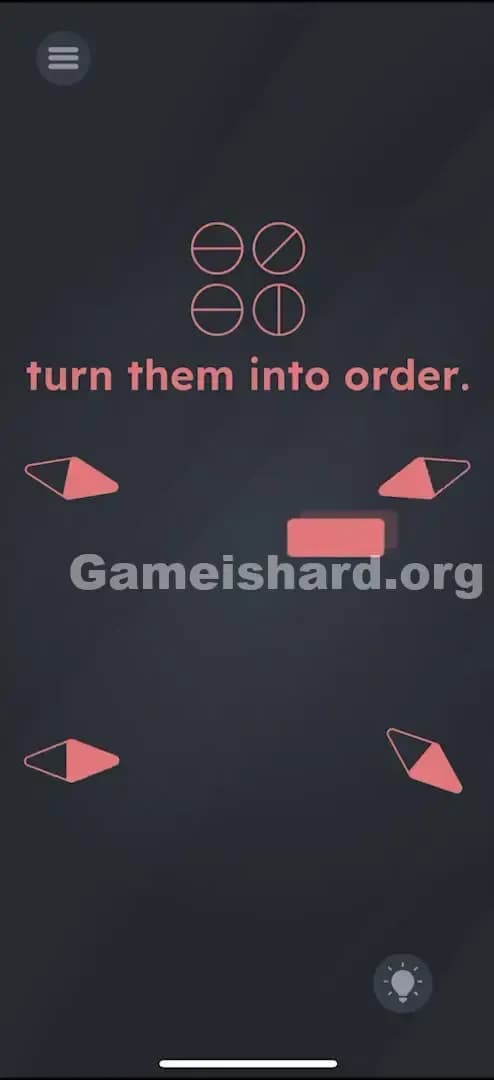
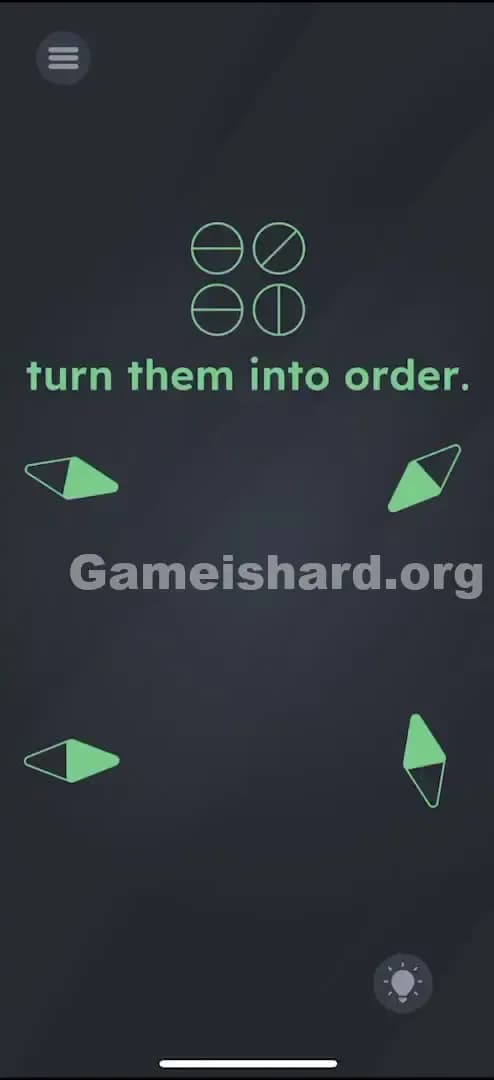
- Match the needles to this order: Top-Left = Horizontal, Top-Right = Diagonal, Bottom-Left = Horizontal, Bottom-Right = Vertical.
Game is Hard Level 106 Overview
The Hook of Game is hard Level 106
You stare at four compass needles pointing randomly. Tapping them does absolutely nothing. The instruction "turn them into order" is mocking you because there are no buttons, no sliders, and shaking your phone just makes you look silly. The game is pretending the controls are broken. They aren't. They're just invisible.
The Objective in Game is hard Level 106
You need to orient four compass needles to match the specific line directions shown in the icons at the top of the screen. But you can't touch the needles directly. You have to use physics.
Key Mechanics in Game is hard Level 106:
- Object Dragging: The central shape isn't decoration; it's a tool.
- Magnetism: One object affects the rotation of others nearby.
- Pattern Matching: You must replicate the visual code at the top.
It’s not a typo. It’s a physics test.
What You See on Screen in Game is hard Level 106
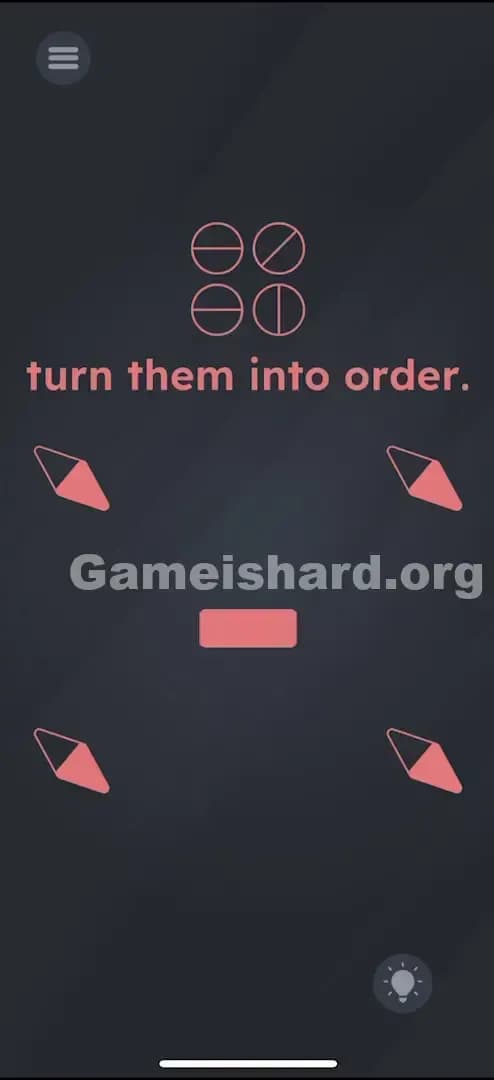
The screen is dark grey with a minimalist layout.
- Top Center: Four circle icons arranged in a 2x2 grid. Each circle has a line inside it indicating a direction (Horizontal, Diagonal, Horizontal, Vertical).
- Text: "turn them into order." in pink letters.
- Middle: Four compass needles (red and black diamonds) arranged in a larger square pattern. They are currently pointing in random directions.
- Dead Center: A small, solid Red Rectangle. It looks like a button, but it doesn't click.
What’s Tricking People in Game is hard Level 106
The Trap of Game is hard Level 106
Most players assume the Red Rectangle is a "submit" button or just a static divider. We are trained by thousands of apps to think "rectangle in the middle = button." When tapping it fails, players usually try swiping the compass needles themselves. That fails too.
The Wrong Instincts in Game is hard Level 106
- Tapping the needles: You can tap them until your screen cracks; they won't budge.
- Shaking the device: Compasses usually react to phone sensors, right? Not this time. The game has disabled the gyroscope for this puzzle to force you to use the on-screen tool.
- Tapping the top icons: The pattern at the top is strictly a reference key, not an input method.
My Reaction to Game is hard Level 106
I spent a solid minute tilting my phone left and right, thinking the compasses were stuck. Then I accidentally dragged my finger across the middle of the screen and saw a needle twitch. That "wait, that moves?" moment is classic for this game.
Game is hard Level 106 Step-by-Step Walkthrough
The Setup of Game is hard Level 106
Ignore the text. Focus on the Red Rectangle in the very center of the screen. This is your magnet. Also, memorize the pattern at the top:
- Top-Left: — (Horizontal)
- Top-Right: \ (Diagonal)
- Bottom-Left: — (Horizontal)
- Bottom-Right: | (Vertical)
The Action in Game is hard Level 106
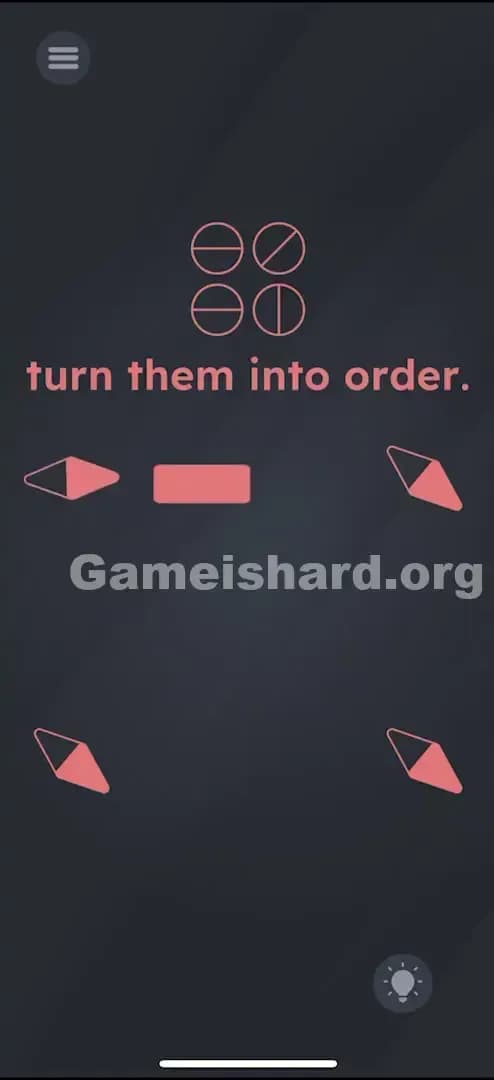
- Grab the Magnet: Place your finger on the central Red Rectangle and hold it.
- Move to Top-Left: Drag the rectangle close to the top-left compass needle. Watch the needle spin as you move the rectangle around it. Position the rectangle so the needle points Horizontally (flat). Move the rectangle away carefully so the needle stays put.
- Move to Top-Right: Drag the rectangle near the top-right needle. Rotate it until it points Diagonally (top-left to bottom-right, roughly like a backslash
\). - Move to Bottom-Left: Drag the rectangle to the bottom-left needle. Make it point Horizontally (flat).
- Move to Bottom-Right: Drag the rectangle to the bottom-right needle. Make it point Vertically (straight up/down).
Troubleshooting at Game is hard Level 106
- The needle keeps spinning back! Move the magnet slowly away from the needle once it is in position. If you whip it away too fast, the "magnetic pull" might drag the needle out of alignment.
- It won't trigger the win: Check the Top-Right diagonal. It needs to match the icon exactly. If it's slanted the wrong way (like
/instead of\), the game won't accept it.
The Logic Behind Game is Hard Level 106
This level relies on "skeuomorphism"—designing digital objects to mimic real-world counterparts. The red rectangle acts like a bar magnet. In real life, if you bring a magnet near a compass, the needle aligns with the magnetic field.
The game is testing your ability to interact with the environment rather than just the UI. It forces you to realize that the "button" is actually an inventory item you can pick up and use. It’s a recurring theme in Game is hard: if touching the problem doesn't work, touch the stuff around the problem.
Pro Tip for Game is Hard Level 106
Don't overthink the exact degrees.
- Focus on one needle at a time.
- "Park" the magnet in the dead center of the screen between adjustments to ensure you don't accidentally rotate a needle you already fixed.
- Do the easy ones (Horizontal/Vertical) first; save the Diagonal for last if you're struggling with precision.
FAQ of Game is hard Level 106 (Short, Useful)
Why won't the compass needles move when I touch them? They aren't touch-sensitive. You must move the central Red Rectangle near them to rotate them using "magnetism."
I matched the pattern, but nothing happened. Double-check the Top-Right diagonal needle. It must match the specific angle in the top icon (top-left to bottom-right). Also, ensure your horizontal needles are perfectly flat.
Does tilting my phone help in Game is hard Level 106? No. The gyroscope is disabled for this level. Only the red rectangle controls the rotation.
Can I move the needles all at once? Technically yes, if you drag the magnet in wide circles, but it's chaotic. It is much faster and easier to set them one by one.
Get more level walkthrough on Gameishard.org
Stuck on another puzzle? We write these guides to get you unstuck fast, without the fluff or "subscribe to my channel" nonsense. If this helped you beat the magnet trick, share the link with a friend who is currently shaking their phone in frustration. Game on.