Game Is Hard Level 285 Solution Walkthrough & Answer
How to solve Game Is Hard level 285? Get instant solution & answer for Game Is Hard level 285: "Tremble and grow!"
Doesn't look like your level?
App updates can sometimes shuffle the order of puzzles. If this level 285 walkthrough doesn't match your screen, don't worry! You can browse our All Levels guide to find your exact puzzle by its picture.



Quick Answer for Game is hard Level 285 (Do This)
Solution: Physically shake your actual device back and forth to make the purple ball expand until the stage completely clears.
Take your fingers off the glass entirely, because this puzzle ignores the touchscreen and exclusively targets your phone's internal motion sensors.
Game is Hard Level 285 Overview
The Hook
You stare at a purple circle and a cryptic command. Nothing drags. Tapping does absolutely zero. The game completely lies to your thumbs here. We spend hundreds of levels swiping, dragging, and pulling text apart. Then the developers flip the script. The screen feels broken. It is a brilliant piece of psychological bait.
The Objective
Your actual goal is to fulfill the text prompt literally rather than virtually. You need to make the small purple shape expand until it consumes the entire available screen space, triggering the win condition.
The mechanics hiding under the hood of this specific puzzle include:
- Sensor mechanics
- Tilt / rotation
- Timing / waiting
- Hardware manipulation
It’s not a typo. It’s ammo.
What You See on Screen in Game is hard Level 285
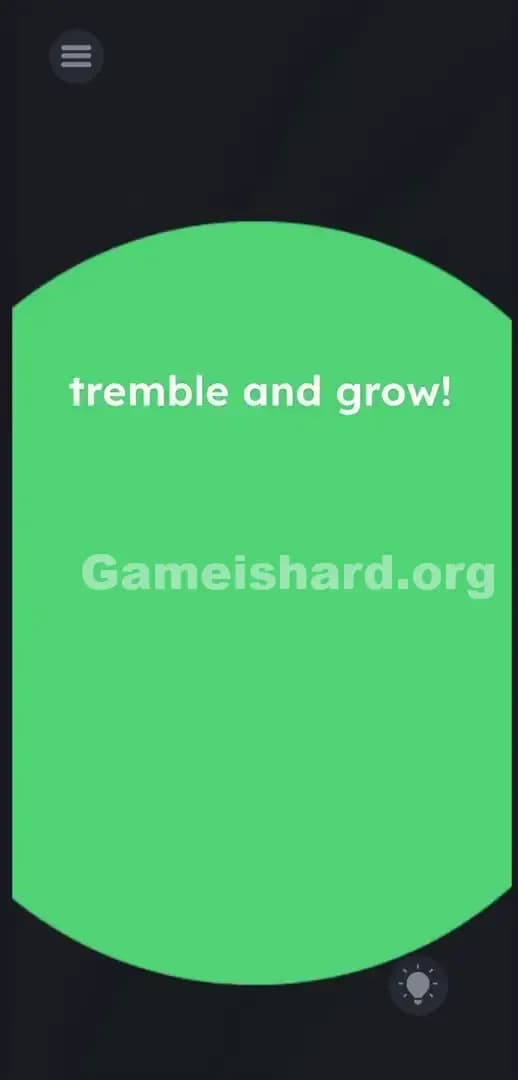
The layout is aggressively minimal. This lack of clutter is exactly what makes the solution so confusing. Against a dark, slightly textured gray background, a line of lowercase purple text sits near the top center: tremble and grow!.
Dead center on the screen is a solid purple circle. It matches the text color perfectly.
Up in the top left corner, you have the standard gray hamburger menu icon for settings. Down in the bottom right corner sits the standard lightbulb hint icon.
There are no hidden buttons. The spacing between the text and the shape is totally normal. No letters are misaligned. No sneaky math equations hide in the shadows. The entire trap is built on the total lack of standard interactive elements. You are staring at a static image that demands a dynamic physical response.
What’s Tricking People in Game is hard Level 285
The Trap
We are entirely hardwired to poke glass. When a mobile puzzle says "grow," human brains instantly default to the universal pinch-to-zoom gesture. UI Blindness strikes with massive force here. You read the text on the screen as flavor rather than a literal mechanical instruction.
You try to stretch the ball. Nothing. You attempt to drag the letters down. Nothing. The game trains you for 284 levels to treat the interface like a digital toy box, so you naturally assume the solution involves manipulating the pixels.
The Wrong Instincts
I tried pulling the edges of the circle outward with two thumbs. I tried dragging the word grow! directly onto the shape to act as a modifier. Pounding the screen with three or four fingers is a classic desperation move here. None of it registers. You might even hit the volume buttons thinking "tremble" implies heavy bass or an audio-based solution. Poking the screen harder just leaves fingerprint smudges.
My Reaction
Absolute facepalm. I spent three full minutes furiously swiping at the screen. I tried double-tapping. I tried holding my finger on the ball while dragging another finger across the text. I finally threw my phone down on my bed in pure frustration. The device bounced. The ball twitched. That exact moment is when the logic clicked and I felt like a total idiot.
Game is hard Level 285 Step-by-Step Walkthrough
The Setup
Take your hands completely off the glass. Stop trying to swipe. Make sure you have a firm, secure grip on your actual mobile device. You do not need to touch the circle or the tremble and grow! text at any point during this sequence.
The Action
- Grip your phone securely with one or both hands to avoid dropping it.
- Vigorously shake the physical device back and forth in the air.
- Watch the screen. The purple circle will immediately begin to swell.
- Keep shaking continuously without stopping. If you pause, the growth halts.
- Continue the motion until the purple shape entirely swallows the screen and the victory banner triggers.
Troubleshooting
- If the ball stops expanding midway through, you stopped shaking too soon. The game engine requires constant, uninterrupted motion data from the accelerometer to keep the growth animation playing.
- If absolutely nothing happens when you shake, check your phone's internal settings. Occasionally, auto-rotate or sensor settings glitch out. Force close the app and reboot it to reset the hardware hooks.
- Make sure your fingers are clear of the power button. Gripping the phone too hard during the shake can easily turn off the screen, which resets your progress.
The Logic Behind Game is Hard Level 285
The game is actively testing your hardware awareness. Mobile titles aren't just software confined to a flat digital plane; they have deep access to gyroscopes and accelerometers. The instructions are pure bait. The UI is a massive distraction.
"Tremble" translates literally to physical shaking. This fits a recurring Game is hard pattern perfectly. The level treats physical, real-world actions like puzzle pieces. The developers know exactly how heavily we rely on touch inputs. By disabling touch entirely, they force a perspective shift. When the digital interface fails to respond, you must immediately start testing the physical state of the hardware. The instructions are bait; the UI is the real puzzle.
Pro Tip for Game is Hard Level 285
Stop wasting precious time trying multi-touch gestures. Pinch-to-zoom is completely disabled in this environment. Do not bother mashing the screen.
- Read the text prompt purely as a physical command.
- Securely grip the outside edges of your device.
- Shake aggressively for roughly 3-5 seconds.
- Wait for the victory screen to pop before you stop moving.
FAQ
Why isn't the ball growing when I pinch it? The game intentionally disables all touch inputs for the main puzzle object on this stage. You have to trigger the device's internal motion sensor instead. Touch will get you nowhere.
How long do I need to shake the phone? Usually just a few straight seconds. Do not stop moving the device until the victory banner actively appears, or the animation will pause. Keep the motion consistent.
Can I drag the text onto the ball? No. The tremble and grow! text is completely static. Touching it, swiping it, or holding it does absolutely nothing. It exists solely to hint at the physical shake mechanic.
What if I'm playing on a PC emulator? You need to map a keyboard macro for the "shake" command. Most major emulators like BlueStacks or LDPlayer have a dedicated, built-in shake icon located directly in their sidebar tools. Click that tool repeatedly to simulate the phone rattling.
Why did my progress reset? You probably bumped the power button or locked the screen while shaking. Grip the top and bottom bezels of the phone to keep your fingers safely away from the side buttons.
Get more level walkthrough on Gameishard.org
Our guides skip the filler and get straight to the exact inputs you need. We break down the hardest logic traps so you never stay stuck. Share this guide with your Discord friends if they are endlessly swiping at dead screens. Go crush the next stage right now.