Game Is Hard Level 29 Solution Walkthrough & Answer
How to solve Game Is Hard level 29? Get instant solution & answer for Game Is Hard level 29: "let's move!"
Doesn't look like your level?
App updates can sometimes shuffle the order of puzzles. If this level 29 walkthrough doesn't match your screen, don't worry! You can browse our All Levels guide to find your exact puzzle by its picture.


Quick Answer for Game is hard Level 29 (Do This)
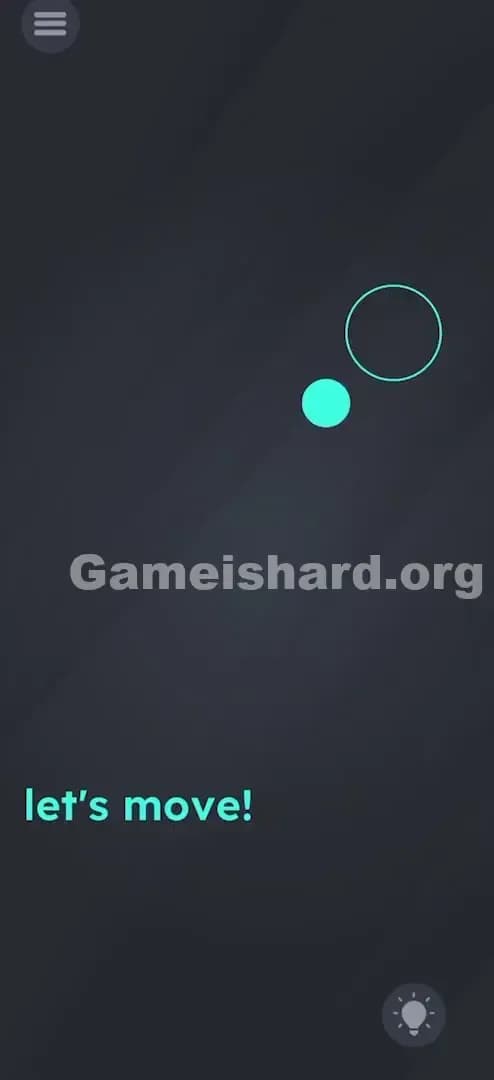
Solution: Physically tilt or rotate your phone to roll the small blue dot into the large empty circle at the top-right corner. Hold the phone steady once the dot is inside the circle until it turns green.
Game is Hard Level 29 Overview
The Hook of Game is hard Level 29
You stare at the screen. You tap the dot. Nothing. You drag the dot with your finger. It snaps back like a rubber band or just sits there mocking you. The text says "let's move!" but nothing wants to move. It’s infuriating because it looks so simple—just put the ball in the hole—but your standard gamer toolkit (tapping and swiping) is completely broken here.
The Objective in Game is hard Level 29
The goal is deceptively simple: get the filled blue dot inside the empty circle outline. However, unlike previous levels where you might drag text or solve a logic riddle, this level breaks the "fourth wall" of your hardware. You aren't playing a touch game right now; you're playing a motion-control game.
Mechanics Involved in Game is hard Level 29
- Tilt Sensors (Gyroscope/Accelerometer): The game is reading the physical angle of your device.
- Gravity Physics: The dot reacts as if gravity is pulling it based on how you hold your phone.
- Precision Steering: You need fine motor control, not fast swipes.
- Patience: Rushing causes the ball to overshoot.
It’s not a glitch. Your phone is the controller and the game board.
What You See on Screen in Game is hard Level 29
Here is the layout breakdown for when you are stuck and staring at the abyss:
- Background: A dark, minimalist gray.
- The Actor: A small, solid light blue dot located near the bottom-left center of the screen.
- The Target: A larger, empty circle outline positioned in the upper-right quadrant.
- The Prompt: The text "let's move!" sits quietly near the bottom.
- The UI: Standard menu icon (top left) and the Hint Lightbulb (bottom right).
Notice there are no arrows, no directional pads, and no obvious drag handles. The screen is purposefully barren to force you to look outside the box (or rather, rotate the box).
What’s Tricking People in Game is hard Level 29
The Trap of Game is hard Level 29
The trap is Touch Reliance. We are conditioned by 99% of mobile games to solve problems with our thumbs. If something needs to move, we drag it. If something needs to activate, we tap it. Game is hard Level 29 disables touch input for the dot entirely. The more you swipe at the screen, the more frustrated you get, because the feedback loop is dead. The game isn't registering your finger; it's waiting for your wrist.
The Wrong Instincts in Game is hard Level 29
- Swiping the dot: You'll try to fling it like an Angry Bird. It won't budge.
- Dragging the text: Sometimes moving the words helps push objects. Not here. The text is passive.
- Tapping the target circle: You might think tapping the destination teleports the object. Nope.
- Shaking the phone: A common sensor trick, but shaking is too violent. This needs smooth tiling.
My Reaction to Game is hard Level 29
I spent a solid minute dragging that blue dot with every finger I have. I even tried using two fingers to "pinch" it. I felt like an idiot when I put my phone down on the desk in frustration, and the dot suddenly rolled halfway across the screen. The game played me.
Game is hard Level 29 Step-by-Step Walkthrough
The Setup of Game is hard Level 29
Get comfortable. If you are lying down in bed, sit up. You need a full range of motion for your wrists. Hold your phone flat, parallel to the floor, as if it were a physical maze toy with a metal ball inside.
The Action in Game is hard Level 29
- Tilt Up and Right: Gently tip the top-right corner of your phone downward. Imagine water flowing on the screen; make the water flow toward the empty circle.
- Watch the Roll: The small blue dot will start sliding across the screen. It has momentum, so don't tilt too aggressively or it will fly past the target.
- Brake and Adjust: As the dot approaches the empty circle, level out your phone to slow it down. You need to "catch" the dot inside the circle.
- Hold Steady: Once the blue dot is perfectly inside the outline, hold your phone completely still.
- Verification: The circle creates a "lock" effect (often turning green or pulsating), and the level will clear.
Troubleshooting in Game is hard Level 29
- Dot stuck in corner: If you tilted too hard and the dot is stuck in the corner, tilt the opposite way to center it again.
- Sensors not working: If the dot literally never moves no matter how you tilt, your phone's gyroscope might be locked or permission might be denied (rare for this game type, but possible). Ensure auto-rotate isn't messing with your view, though usually, game sensors work independently of screen rotation lock.
- Overshooting: If the dot keeps flying past the circle, you are tilting too steeply. Shallow angles are key.
Micro-Details That Make the Move Register in Game is hard Level 29
Physics engines in 2D puzzle games can be finicky. Here is the secret sauce for Level 29:
- The "Dead Zone": There is a small margin of error. You don't need pixel-perfect alignment, but the center of the blue dot needs to be inside the boundary of the target circle.
- Velocity Matters: If the dot hits the circle while moving at Mach 10, the game logic often won't register the "win" state fast enough before the dot exits the circle again. You must slow down on approach.
- I fixed it by: Treating my phone like a waiter's tray holding a full glass of water. Smooth, deliberate movements prevented the jerky physics that kept throwing the ball off course.
The Logic Behind Game is Hard Level 29
This level is a classic example of Hardware Interaction Puzzles. The developers are testing your awareness of the device itself, not just the software running on it.
- Breaking the Fourth Wall: The puzzle isn't on the screen; the puzzle is the screen.
- Recurring Pattern: Game is Hard loves to switch input methods without warning. Level 28 might have been a logic riddle, Level 29 is a motion control test, and Level 30 might be an audio trick. They do this to keep you off balance so you can't autopilot through the game.
Pro Tip for Game is Hard Level 29
If you are speedrunning or just want this over with:
- Lay phone flat on a table.
- Place a finger on the top left corner of the phone case (not screen).
- Lift the bottom left corner of the phone slightly.
- The table provides stability so you don't get "shaky hand" syndrome, making the slide much smoother.
Alternative Attempts of Game is hard Level 29 (What Doesn’t Work, and Why)
Here is a list of things I tried that resulted in absolute failure:
- Dragging the word "move": I thought "let's move" meant I had to move the text. The text is just flavor; it’s not an object here.
- Drawing a line: I tried to draw a path from the dot to the circle. This game doesn't support drawing mechanics in this level.
- Blowing into the microphone: Wind physics? Nope. Microphone input is ignored.
- Volume Buttons: Sometimes volume keys move objects left/right. Not in Level 29.
- Clicking the Lightbulb: This just asks you to watch an ad. Don't do it unless you really need the hint (which you don't, because you have this guide).
- Multi-touch pinching: Trying to shrink the target circle or expand the dot does nothing.
Common Mistakes for Game is Hard Level 29
- Thinking it's broken: Many players restart the app thinking the touch controls froze. They didn't freeze; they just aren't the answer.
- Tilting too fast: The physics are "floaty." If you tilt fast, the ball accelerates quickly.
- Playing while lying down: If you are holding the phone upside down or at a weird angle in bed, the gyroscope gets confused about which way is "down." Sit up straight.
- Ignoring the momentum: The ball doesn't stop instantly when you level the phone. It slides a bit. Anticipate the slide.
- Touching the screen while tilting: While it usually doesn't hurt, sometimes a stray thumb on the screen can interfere with the view or pause the physics engine depending on the OS version. Hands off the glass!
Pattern Recognition: How to Spot This Trick in Future Game is Hard Levels
The Tell
How do you know when to stop touching and start tilting?
- Simple Geometry: If the level is just a ball and a hole, physics are likely involved.
- Zero Touch Response: If tapping and dragging an object yields absolutely zero animation (no wiggle, no highlight), stop touching it immediately.
- Words like "Roll," "Slide," "Gravity," or "Move": These are linguistic triggers for motion controls.
The Habit
Whenever a level in Game is hard seems unresponsive to touch, your immediate next reaction should be to shake or tilt your device. It is the standard "Plan B" for this genre of puzzle games. Establish a flowchart in your head:
- Try Dragging.
- Try Tapping.
- Try Tilting.
- Try Shaking.
Game is hard Level 29 FAQ (Short, Useful)
Q: Why isn't the ball moving when I tilt in Game is hard Level 29? A: Check if your phone's screen rotation is locked (though usually, gyro works anyway). More likely, you aren't tilting steep enough, or the app is lagging. Close other apps.
Q: Can I use my finger to stop the ball in Game is hard Level 29? A: No. Your finger is a ghost in this level. It passes right through the ball. You must use gravity to stop it.
Q: The ball went off the screen in Game is hard Level 29! A: Tilt the phone the opposite direction to bring it back. It doesn't fall off the edge of the world; it just hides off-camera.
Q: Do I need to keep the phone flat in Game is hard Level 29? A: It helps start from a flat position so you have a neutral "zero" point, but you can play holding it upright if you are good at mental rotation.
Get more level walkthrough on Gameishard.org
Stuck on the next puzzle? We have streamlined, no-nonsense guides for every single stage. We cut out the fluff so you can get back to feeling smart. Share this with your friends who are still furiously swiping their screens trying to move that blue dot.
Good luck on Game is hard Level 30!