Game Is Hard Level 45 Solution Walkthrough & Answer
How to solve Game Is Hard level 45? Get instant solution & answer for Game Is Hard level 45: "I have a special message for you."
Doesn't look like your level?
App updates can sometimes shuffle the order of puzzles. If this level 45 walkthrough doesn't match your screen, don't worry! You can browse our All Levels guide to find your exact puzzle by its picture.
Quick Answer for Game is hard Level 45 (Do This)
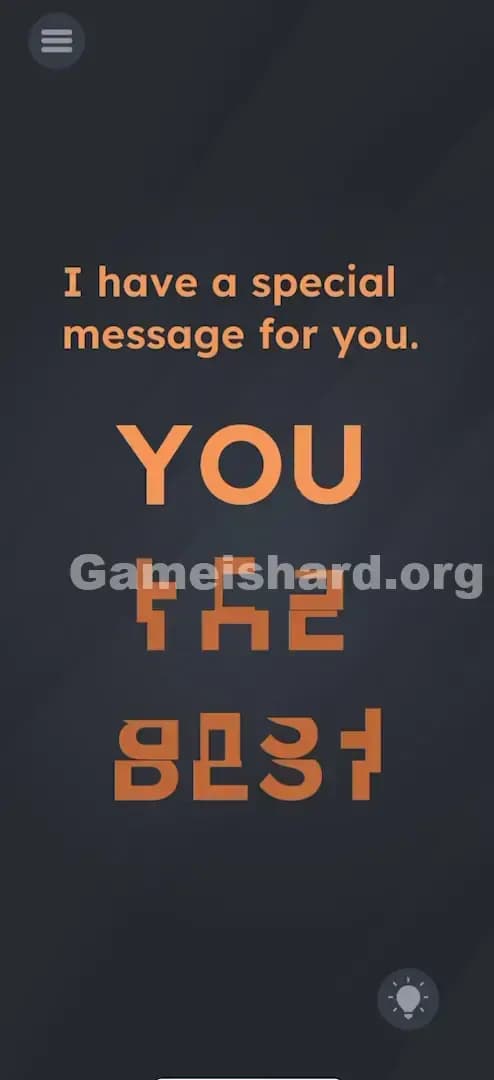
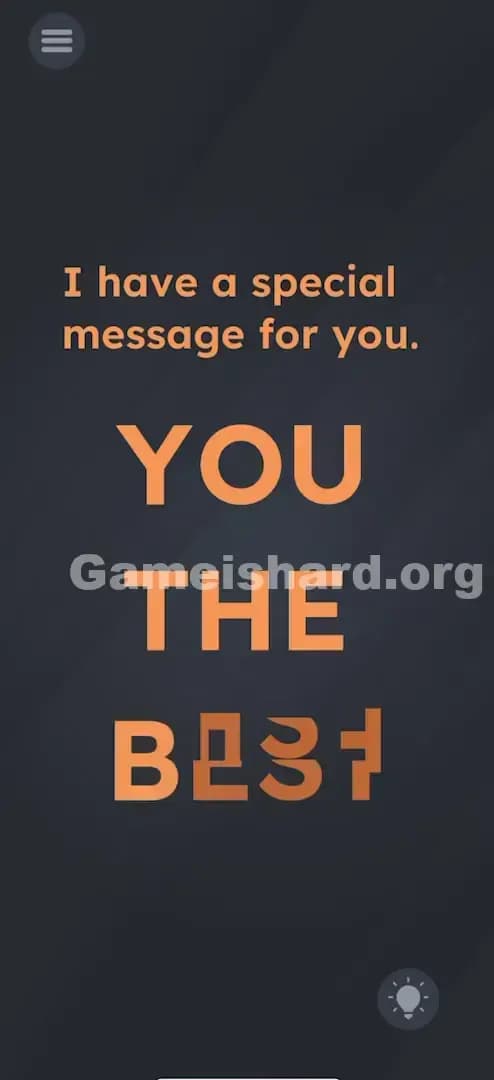
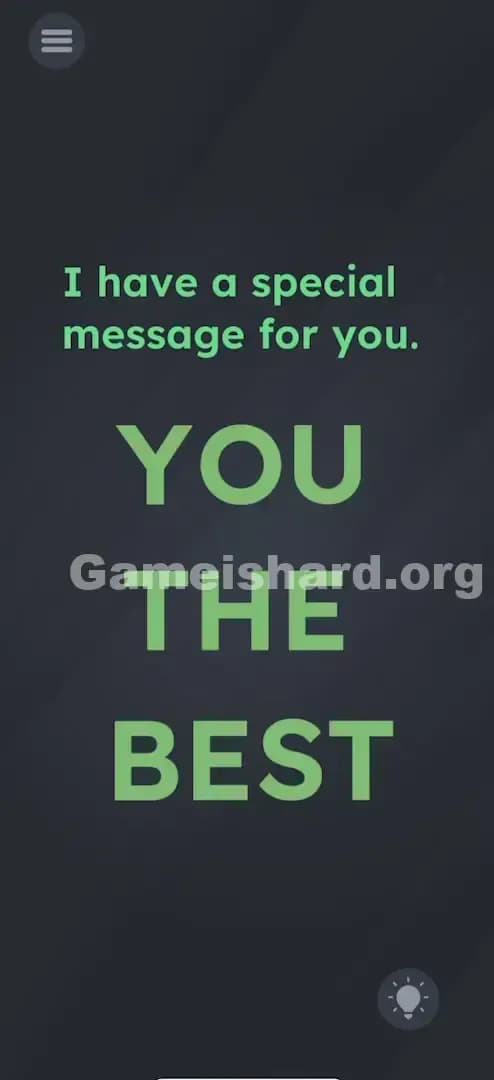
Solution: Tap each individual scrambled orange shape repeatedly to rotate it until the pieces align to spell "YOU THE BEST" clearly.
Keep tapping until the weird alien symbols turn into readable English; the orientation matters for every single piece.
Game is Hard Level 45 Overview
The Hook of Game is hard Level 45
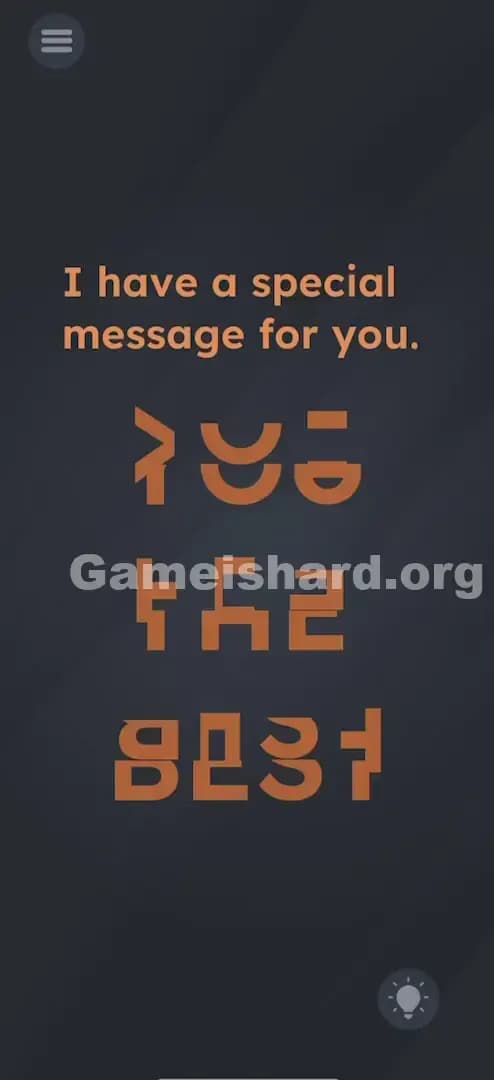
You open the level and it looks like the game glitched out. The text says, "I have a special message for you," but beneath it is a mess of orange hieroglyphs. It looks like an ancient alien language or a corrupted font file. Your first instinct is probably to shake the phone to fix the "glitch" or drag the pieces around like a jigsaw puzzle. Neither of those will work. This level is a visual perception test disguised as a broken UI.
The Objective in Game is hard Level 45
Your goal is to decipher the scrambled shapes. You aren't building words from scratch; the words are already there, just twisted out of recognition. You need to manipulate the orientation of each fragment until the message becomes legible. It’s a classic rotation puzzle.
Key Mechanics in Game is hard Level 45
- Rotation on Tap: This is the primary mechanic. Tapping an object spins it 90 degrees.
- Visual Alignment: You have to mentally connect the top and bottom halves of letters.
- Segmented Text: The words aren't single objects; they are broken into individual letter parts.
- UI Interaction: The "glitched" graphics are interactive buttons, not static background art.
It’s not a typo. It’s a puzzle.
What You See on Screen in Game is hard Level 45
Imagine looking at a ransom note cut out of magazines, but someone sneezed and blew all the scraps around. That's this level.
- Top Text: A standard white prompt reads: "I have a special message for you."
- The Puzzle Area: Below the prompt, there are three distinct lines of orange shapes.
- The top line has three distinct shapes.
- The middle line has three more blocky shapes.
- The bottom line has four shapes.
- The Shapes: They look like the top or bottom halves of block letters (like E, H, S, T) but rotated sideways or upside down. Some look like brackets
], some look like the number3, and others look like random geometric blobs.
What’s Tricking People in Game is hard Level 45
The Trap of Game is hard Level 45
The main trap here is Pattern Recognition Failure. Because the letters are cut in weird places (horizontally through the middle usually), your brain struggles to identify them as letters when they are rotated. An "E" on its side looks like an "M" or a "W". A "T" on its side looks like a tack. The game relies on you not realizing these are standard alphabet characters.
The Wrong Instincts in Game is hard Level 45
Most players immediately try to drag and drop. We see scattered pieces, so we assume it's a jigsaw puzzle where we need to slide the pieces together to form a picture. You might drag the top piece to the bottom piece, hoping they snap together. They won't move. They stay glued to their grid spots.
My Reaction to Game is hard Level 45
I spent a solid minute trying to tilt my phone to "slide" the pieces into place, thinking gravity was the answer. I felt pretty silly when I accidentally tapped one piece, saw it spin, and realized I just needed to tap the screen about twenty times. It was way simpler than I made it out to be.
Game is hard Level 45 Step-by-Step Walkthrough
The Setup of Game is hard Level 45
Focus on the first line of orange symbols. Ignore the rest for a second. You are looking for the word "YOU".
The Action in Game is hard Level 45
- Identify the first letter: Look at the top-left shape. It looks like a weird bracket. Tap it once or twice. It will rotate 90 degrees each time. Keep tapping until it looks like a "Y".
- Fix the rest of the top line: Tap the second shape until it becomes an "O". Tap the third shape until it becomes a "U".
- Move to the second line: This line spells "THE". Tap the first shape to make a "T". Tap the middle shape for "H". Tap the last shape for "E".
- Finish the bottom line: This line spells "BEST". Tap the shapes left-to-right until you clearly see B, E, S, and T.
Troubleshooting at Game is hard Level 45
- It won't clear: If you think you've spelled it correctly but the level won't end, check the letters "H", "O", "S", and "E". These letters sometimes look "correct" even when upside down, but the game hitbox requires them to be right-side up. If it looks right but fails, tap that specific letter 2 more times (rotate it 180 degrees).
Micro-Details That Make the Move Register in Game is hard Level 45
Precision isn't about where you tap here, it's about how many times you tap.
- The 180-Degree Trap: Letters like H, I, O, S, X, and Z have rotational symmetry. In real life, an "H" is an "H" whether it's right-side up or upside down. In Game is hard Level 45, the game code likely has a specific "correct" orientation (usually 0 degrees). If your "H" looks perfect but the level isn't finishing, give it two more taps.
- Visual Snapping: There is no animation "snap" or sound effect when a letter is in the correct position. You have to rely entirely on your eyes.
- I fixed it by... rotating the "O" in "YOU" two extra times. It looked circular regardless, but the game needed the invisible "top" of the texture to be at the top.
The Logic Behind Game is Hard Level 45
This level tests your spatial reasoning and your ability to interact with the environment. It moves away from the "trick question" logic and into "mechanical puzzle" territory.
- UI as Physical Objects: The game continues its theme that text and graphics aren't just display elements; they are toys to be played with.
- Hidden Interactions: There are no buttons labeled "Rotate." You have to discover the mechanic by poking the world.
- Optical Illusions: By breaking the familiar pattern of the alphabet, the game forces you to reconstruct meaning from chaos.
Pro Tip for Game is Hard Level 45
If you are speedrunning or replaying, here is the fastest way to clear it:
- Read the phrase "YOU THE BEST" in your head so you know the target.
- Use multi-touch. You can tap two letters at once with two different fingers.
- Start from the last word (BEST). It has the most recognizable shapes (B and S), which helps ground your orientation faster than the symmetrical "O" or "H".
- Don't stop tapping until the shape is perfectly upright.
Alternative Attempts on Game is hard Level 45 (What Doesn’t Work, and Why)
Here are the things I tried that failed miserably, so you don't have to:
- Dragging pieces together: The pieces are locked in a grid. They rotate; they don't translate (move).
- Shaking the phone: This usually resets puzzles or unsticks items. Here, it does absolutely nothing.
- Pinching to zoom: I thought maybe the letters were too small or needed to be merged. Pinch gestures are ignored.
- Tapping the white text: The prompt "I have a special message..." is inert. Tapping it won't give hints.
- Waiting: Sometimes the text fixes itself over time. Not here. You have to do the work.
- Volume Keys: This isn't a hardware puzzle. Buttons won't help.
Common Mistakes for Game is Hard Level 45
- Leaving symmetry letters wrong: Assuming an upside-down "O" is correct because it looks round.
- Misinterpreting the "E": The letter "E" appears twice. People often rotate it so the prongs face up (looking like a W) or down (looking like an M). The prongs must face right.
- Confusing S and Z: The "S" in "BEST" can look like a "Z" if rotated 90 degrees. Make sure it curves correctly.
- Ignoring the "Y": The "Y" in "YOU" can look like a weird lambda symbol or a stick figure if not rotated correctly.
- Giving up on dragging: Players drag once, see it fail, and assume the game is frozen rather than trying a tap.
Pattern Recognition: How to Spot This Trick in Future Game is Hard Levels
The Tell
Whenever you see scrambled, blocky, or disjointed graphics that look vaguely like text or familiar icons, assume it is a Rotation Puzzle. If the graphics are laid out in a grid or a line, that reinforces the idea that they are fixed in place but can spin.
The Habit
Tap everything once. Before you try to drag, shake, or think too hard, just tap every suspicious object on the screen. If it moves, changes color, or rotates, you’ve found your mechanic. If tapping does nothing, then move to dragging.
Game is hard Level 45 FAQ
Q: I spelled YOU THE BEST but the level won't end in Game is hard Level 45. A: Check the symmetrical letters like "O", "H", and "S". Even if they look right, they might be upside down according to the game code. Tap them twice to flip them 180 degrees.
Q: Can I move the letters in Game is hard Level 45? A: No. The letters are glued to their spots. You can only rotate them in place.
Q: What is the message supposed to say in Game is hard Level 45? A: "YOU THE BEST."
Q: Does the "I have a special message" text matter in Game is hard Level 45? A: No, that is just flavor text to set up the puzzle. Ignore it and focus on the orange shapes.
Get more level walkthrough on Gameishard.org
If this guide saved your streak, you're welcome. We write these guides to be fast, accurate, and free of the usual fluff because we know you just want to get back to playing. Check out the rest of our Game is hard walkthroughs if you get stuck on the next brain teaser. Share this with your friends if they are struggling to tell their Ys from their Zs!