Game Is Hard Level 5 Solution Walkthrough & Answer
How to solve Game Is Hard level 5? Get instant solution & answer for Game Is Hard level 5: "Read a hint if you get stuck."
Doesn't look like your level?
App updates can sometimes shuffle the order of puzzles. If this level 5 walkthrough doesn't match your screen, don't worry! You can browse our All Levels guide to find your exact puzzle by its picture.
Quick Answer for Game is hard Level 5 (Do This)
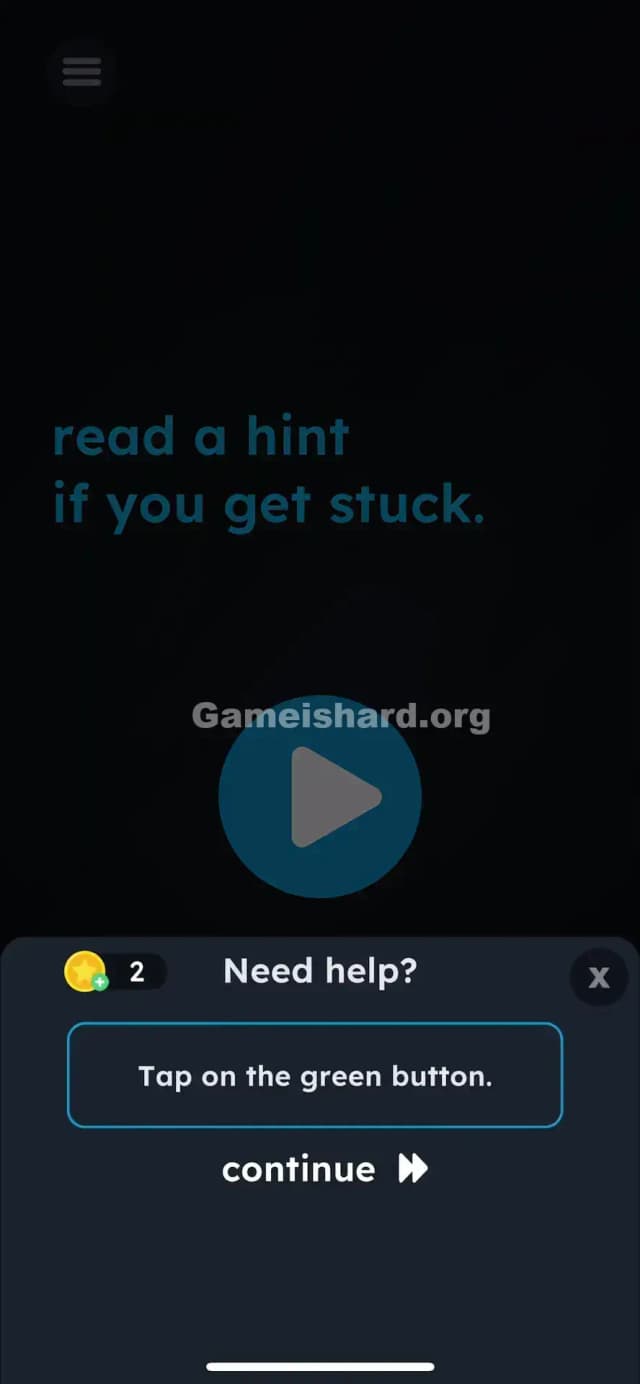
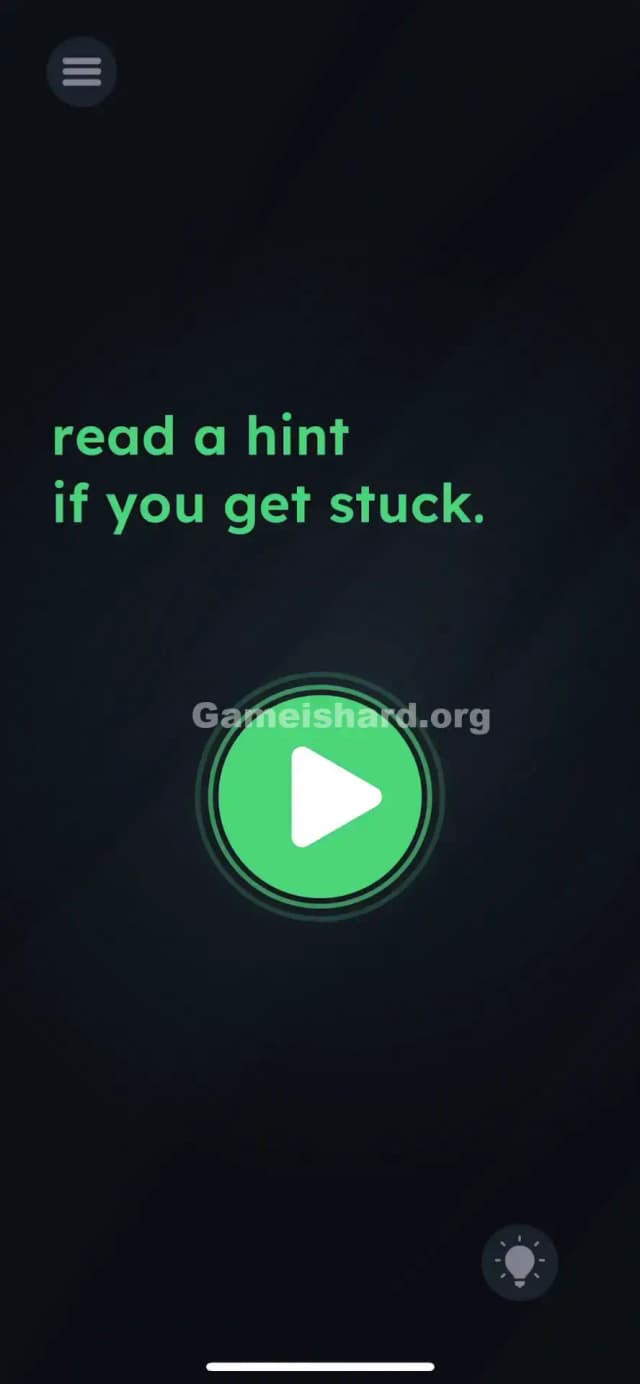
Solution: Tap the lightbulb icon in the bottom-right corner, wait for the hint to appear, then tap the big blue Play button in the center.
The level forces you to actually use the hint system as a mechanic, not just for help.
Game is Hard Level 5 Overview
The Hook of Game is hard Level 5
You’re staring at a big, inviting Play button. You tap it. Nothing. You tap it harder. Still nothing. The game is mocking you with a simple instruction: "read a hint if you get stuck." Most gamers are conditioned to ignore hints. We view them as failure. Game is hard Level 5 preys on your pride. It knows you don't want to use the hint button, so it hides the win condition right behind your ego.
The Objective in Game is hard Level 5
This isn't a puzzle where you drag text or shake your phone. The objective is obedience. The game gives you a direct command ("read a hint"), and you cannot progress until you follow that specific instruction. It's not testing your IQ; it's testing your reading comprehension.
Mechanics Involved in Game is hard Level 5
- UI Interaction: You must interact with the game's menu system (the hint button) as part of the level itself.
- Sequential Logic: The Play button is locked until a specific prerequisite action (opening the hint) is completed.
- Misdirection: The big central button looks like the primary interactor, but it's a decoy until activated.
- Text-as-Instruction: The text on screen is literal. It is not flavor text.
It’s not a typo. It’s a command.
What You See on Screen in Game is hard Level 5
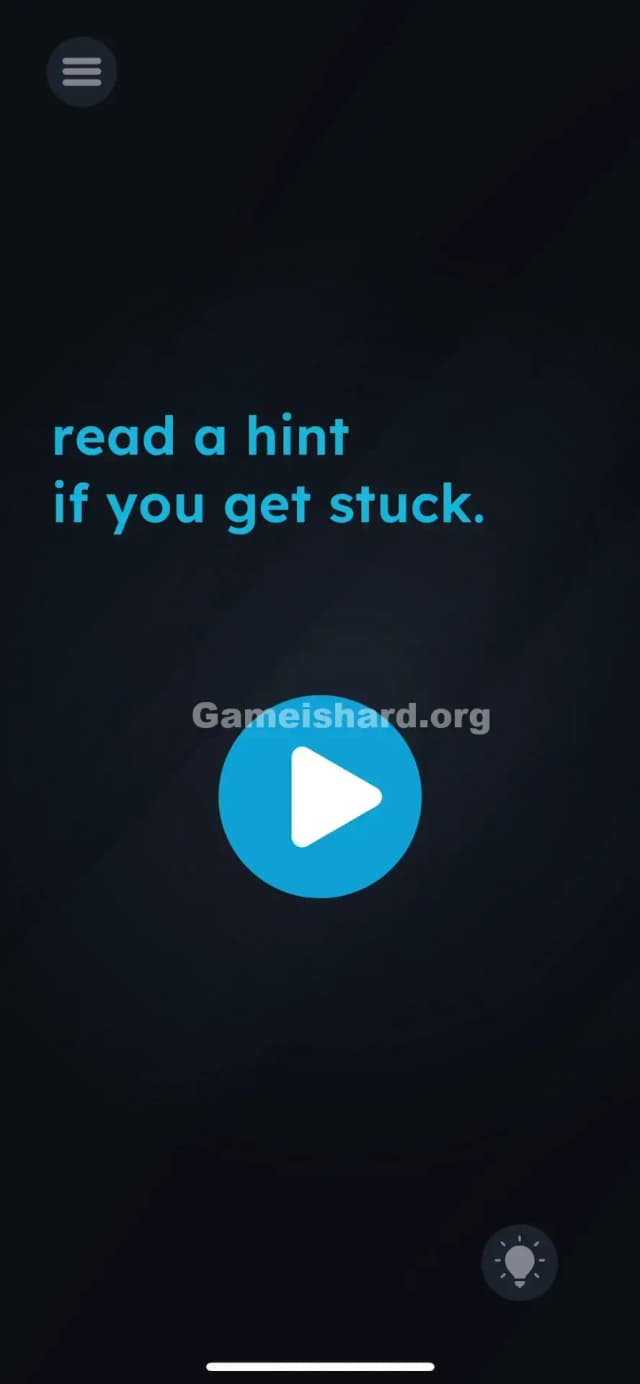
The screen is stark and dark, typical of the game's minimalist aesthetic. Here is the layout:
- Top Left: A standard menu burger icon.
- Center Text: Bright blue text that reads: "read a hint if you get stuck." The font is sans-serif, clean, and centers the player's attention.
- Center Button: A large, circular, blue button with a white "Play" triangle in the middle. It looks exactly like a video player start button or a "Next Level" button.
- Bottom Right: A faint, greyed-out Lightbulb Icon. This is the universal symbol for "Hint" in mobile puzzle games.
- Background: A dark, textured navy/black void.
There are no moveable objects, no hidden numbers, and no obvious traps. Just a button that refuses to work.
What’s Tricking People in Game is hard Level 5
The Trap of Game is hard Level 5
The trap is gamer pride. We are trained to solve puzzles without help. Using a hint feels like cheating or admitting defeat. By making the solution "use the hint," the developers have created a psychological barrier. You sit there tapping the Play button, shaking your phone, or trying to drag the text because your brain refuses to accept that the solution is to ask for help.
The Wrong Instincts of Game is hard Level 5
- Spamming Play: Everyone tries tapping the big blue button first. It’s the biggest object on the screen. It demands to be touched.
- Dragging Text: In previous levels, you might have dragged words around. You might try dragging the word "hint" onto the button.
- Looking for Hidden Objects: You might scour the black background for a hidden key or switch.
- Waiting: Some levels require doing nothing. This isn't one of them. You can wait forever; nothing will happen.
My Reaction to Game is hard Level 5
I spent a good two minutes dragging the word "stuck" around the screen. I thought, "Maybe I need to get unstuck?" I felt ridiculous when I finally tapped the lightbulb. The game wasn't being subtle; I was just being stubborn. It was a classic "facepalm" moment where the answer was staring me in the face literally the whole time.
Game is hard Level 5 Step-by-Step Walkthrough
The Setup of Game is hard Level 5
Stop trying to solve the puzzle with the objects in the center of the screen. Look away from the blue text and the blue button. Direct your attention to the bottom right corner of your device screen.
The Action in Game is hard Level 5
- Locate the Lightbulb: Find the small lightbulb icon in the bottom-right corner. It is part of the game's HUD (Heads Up Display).
- Tap the Lightbulb: Tap it once. A hint overlay or popup will appear. You don't necessarily need to watch an ad (depending on your game version/state), but you must trigger the hint interface.
- Tap the Play Button: Once the hint has been "read" (or opened), the central Play button becomes active. Tap the big blue button in the middle of the screen to finish the level.
Troubleshooting in Game is hard Level 5
- If the Play button still doesn't work: Ensure you didn't close the hint popup too fast. Some versions of the game require the hint text to fully render before the "trigger" is set to true.
- Connection Issues: Since hints sometimes load from a server (ads), make sure you are online if the bulb isn't responding. However, usually, the first hint is free/offline.
- Game Frozen: If the lightbulb doesn't react to your touch at all, force close the app and restart. The UI layer might be bugged.
Micro-Details That Make the Move Register in Game is hard Level 5
Precision isn't the issue here; sequence is.
- The Trigger: The game code is looking for a specific boolean flag:
hasOpenedHint = true. Until that flag flips, the Play button'sonClickfunction is essentially empty. - Visual Cues: Watch the Play button closely after you close the hint. In some updates, it pulses slightly or changes shade to indicate it is now "unlocked."
- No Dragging Needed: Do not drag the lightbulb. Do not drag the text. This is purely a tap-based interaction.
I fixed my own struggle by realizing the game treats the UI (the HUD) as part of the puzzle world, not just an overlay.
The Logic Behind Game is Hard Level 5
This level introduces the concept of Meta-Gaming.
- Breaking the Fourth Wall: The puzzle isn't inside the level; the puzzle is the interface. The developers are teaching you that every pixel on your screen is fair game, including the pause button, the volume controls, and the hint system.
- Literalism: This is a recurring theme in Game is hard. If the text says "Stop," you stop. If it says "Read a hint," you read a hint. It punishes you for overthinking and rewards you for following instructions exactly.
- Conditioning: Level 5 is early in the game. It’s designed to break your habit of ignoring the HUD. Future levels will likely hide clues in the menu, the level number, or the ad banners.
Pro Tip for Game is Hard Level 5
If you are speedrunning or just want to get through this fast:
- Tap Lightbulb immediately upon level load.
- Dismiss the hint pop-up instantly (tap X or background).
- Tap Play.
Don't waste time on Game is hard Level 5:
- Dragging the words "read" or "hint."
- Shaking the phone.
- Tapping the level number.
Alternative Attempts of Game is hard Level 5 (What Doesn’t Work, and Why)
- Dragging the word "Hint" to the bulb: Logical, but incorrect. The text is static.
- Tapping the word "Play" inside the button: The hit box is the whole button, but it's disabled until the trigger event.
- Swiping the screen: No swipe gestures are registered in this level.
- Holding the Play button: Long-pressing does nothing different than a tap.
- Volume Keys: Sometimes the answer is hardware buttons, but not here.
- Turning off WiFi: This won't bypass the logic check for opening the hint menu.
Common Mistakes for Game is Hard Level 5
- Ignoring the text: Players assume the text is just flavor or a tutorial message.
- Stubbornness: Refusing to tap the hint button because "I don't need help."
- Over-complicating: Trying to find a hidden pattern in the background texture.
- Misinterpreting the icon: Thinking the lightbulb is just a decoration rather than a button.
- Timing: Tapping Play while the hint is opening (multi-touch) often fails. Do it sequentially.
Pattern Recognition: How to Spot This Trick in Future Game is Hard Levels
The Tell
Whenever a level gives you a direct command that involves a UI element ("Pause the game," "Turn up the volume," "Check the settings"), assume the solution is outside the main play area. If the text references a specific function of the app (like a hint), do it.
The Habit
Always scan the corners of the screen. Don't just look at the center. If a standard UI button (Pause, Hint, Sound) looks slightly different or is referenced in the text, interact with it. Treat the HUD as an inventory of tools.
FAQ of Game is hard Level 5 (Short, Useful)
Q: Do I have to watch an ad to beat Game is hard Level 5? A: Usually, no. The first hint is often free or just text. You just need to trigger the hint window; you don't necessarily need to "pay" for it.
Q: I tapped the hint, but the Play button still doesn't work in Game is hard Level 5. A: Close the hint window first. The Play button is often obscured or inactive while the popup is open.
Q: Is there a hidden object in the dark background of Game is hard Level 5? A: No. The background is empty. Focus entirely on the lightbulb icon.
Q: Can I skip this level in Game is hard Level 5? A: You can only skip if you have enough "skips" accumulated, but this level is so fast to solve (once you know how) that skipping is a waste of resources.
Get more level walkthrough on Gameishard.org
Stuck on the next puzzle? We have straight-to-the-point guides for every single stage. We strip out the fluff so you can get back to feeling like a genius. Share this with your friends who are too proud to click the hint button—they need it more than you do.
Good luck on Game is hard Level 6!