Game Is Hard Level 290 Solution Walkthrough & Answer
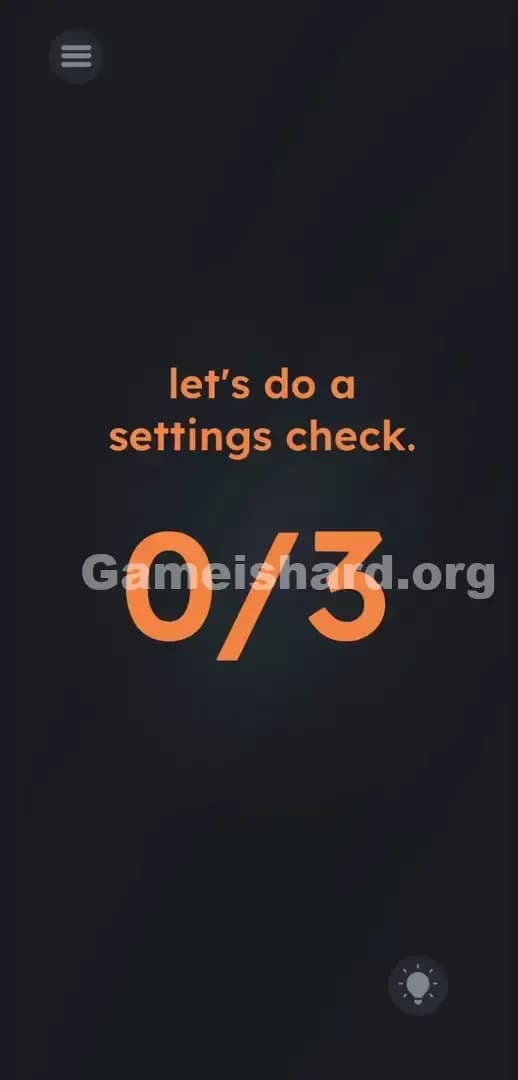
How to solve Game Is Hard level 290? Get instant solution & answer for Game Is Hard level 290: "Let's do a settings check. 0/3."
Doesn't look like your level?
App updates can sometimes shuffle the order of puzzles. If this level 290 walkthrough doesn't match your screen, don't worry! You can browse our All Levels guide to find your exact puzzle by its picture.
Quick Answer for Game is hard Level 290 (Do This)
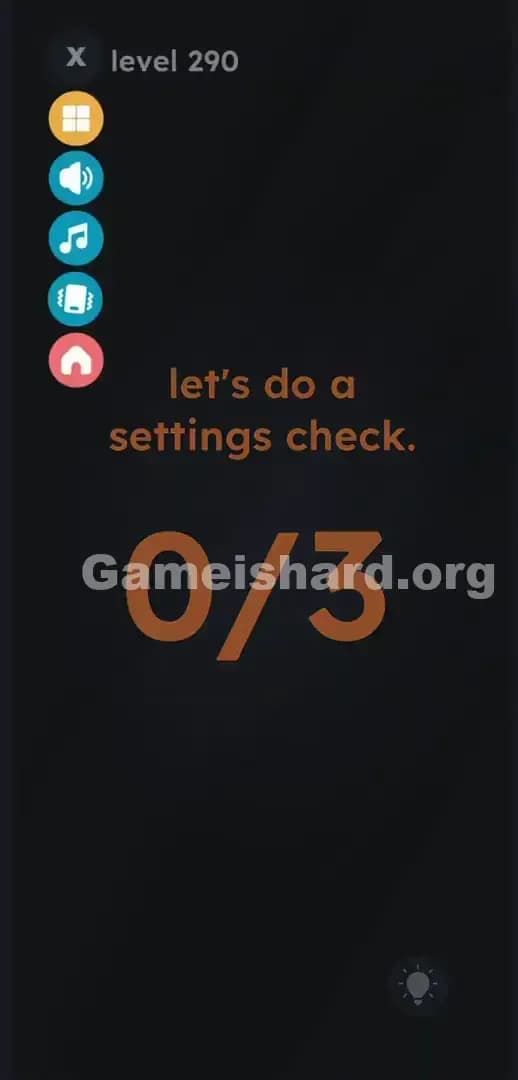
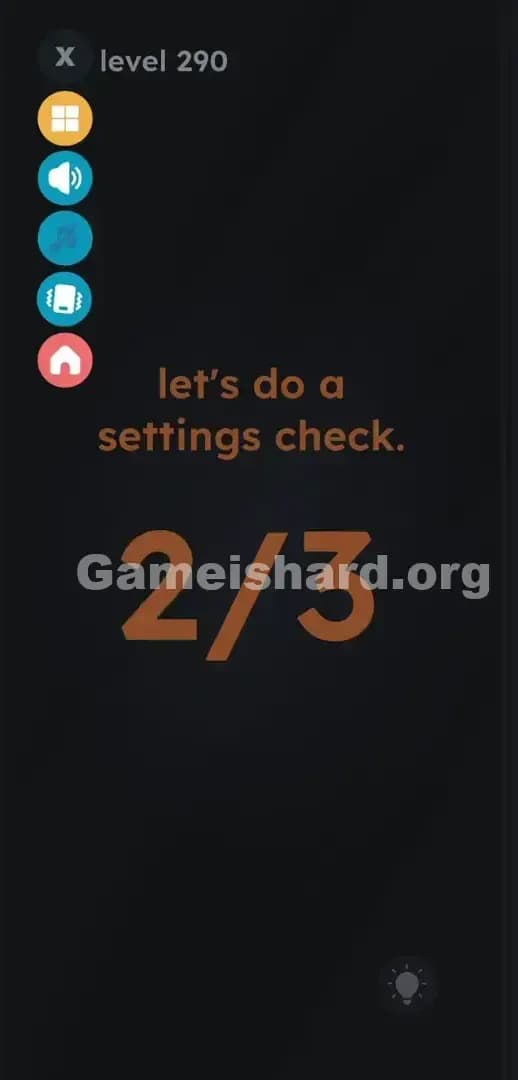
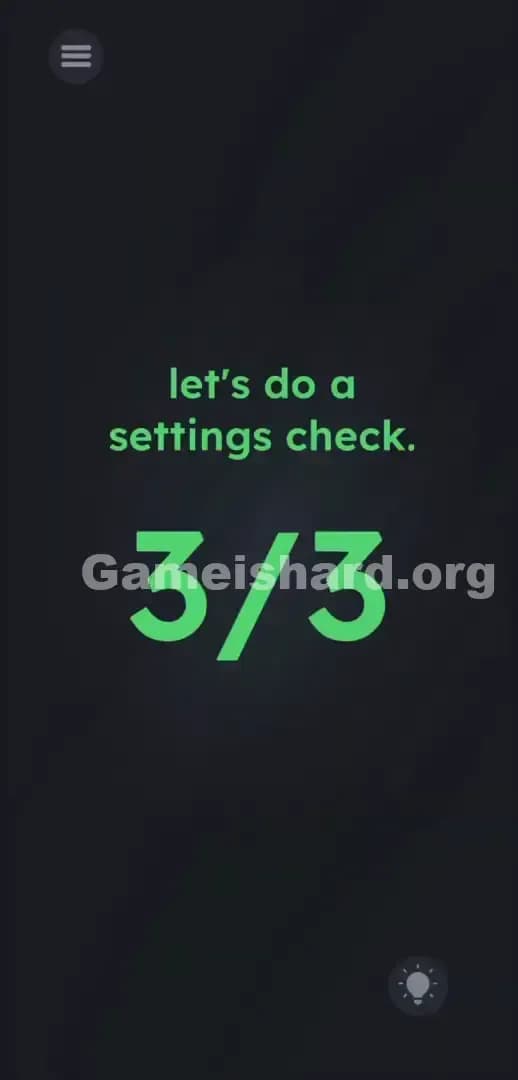
Solution: Tap the top-left hamburger menu icon to open the side panel, then tap the sound, music, and haptics buttons to change the counter to 3/3.
You are interacting with the actual game settings, not a fake puzzle object placed in the middle of the main screen.
Game is Hard Level 290 Overview
The Hook
You stare at the screen. It tells you to do a settings check. You tap the words. Nothing. You swipe the massive numbers. Nothing. You try shaking your phone. Dead silence. The game is straight up lying to you about where the puzzle actually lives. This is a classic fourth-wall break. You are looking for a hidden mechanic in the main play area. Stop. The puzzle is outside the box.
The Objective
Your goal is to register three specific inputs to fill the giant 0/3 fraction dominating the screen. You must find the hidden interactive elements disguised as standard system UI.
- Hidden object: The actual puzzle pieces are hidden completely out of sight inside the pause menu.
- Button trick (volume/mute): You must interact with the game's actual audio and vibration toggles, rather than virtual objects.
- UI drag / interaction: We are trained to ignore the pause button while actively playing. The game exploits that psychological blind spot heavily.
- Timing / waiting: There is no timer here. You have infinite time to realize you are being trolled.
It’s not a typo. It’s ammo.
What You See on Screen in Game is hard Level 290
The visual layout is aggressively minimal. Almost empty. Dead center, in casual, lowercase orange text, reads let's do a settings check.
Right below that sits a giant, intimidating 0/3 fraction. It takes up a massive portion of the real estate. It dominates the visual hierarchy. Your eyes naturally lock onto it.
In the top left corner, there is a standard hamburger menu icon (three horizontal lines). It sits in the dark grey background, intentionally faded to blend in. This is the button you normally press to quit out of frustration. Down in the bottom right, the standard lightbulb icon waits quietly, hoping you cave and burn a hint.
There are no hidden shapes in the shadows. There are no weirdly misaligned letters in the prompt. Just a massive fraction mocking your inability to locate the settings.
What’s Tricking People in Game is hard Level 290
The Trap
This game weaponizes UI Blindness. We are conditioned by years of mobile gaming to separate the "game world" from the "system menu." When a level starts, your brain draws an invisible boundary around the center of your phone. Everything outside that boundary—the pause button, the hint icon, your phone's battery indicator—is filtered out as dead space. Game is hard Level 290 obliterates that boundary. You fail because you refuse to look at the top left corner.
The Wrong Instincts
- Tapping the literal orange words settings check.
- Pressing the physical volume rockers on the side of your actual smartphone.
- Swiping the 0 aggressively to try and drag a 3 over it.
- Yelling into the microphone. (Previous levels train you to use sensors, so this is a highly common mistake).
- Staring at the screen waiting for a fake, in-game settings panel to magically pop up.
My Reaction
I spent three minutes swiping the text around like an absolute idiot. I rubbed the screen trying to reveal a hidden slider. I even reached for my iPhone's physical volume down button, completely convinced it was a hardware trick. When I finally rage-tapped the pause button to exit to the main menu, the side panel popped out. The numbers in the background instantly clicked in my head. Facepalm.
Game is hard Level 290 Step-by-Step Walkthrough
The Setup
Stop staring at the center of the screen. Break your focus away from the giant orange numbers. Look up at the very top left corner of your device. You need to pull up the system UI.
The Action
- Tap the hamburger menu icon (the three horizontal lines) in the top-left corner. A vertical column of colored buttons will immediately slide out from the left edge.
- Look at the slide-out menu. You will see a dark grey X at the top. Below that is a yellow squares icon. Ignore both.
- Tap the blue Speaker icon (Sound).
- Tap the teal Music Note icon (Music).
- Tap the green Vibrating Phone icon (Haptics).
- Watch the giant fraction in the background change. Each toggle registers a hit. Once you tap those three specific buttons, the background text updates to 3/3. The level clears automatically.
Troubleshooting
- The counter is stuck at 2/3: You missed a toggle. Look closely at the side menu. Make sure you hit all three distinct audio/vibration buttons. They usually display a diagonal slash through the icon when deactivated.
- I pressed the red house: You hit the Home icon. That boots you entirely out of the puzzle back to the main stage select screen. Relaunch the level and try again. Stay away from the red button.
- Nothing happens when I open the menu: Opening the slide-out tray does not count toward the goal. The game specifically demands you alter the state of the three settings toggles.
The Logic Behind Game is Hard Level 290
The rule here is blunt: nothing is safe from the puzzle design. The boundary between the playable area and the user interface does not exist.
The instructions are bait; the UI is the real puzzle. The developers know exactly how human eyes scan a mobile device. You naturally filter out administrative buttons. By tying the win condition to the actual, literal game settings, they force you to break your own deeply ingrained gaming habits. The level treats system toggles like puzzle pieces. It is a brilliant piece of meta-gaming. Games have done this for decades. Think about swapping controller ports to beat Psycho Mantis. Same exact logic applied to a modern touchscreen interface.
Pro Tip for Game is Hard Level 290
Stop overthinking the on-screen text. Do not attempt to interact with the orange font. The solution is entirely mechanical and takes about two seconds if you know the trick.
- Immediately tap the top-left menu button.
- Rapid-fire tap the sound, music, and haptic toggles in the side bar.
- Ignore the bottom home button.
- Proceed to the next stage.
FAQ
Why aren't my phone's physical volume buttons working for this check? Game is hard Level 290 tracks in-game software toggles exclusively. It does not read your device's hardware volume inputs. You must use the game's built-in pause menu to manipulate the audio state.
Do I have to leave the sound and music off permanently? No. You just need to switch their state to trigger the counter. If you prefer playing with the sound on, simply tap the Speaker and Music Note icons a second time to turn your audio right back on once the level registers the 3/3 completion.
I hit the menu button but the giant number still says 0/3. Is it bugged? Opening the menu is just step one. Revealing the UI does not trigger the objective. The counter only moves when you physically press the sound, music, and haptics icons inside that menu to turn them off or on.
What happens if I press the red home button inside the menu by mistake? You will instantly exit the level and drop back to the main menu screen. You will lose any progress on the current stage. Keep your fingers strictly on the middle three buttons.
Get more level walkthrough on Gameishard.org
Our guides are built to be fast, accurate, and completely free of fluff. We tell you exactly where to tap and why the game is trying to mess with your head. If you are stuck on another impossible puzzle, search Gameishard.org for the exact stage number you need. Share this guide with your friends on Discord so they stop raging at fake mechanics. Beat the game, don't let it beat you. Keep tapping.