Game Is Hard Level 28 Solution Walkthrough & Answer
How to solve Game Is Hard level 28? Get instant solution & answer for Game Is Hard level 28: "Imitate"
Doesn't look like your level?
App updates can sometimes shuffle the order of puzzles. If this level 28 walkthrough doesn't match your screen, don't worry! You can browse our All Levels guide to find your exact puzzle by its picture.
Quick Answer for Game is hard Level 28 (Do This)
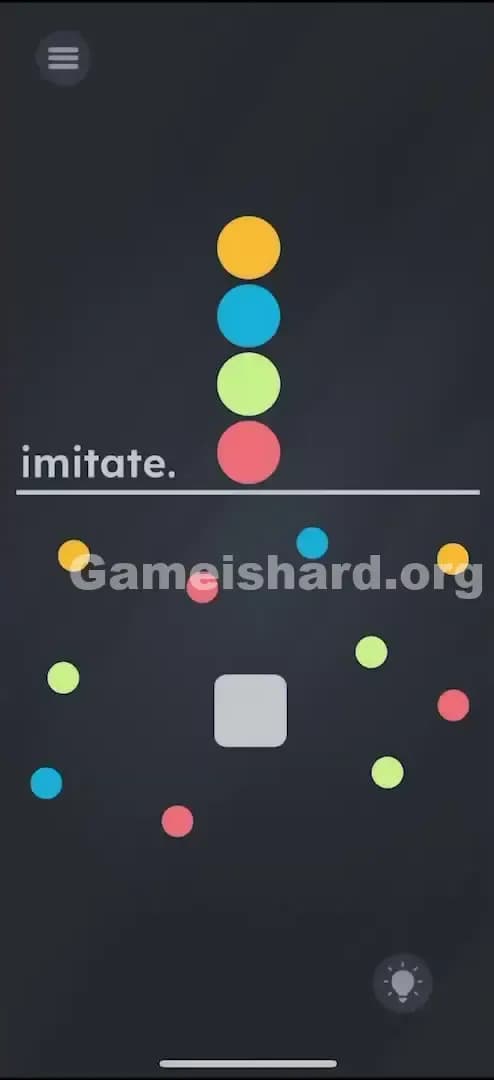
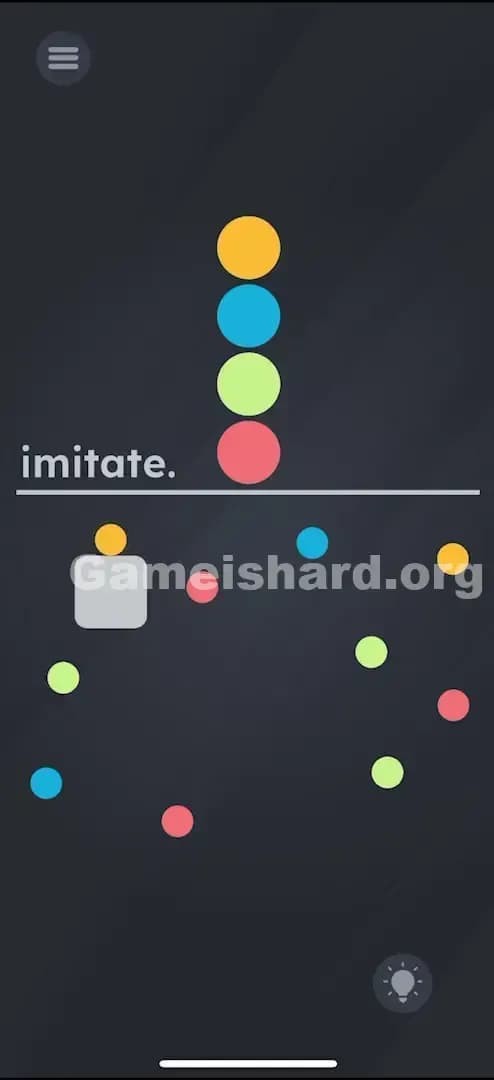
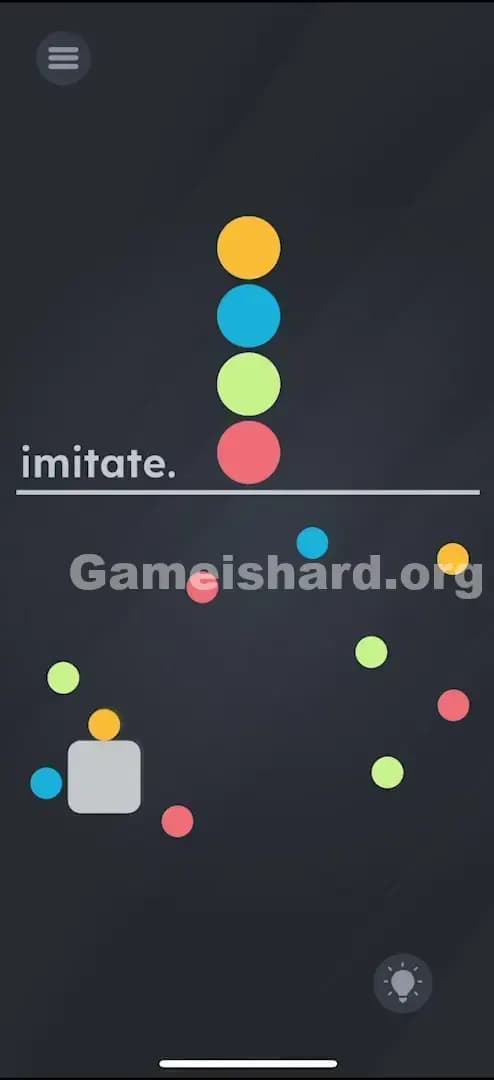
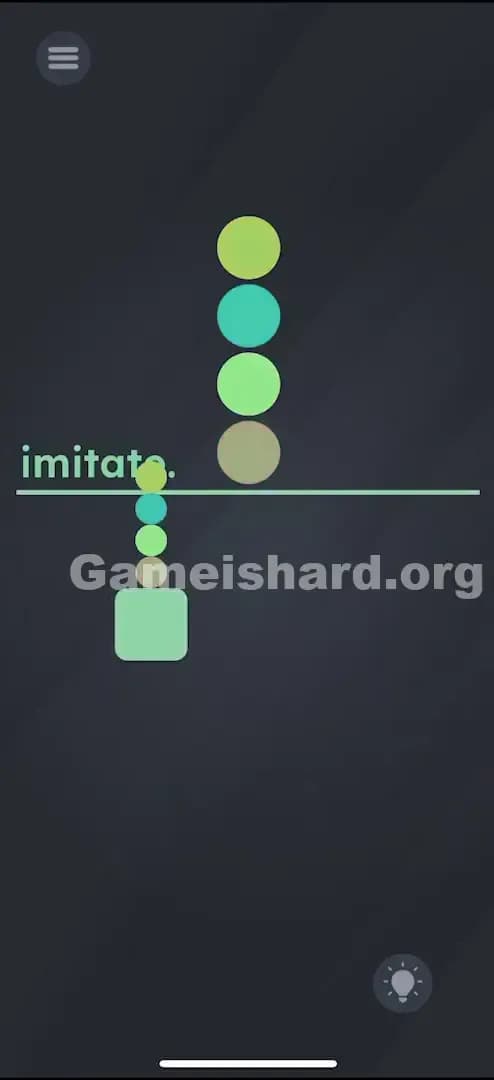
Solution: Drag the grey square slowly through the field to touch the colored balls in this exact sequence: Yellow, then Blue, then Green, then Red.
Target: You are mimicking the vertical stack shown at the top of the screen; avoid touching any wrong colors while navigating between targets.
Game is Hard Level 28 Overview
The Hook of Game is hard Level 28
You see a stack of colored balls. You see a mess of colored balls. You see a grey square. It looks like a toddler’s sorting toy, but the controls feel like you’re defusing a bomb with oven mitts. Game is hard Level 28 isn't testing your intelligence; it’s testing your fine motor skills and your patience. The prompt simply says "imitate." That is the only clue you get. It’s cryptic, minimal, and frustratingly vague until you realize the screen is split into two distinct zones: the instruction manual (top) and the playing field (bottom).
The Objective in Game is hard Level 28
Your goal is to program the grey square with a specific sequence of colors. The game wants you to "collect" the sequence shown in the top half of the screen by navigating the minefield in the bottom half. You aren't moving the colored balls. You are moving the collector.
Key Mechanics involved in Game is hard Level 28
- Drag & Drop Navigation: The grey square is your avatar. It follows your finger.
- Collision Detection: This is the killer. The hitboxes on these circles are unforgiving. If you clip the edge of a Red ball while trying to reach a Blue one, you fail.
- Sequencing: The order is non-negotiable. Yellow must be first. If you hit Blue first, nothing happens, or worse, you fail immediately.
- Visual Matching: You have to constantly glance up to check the reference stack while keeping your eye on the square below.
It’s not a typo. It’s an escort mission where you are escorting your own finger.
What You See on Screen in Game is hard Level 28
Let’s break down the visual chaos. If you are staring at the screen wondering why nothing is clickable, here is the lay of the land.
-
The "Imitate" Stack (Top Half): There is a neat, vertical pile of four circles. From top to bottom, they are Yellow, Blue, Green, and Red. There is a horizontal line separating this stack from the rest of the screen. The word imitate. sits on this line. This is your map. This is the code you need to crack.
-
The Minefield (Bottom Half): Below the line, it’s a mess. There are duplicates of every color scattered randomly. There is no pattern here. It is just noise designed to get in your way.
-
The Avatar (The Grey Square): Right in the middle of the chaos is a rounded grey square. It stands out because it’s the only shape that isn’t a circle. It’s the only thing that looks "interactive."
-
The Spacing: Notice the gaps between the balls in the bottom half. Some are wide, some are narrow. The game has deliberately placed "trap" colors near the "target" colors to force you to make wide, looping movements rather than straight lines.
What’s Tricking People in Game is hard Level 28
The Trap of Game is hard Level 28
The biggest trap here is "UI Blindness" combined with "Finger Blindness." When you drag the grey square, your own hand likely covers the screen. You can’t see the red ball hidden under your thumb until the "Level Failed" screen pops up. The game relies on the fact that you are playing on a touch screen where the input device (your finger) is opaque.
The Wrong Instincts in Game is hard Level 28
- Tapping the balls: Most players see the stack and immediately start tapping the balls in the bottom half in order (Yellow, then Blue...). This does nothing. The game ignores taps.
- Dragging the balls: Logic suggests you should drag the colored balls into the grey square or onto the line. But the colored balls are static background elements. They are painted on. They won't budge.
- The "Top-Down" Confusion: Some players try to read the stack bottom-to-top (Red first). In almost every Western game design standard, lists are read top-to-bottom. Game is hard Level 28 follows this rule, but it doesn’t tell you that explicitly.
My Reaction to Game is hard Level 28
I spent a solid two minutes trying to drag the top stack downwards. I thought, "Oh, I need to drag the sample Yellow ball onto the grey square." Nope. The top half of the screen is completely inert. It’s just a billboard. I felt like an idiot when I realized the grey square was the only moving part.
Game is hard Level 28 Step-by-Step Walkthrough
The Setup of Game is hard Level 28
Put your phone on a flat surface if you have shaky hands. You need precision here. Look at the top stack. Memorize the order: Yellow -> Blue -> Green -> Red.
The Action in Game is hard Level 28
- Step 1: Tap and hold the grey square. Do not let go. It should snap to your finger movement.
- Step 2: Drag the square carefully towards a Yellow ball. Any yellow ball will do, but pick the one that is easiest to reach without brushing against other colors.
- Step 3: Once you touch the Yellow ball, the game registers step one. Now, without lifting your finger, scan for the nearest Blue ball.
- Step 4: Navigate the grey square to the Blue ball. Crucial: You must path around any Green or Red balls in your way. Do not move in a straight line if the path isn't clear. Loop around the edges of the screen if you have to.
- Step 5: Touch the Blue ball. Next is Green. Locate an accessible Green ball. Drag the square to it, avoiding the remaining Red and Yellow decoys.
- Step 6: Finally, drag the square to a Red ball.
Verification
As soon as the grey square touches the final Red ball (assuming you hit Yellow, Blue, and Green previously in that continuous streak), the level will clear.
Troubleshooting at Game is hard Level 28
- "I touched the right color but it failed!" You likely clipped the edge of a different color slightly before or after. The hitboxes are squares, not circles. They are bigger than they look.
- "Nothing happens when I touch Yellow." You might be dragging too fast. Hover over the color for a millisecond to ensure the collision registers.
Micro-Details That Make the Move Register on Game is hard Level 28
The physics in Game is hard Level 28 are a bit sticky. Here is the nuance:
- The "Stickiness": The grey square doesn't have momentum. It stops instantly when you stop moving. This is good for precision.
- The Hitbox: The trigger point is the center of the grey square interacting with the edge of the colored ball. You don't need to overlap them perfectly. Just a "kiss" between the shapes is enough to register the hit.
- Lift vs. Drag: You technically can lift your finger between touches in some versions of this puzzle type, but it is safer to do it in one continuous stroke. Lifting your finger risks dropping the square on top of a wrong color if your tap accuracy isn't perfect. Keep the drag continuous.
I fixed it by: Switching to my index finger instead of my thumb. My thumb was too thick and obscured the balls I was trying to avoid. Using an index finger gave me a better view of the gap between the grey square and the "danger" balls.
The Logic Behind Game is Hard Level 28
This level is a classic "Maze" puzzle disguised as a "Matching" puzzle.
The game is testing Visual-Motor Integration. It forces your brain to hold a sequence in working memory (Y-B-G-R) while simultaneously processing spatial information (navigating the gaps). It creates a cognitive load. You are thinking "Yellow, Blue..." while also thinking "Don't hit the red, don't hit the red."
It breaks the pattern of previous levels where text was the answer. Here, the text "imitate" is just a command. The actual puzzle is purely physical. It’s a callback to the old "wire loop" games where touching the wire sets off the buzzer.
Pro Tip for Game is Hard Level 28
- Map the route first: Before you move the square, look at the bottom field. Find a Yellow, Blue, Green, and Red that are relatively close to each other or have clear paths between them.
- Ignore the Decoys: You don't need to clear all the balls. You only need one of each. Pick the "safest" Yellow, not necessarily the closest one.
- Go Wide: The edges of the screen are usually safer. If you need to get from the bottom-left to the top-right, go around the perimeter of the chaos rather than through the center.
- Slow Down: There is no timer on Game is hard Level 28. Speed is your enemy. Move painfully slowly.
Alternative Attempts (What Doesn’t Work, and Why)
Here is a graveyard of failed ideas so you don’t have to waste your time:
- Dragging the stack colors down: The top colors are strictly for show. They are painted onto the UI layer and cannot be interacted with.
- Tapping the colors in rhythm: Rhythm doesn't matter. This isn't a music game.
- Dragging the word "imitate": In many levels, the text is moveable. Here, it is static. Dragging it does nothing.
- Shaking the phone: Shaking usually resets positions or drops items. Here, gravity is turned off. Shaking achieves nothing.
- Combining colors: Trying to drag a Yellow ball onto a Blue ball to make Green. This is overthinking it. The game physics aren't that complex.
Common Mistakes for Game is Hard Level 28
- Rushing the Blue-to-Green transition: The Blue and Green balls are often clustered with Red balls. Players get confident after hitting the first two and swipe too fast for the third.
- Misinterpreting the order: Swapping Blue and Green is the most common memory error. Check the stack again. Yellow -> Blue -> Green -> Red.
- Fat-fingering: Touching a "trap" ball because you thought your finger was clear of it.
- Assuming the balls move: You might flinch thinking a ball is going to drift into you. They are stationary (in most updates of this level). Trust the layout.
- Starting with Red: Because it's at the bottom of the stack, people think it's the "start" point. It is the end point.
Pattern Recognition: How to Spot This Trick in Future Game is Hard Levels
The Tell
When you see a specific order of items separated from a chaotic group of the same items, the mechanic is almost always Sequential Collection.
The Habit
Whenever you see a "Master List" and a "Play Area," stop. Do not tap. Look for a movable "cursor" object (like the grey square). If there is no cursor, the cursor is usually you (tapping in order). If there is a cursor, the game is a maze. Always verify if the instruction list is top-to-bottom or left-to-right before making your first move.
Game is hard Level 28 FAQ (Short, Useful)
Q: Can I lift my finger between colors in Game is hard Level 28? A: Usually, yes. But it’s risky. If you tap down slightly off-center, the game might register a tap on a nearby wrong color. Dragging is safer.
Q: What happens if I touch a wrong color in Game is hard Level 28? A: The level usually fails immediately, or the grey square flashes red and you have to start the sequence over from Yellow.
Q: Do I have to touch specific balls in Game is hard Level 28? A: No. Any ball of the correct color works. Pick the ones with the most space around them.
Q: Why isn't the level ending after I touched Red in Game is hard Level 28? A: You likely missed one of the intermediate colors (Blue or Green) without realizing it. You must restart the sequence from Yellow.
Get more level walkthrough on Gameishard.org
Stuck on the next puzzle? We’ve got guides that cut through the nonsense and get you straight to the solution. No life stories, just answers. Check out the rest of our Game is hard walkthroughs to keep your win streak alive. Share this with your friends who are still tapping the screen like maniacs. Good luck!