Game Is Hard Level 27 Solution Walkthrough & Answer
How to solve Game Is Hard level 27? Get instant solution & answer for Game Is Hard level 27: "put it in!"
Doesn't look like your level?
App updates can sometimes shuffle the order of puzzles. If this level 27 walkthrough doesn't match your screen, don't worry! You can browse our All Levels guide to find your exact puzzle by its picture.
Quick Answer for Game is hard Level 27 (Do This)
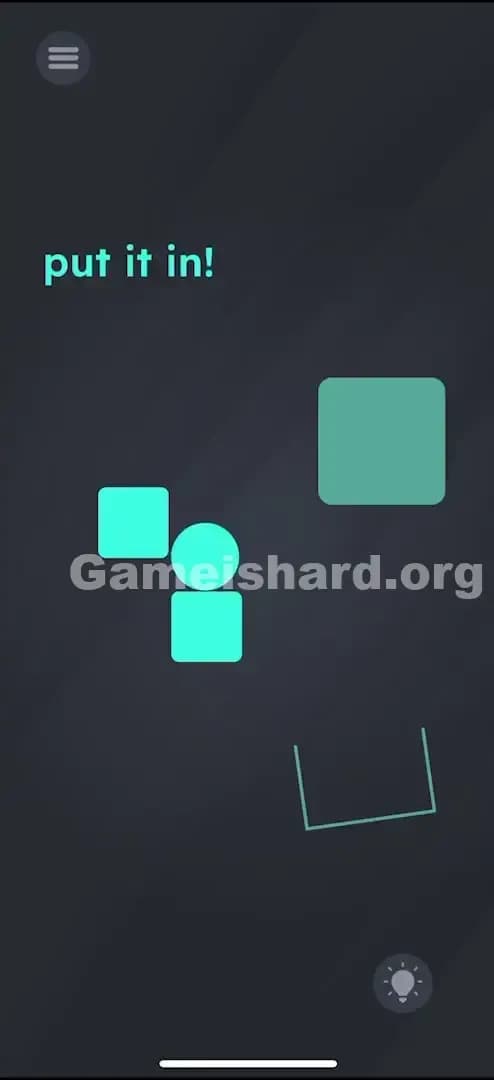
Solution: Slide the lowest square to the left to create a platform, then physically tilt your phone left (and then right) to roll the ball off its perch and down into the U-shaped cup.
Use the moving square as a bridge so the ball doesn't miss the cup entirely.
Game is Hard Level 27 Overview
The Hook of Game is Hard Level 27
You stare at the screen. There's a ball perched precariously on a high block, and a target cup way down at the bottom. The instruction "put it in!" mocks you because tapping the ball does absolutely nothing. It just sits there. Swiping it? Nothing. The physics engine seems asleep until you realize you aren't playing with a touchscreen; you're playing with a gyroscope.
The Objective in Game is Hard Level 27
Your goal is simple gravity manipulation. You need to get the ball from the top-right perch into the U-shaped container at the bottom-right. The catch is that a straight drop won't work—the obstacles are misaligned, and standard gravity isn't enough. You have to be the wind.
Mechanics at Play Game is Hard Level 27
- Tilt Control / Gyroscope: The ball reacts to how you hold your device.
- Draggable Objects: Some parts of the level (the squares) are not fixed terrain; they are movable tools.
- Physics Puzzle: You have to predict the bounce and roll path.
- Timing: Once the ball starts rolling, you have to react quickly to catch it.
It’s not just about what you see; it’s about moving the world around the ball.
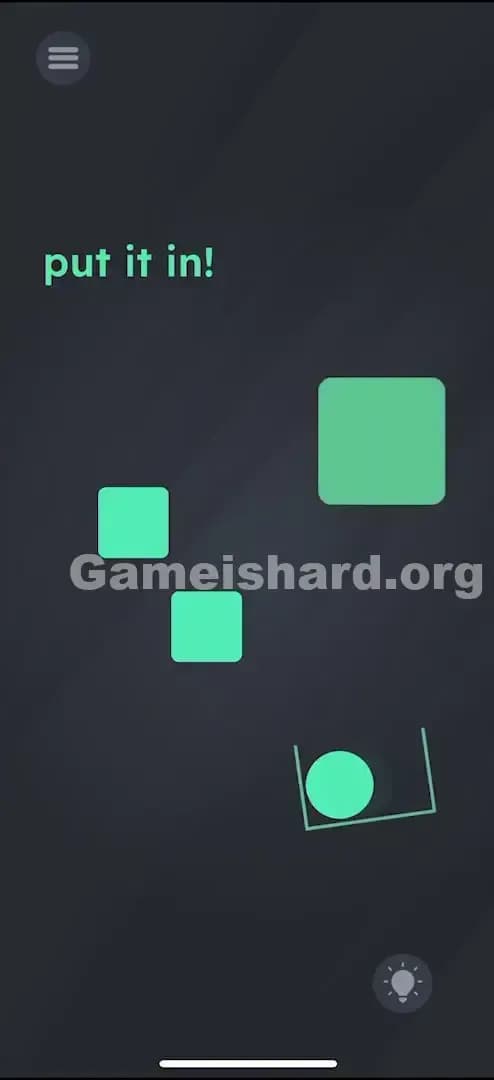
What You See on Screen in Game is hard Level 27
Let’s break down the layout so we’re on the same page.
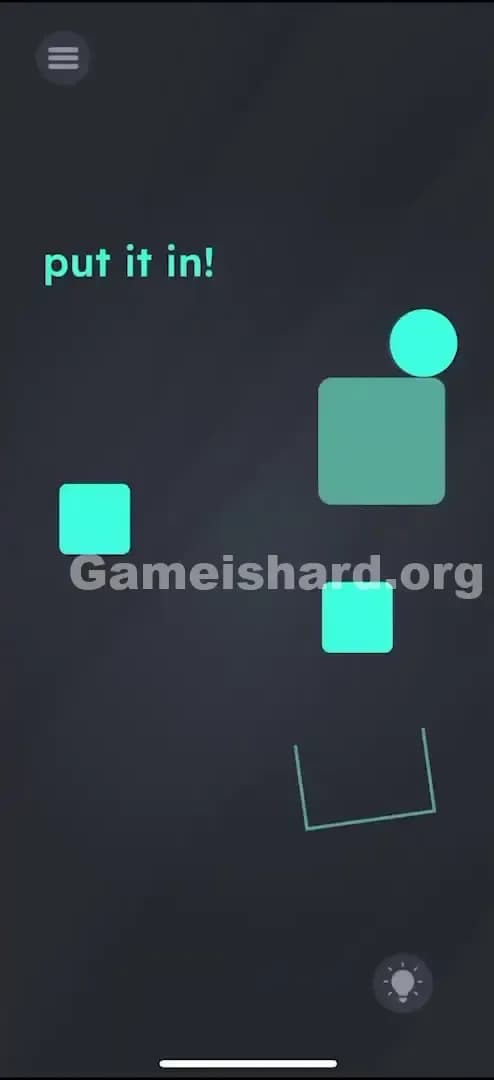
- Top Left: The instruction text simply says "put it in!" in green letters.
- Top Right: A green circle (the ball) rests on top of a large, solid green square.
- Middle Left: A smaller, floating green square sits in the middle of nowhere.
- Middle Right: Another small green square sits below the large one. This is the critical piece.
- Bottom Right: A U-shaped outline (the cup/container) waits to catch the ball.
- Background: The standard dark grey void.
The layout looks like a broken staircase. If the ball falls straight down from its starting point, it might hit the middle-right square, bounce weirdly, and miss the cup. Or it might just get stuck. The gaps are too wide.
What’s Tricking People in Game is hard Level 27
The Trap of Game is Hard Level 27
The biggest trap here is "Passive Observer Syndrome." Most mobile games train us to tap things to make them move. In Game is hard Level 27, tapping the ball is useless. Players often tap the cup, tap the text, or try to drag the ball directly with their finger. The ball isn't touch-responsive; it's gravity-responsive.
The Wrong Instincts in Game is Hard Level 27
- Dragging the ball: You might try to pick up the ball and drop it in the cup. The game won't let you. It’s glued to physics rules, not drag-and-drop rules.
- Dragging the cup: Why not just move the cup under the ball? Nice try, but the cup is bolted to the background.
- Shaking the phone: While sensors are involved, violent shaking usually just sends the ball flying off-screen, resetting the level.
My Reaction to Game is Hard Level 27
I spent a solid minute trying to drag the U-shaped cup upwards. I thought, "Surely, if I can't move the ball, I move the target." Nope. Then I accidentally tilted my phone to check a notification, and the ball rolled off the edge and fell into the abyss. That was the "Aha!" moment—but also the "Oh no" moment because I realized I needed precision, not just movement.
Game is hard Level 27 Step-by-Step Walkthrough
The Setup of Game is Hard Level 27
Before you start tilting like a madman, look at the third square down (the small one below the big starting block). This square is movable. If you don't move it, the ball has a hard time reaching the cup safely.
The Action in Game is Hard Level 27
- Move the Bridge: Place your finger on the lowest small square (the one directly above the U-shaped cup but below the big block). Drag it slightly to the left.
- Why? You are widening the platform so the ball has something to bounce off or roll across. If you leave it there, it sometimes acts as a blocker. Moving it creates a better path.
- Tilt Left: Gently tilt your phone to the left.
- Watch the ball roll off the large top square. It should drop down towards the square you just moved or the other floating square on the left.
- Tilt Right (The Correction): As soon as the ball is falling and clears the obstacles, tilt your phone to the right.
- You are guiding it mid-air. You want it to swoop down and land inside the U-shaped cup.
- Verification: Once the ball settles inside the cup, the level ends.
Troubleshooting at Game is Hard Level 27
- Ball flew off screen? You tilted too hard. The physics are sensitive. Use gentle inclinations, not 90-degree turns.
- Ball stuck on a square? Tilt the phone upside down or shake gently to dislodge it. If it’s really stuck, hit the restart button.
- Did nothing happen when tilting? Check if your screen rotation lock is on (though usually, games override this). More likely, your phone's gyroscope is just being finicky—try laying the phone flat on a table and then picking it up again to "re-center" the sensor.
Micro-Details That Make the Move Register in Game is Hard Level 27
Precision matters here. The "move the square" step is technically optional for speedrunners who have perfect tilt control, but for the average player, it is essential.
- The Sweet Spot: Move that third square about an inch to the left. You want to create a "step" rather than a vertical drop.
- The Tilt Angle: You aren't driving a race car. You only need about 20-30 degrees of tilt. Think of it like balancing a marble in a wooden labyrinth game.
- I fixed it by... changing my grip. I was holding the phone one-handed and couldn't tilt right fast enough. Switching to two hands gave me the stability to do the "Left-then-Right" maneuver smoothly.
The Logic Behind Game is Hard Level 27
Game is hard Level 27 is testing your ability to combine two different interaction models: Touch UI and Device Motion.
Usually, a level is either a "drag things" puzzle or a "tilt things" puzzle. This level combines them. It forces you to construct the environment (drag the square) before you navigate it (tilt the phone). It’s a classic level design trope: Prepare the path, then run the course. If you try to run the course without preparing the path, you fail. The game is teaching you that you have control over the environment, not just the protagonist (the ball).
Pro Tip for Game is Hard Level 27
If you are replaying this or just want to get it over with fast:
- Drag the lower-right square FAR left immediately. Get it out of the way entirely.
- Tilt Left sharply.
- Tilt Right sharply as it falls.
- Don't wait for the ball to settle; as long as it touches the "zone" of the cup, it counts.
Do NOT waste time:
- Trying to move the big top square (it's static).
- Trying to catch the ball with your finger.
Alternative Attempts on Game is Hard Level 27 (What Doesn’t Work, and Why)
Here are the things I tried that failed miserably, so you don't have to:
- Tapping the "put it in!" text: In previous levels, the text is an object. Here, it’s just text. Useless.
- Turning the phone upside down immediately: The ball falls "up" (relative to the screen) and disappears. Level reset.
- Dragging the left square to the right: This actually blocks the cup. The U-shape needs clear airspace above it.
- Swiping the ball: I tried to "throw" the ball like in Pokemon Go. The ball has no touchbox. It ignored me.
- Waiting: I thought maybe wind would blow? No. The ball will sit there until your battery dies.
Common Mistakes for Game is Hard Level 27
- Forgetting to move the square: Players try to "pro gamer" the tilt without moving the obstacle, causing the ball to bounce off the rim of the cup and out.
- Over-tilting: Flipping the phone 90 degrees usually makes the ball move too fast to control.
- Wrong Direction: Tilting right first just mashes the ball against the right wall of the screen.
- Screen Lock: Having "Portrait Orientation Lock" on sometimes messes with how your brain interprets the tilt, even if the game reads the sensors correctly.
- Giving up on the physics: Sometimes the ball bounces out of the cup. Don't restart immediately! Tilt back and forth; you might be able to scoop it back in before the "Fail" screen triggers.
Pattern Recognition: How to Spot This Trick in Future Game is Hard Levels
The Tell
Whenever you see a ball or a round object sitting on a flat surface with no obvious buttons, assume Gyroscope/Tilt controls are active. If tapping does nothing, tilting is the next logical step.
The Habit
Always check which environmental objects are movable before you start the action. In physics puzzles, "setup" is usually 90% of the solution. Before you tilt, tap and drag every rock, block, and cloud to see what can be repositioned to make your life easier.
Game is Hard Level 27 FAQ (Short, Useful)
Q: Why isn't the ball moving when I tilt in Game is Hard Level 27? A: Your phone's sensor might be stuck. Try shaking the device vigorously for a second to wake it up, or verify you aren't playing on a strictly flat surface emulator without configured motion controls.
Q: Can I move the cup in Game is Hard Level 27? A: No. The cup and the large top block are static. Only the smaller squares can be nudged.
Q: Do I have to move the square in Game is Hard Level 27? A: Technically no, if you are a wizard at tilting. But moving the square creates a catch-basin that makes the shot 10x easier.
Q: My ball keeps bouncing out of the cup in Game is Hard Level 27! A: You are coming in too hot. Tilt more gently so the ball rolls rather than falls. Gravity accelerates it; friction slows it. Use shallow angles.
Get more level walkthrough on Gameishard.org
Stuck on another brain-twisting level? We’ve got fast, no-fluff guides for every single stage of the game. We break down the logic so you don't have to rage-quit. Share this with your friends if they’re stuck tilting their phones like crazy people!
Good luck with Game is hard Level 78! Go crush it.