Game Is Hard Level 55 Solution Walkthrough & Answer
How to solve Game Is Hard level 55? Get instant solution & answer for Game Is Hard level 55: "square trapezoid triangle rectangle rhombus"
Doesn't look like your level?
App updates can sometimes shuffle the order of puzzles. If this level 55 walkthrough doesn't match your screen, don't worry! You can browse our All Levels guide to find your exact puzzle by its picture.
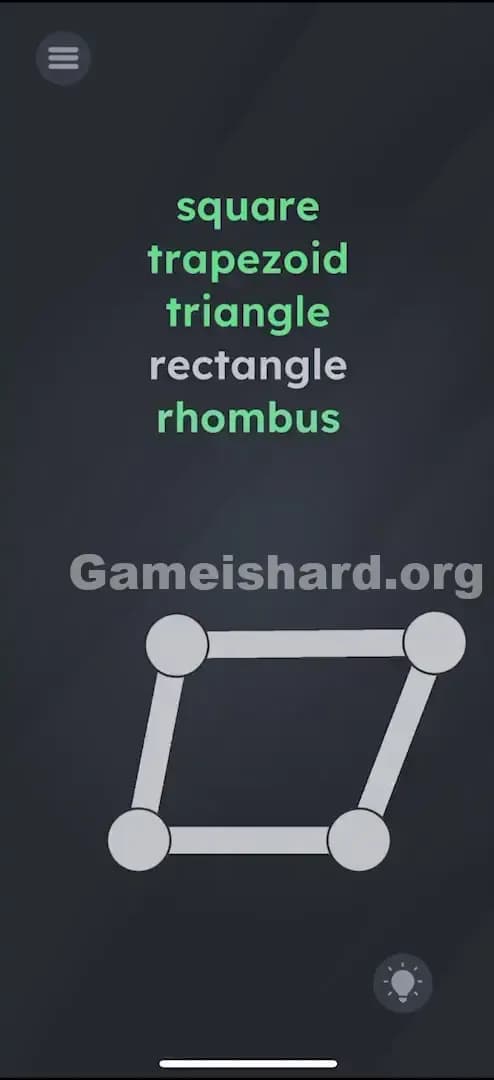
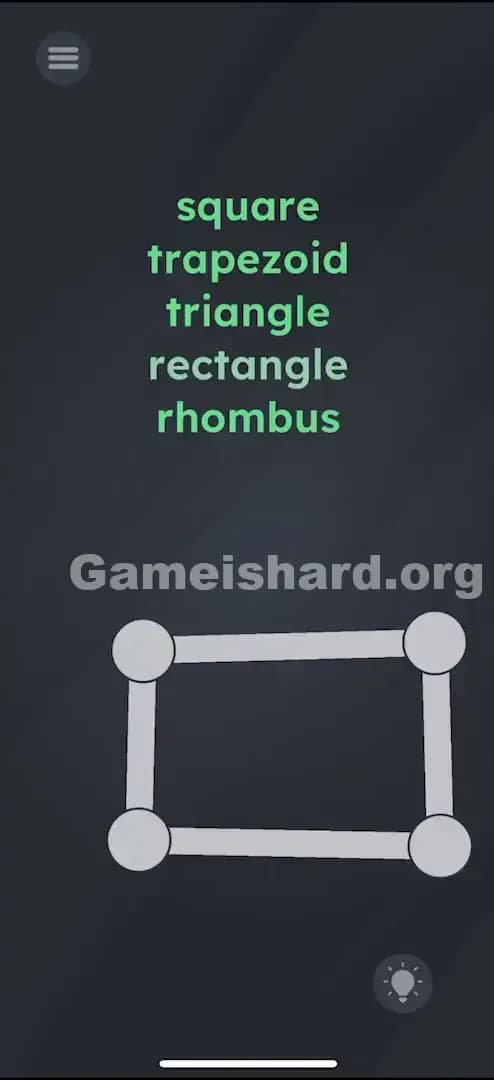
Quick Answer for Game is hard Level 55 (Do This)
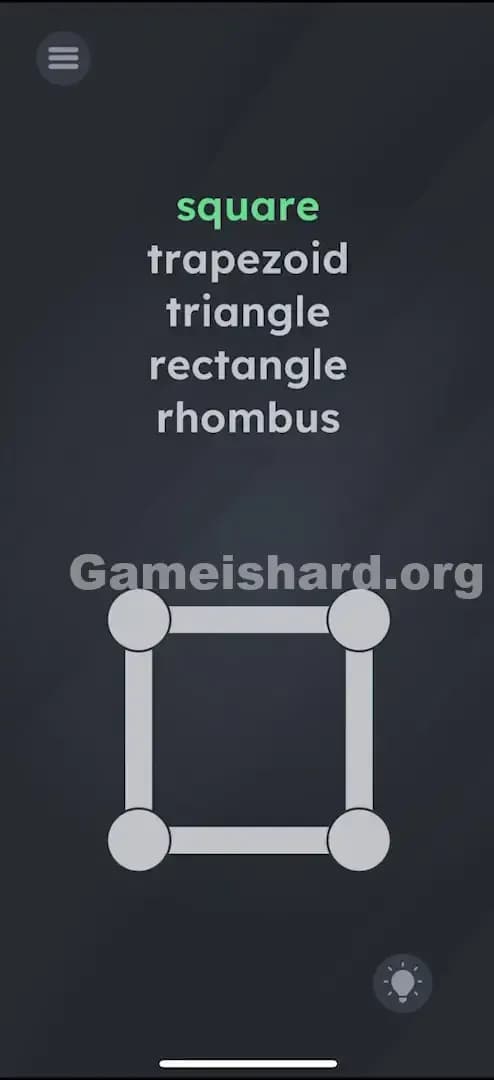
Solution: Drag the four corner dots of the wireframe shape to physically mimic every shape listed: square, trapezoid, triangle, rectangle, and rhombus.
You have to create all five shapes one by one until every word in the list turns green.
Game is Hard Level 55 Overview
The Hook of Game is hard Level 55
You see a list of geometry terms. You see a shape. Normally, in a quiz, you'd match a word to a picture. But nothing is happening. Tapping the words does nothing. Tapping the shape does nothing. The game is waiting for you to stop treating this like a multiple-choice test and start treating it like a construction site.
The Objective in Game is hard Level 55
You need to manually sculpt the wireframe at the bottom of the screen to match the five definitions listed above it. The goal isn't to pick the right answer; it's to build all the answers.
Mechanics involved:
- UI Drag: The dots are movable handles.
- Physics/Geometry: The game detects the angles and lengths of the connected lines.
- Checklist: You must complete all items in the list to pass.
It’s not a typo. It’s a blueprint.
What You See on Screen in Game is hard Level 55
The screen is stark and simple.
- Top half: A vertical list of words: square, trapezoid, triangle, rectangle, rhombus.
- Bottom half: A grey wireframe box. It has four large circular dots at the corners connected by thick grey lines.
- The Vibe: It looks like a school geometry app that froze.
What’s Tricking People in Game is hard Level 55
The Trap of Game is hard Level 55
We see a list and we want to select something. The urge to tap the word "square" because the shape looks like a square is overwhelming. This is "UI Blindness" at its finest. The game presents a dynamic tool (the draggable shape) but disguises it as a static image.
The Wrong Instincts in Game is hard Level 55
- Tapping the words furiously.
- Trying to shake the phone to change the shape.
- Waiting for the shape to morph on its own.
- Thinking you only need to make one shape (the list implies a sequence, not a choice).
My Reaction to Game is hard Level 55
I stared at this for a solid minute thinking it was bugged. "Why can't I select trapezoid?" I muttered. Then I accidentally bumped a corner dot while wiping my screen, and the whole geometry warped. Facepalm moment of the century.
Game is hard Level 55 Step-by-Step Walkthrough
The Setup of Game is hard Level 55
Focus your attention entirely on the four grey dots connecting the lines at the bottom. These are your controls. Ignore the words for a second; just play with the dots.
The Action in Game is hard Level 55
You need to turn the list of words green. Order does not matter, but here is the easiest flow:
- Square: The shape usually starts as a square. If the word square isn't green, wiggle the corners slightly to make it a perfect box.
- Rectangle: Drag two top corners up (or side corners out) to elongate the box. Make the sides uneven lengths but keep 90-degree angles. rectangle will turn green.
- Rhombus: Take your square/rectangle and slant it. Drag the top two dots to the right while keeping the bottom two dots still. It's like a leaning square. rhombus turns green.
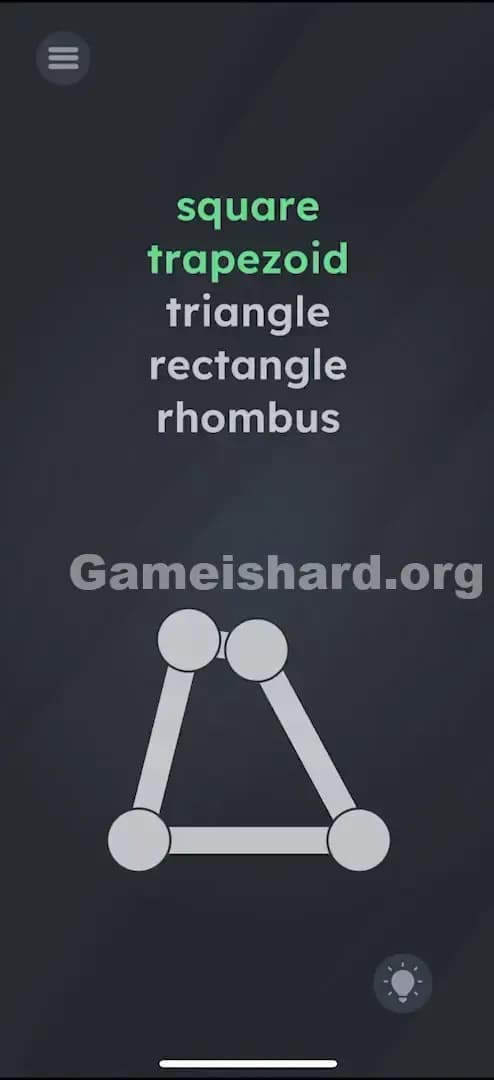
- Trapezoid: Drag the top two dots closer together so the top line is shorter than the bottom line. It should look like a skirt or a pyramid with the top cut off. trapezoid turns green.
- Triangle: This is the tricky one because you have four dots. Drag the top two dots until they essentially overlap into a single point at the top center. The shape will look like a triangle with a double-dot tip. triangle turns green.
Troubleshooting
- If a shape won't register: The game's geometry detection can be finicky. If "Square" won't light up, try making it bigger. If "Triangle" fails, make sure the top two dots are touching perfectly.
- Order: You can do these in any order. If you accidentally make a trapezoid while trying for a triangle, it still counts.
The Logic Behind Game is Hard Level 55
This level tests your willingness to interact with the environment rather than just clicking buttons. It forces you to demonstrate knowledge of geometry definitions using a tactile interface.
The core recurring trick here is "The Object is Malleable." In Game is Hard, shapes are rarely static images; they are almost always physics objects you can manipulate. The list serves as a progress bar, giving you immediate feedback on your sculpting skills.
Pro Tip for Game is Hard Level 55
Don't obsess over mathematical perfection. The game is generous with the definitions.
- Triangle Shortcut: Just smash the top two dots together.
- Rhombus Shortcut: Skew a square hard to the right.
- Trapezoid Shortcut: Pinch the top.
Don't waste time trying to make an equilateral triangle or a golden ratio rectangle. Rough shapes work fine.
FAQ of Game is hard Level 55 (Short, Useful)
Q: Do I have to do them in the order listed in Game is hard Level 55? A: No. You can complete the shapes in any order you like. The level ends once all five words are green.
Q: How do I make a triangle with four dots in Game is hard Level 55? A: You fake it. Drag two of the corner dots (usually the top two) on top of each other so they merge into one point visually.
Q: Why won't "Square" turn green? A: Your sides might be slightly uneven. Try to make it as perfectly boxy as possible, or reset the level to get the default square back.
Q: Can I use two fingers? A: Yes! Multi-touch works well here. You can drag two corners simultaneously to resize the shape faster.
Get more level walkthrough on Gameishard.org
If this guide saved your streak, check out our other walkthroughs. We write these to get you past the frustration and back to the fun without reading a novel. Share this with your friends who are stuck on the geometry test!