Game Is Hard Level 2 Solution Walkthrough & Answer
How to solve Game Is Hard level 2? Get instant solution & answer for Game Is Hard level 2: "Can you pass this level?"
Doesn't look like your level?
App updates can sometimes shuffle the order of puzzles. If this level 2 walkthrough doesn't match your screen, don't worry! You can browse our All Levels guide to find your exact puzzle by its picture.
Quick Answer for Game is hard Level 2 (Do This)
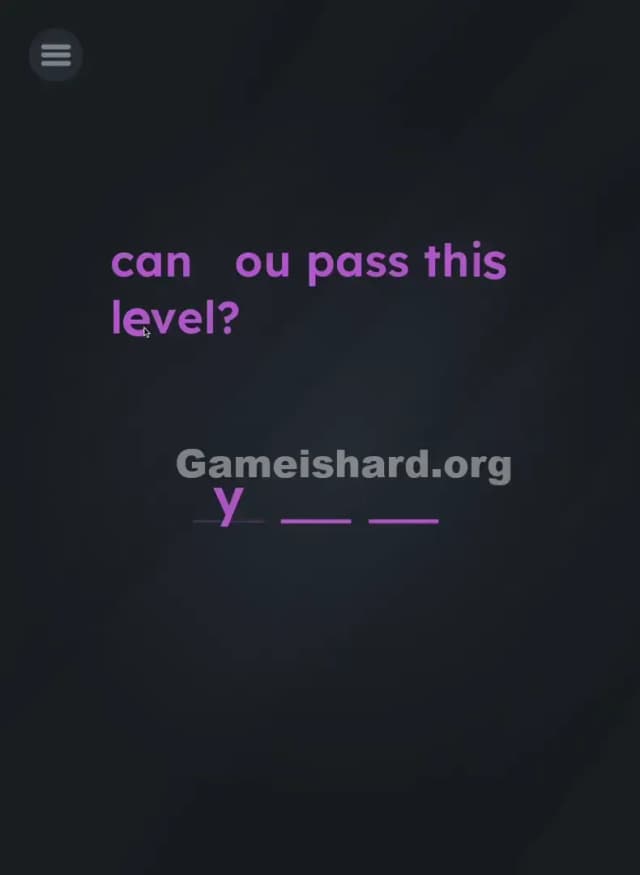
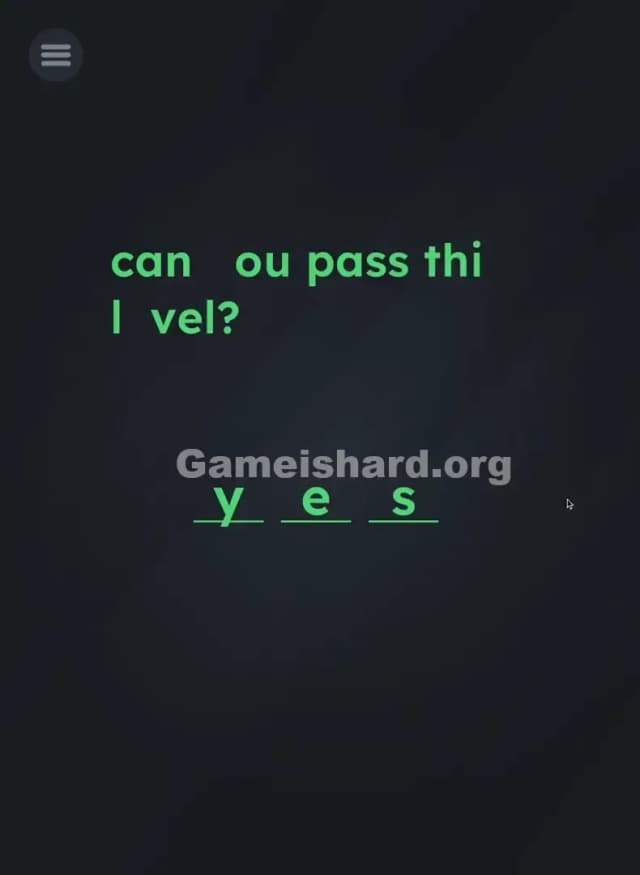
Solution: Drag the letter y from "you", the letter e from "level", and the letter s from "this" onto the three blanks at the bottom to spell YES. Target the specific letters within the question text itself, not a hidden keyboard.
Game is Hard Level 2 Overview
The Hook of Game is hard Level 2
You open Game is hard Level 2 and see a simple question: "can you pass this level?". Below it, three taunting underlines waiting for an answer. Instinct kicks in. You tap the screen, expecting a keyboard to pop up. Nothing. You tap the blanks. Nothing. You shake your phone. Still nothing. The frustration sets in immediately because the game is lying to you about how its interface works. It looks like a quiz, but it's actually a construction site.
The Objective
Your goal isn't to answer the question in the traditional sense. You don't need to type "YES" or find a "YES" button hidden in the corner. The objective is to physically build the word "YES" using the raw materials provided on the screen. In this case, the raw materials are the letters making up the question itself.
Key Mechanics in Game is hard Level 2
- Text Drag / UI Drag: The letters on the screen are moveable objects, not static font.
- Hidden Object: The answer is hiding in plain sight within the question.
- Precision Dropping: You must place the items specifically on the target lines.
It’s not a typo. It’s ammo.
What You See on Screen in Game is hard Level 2
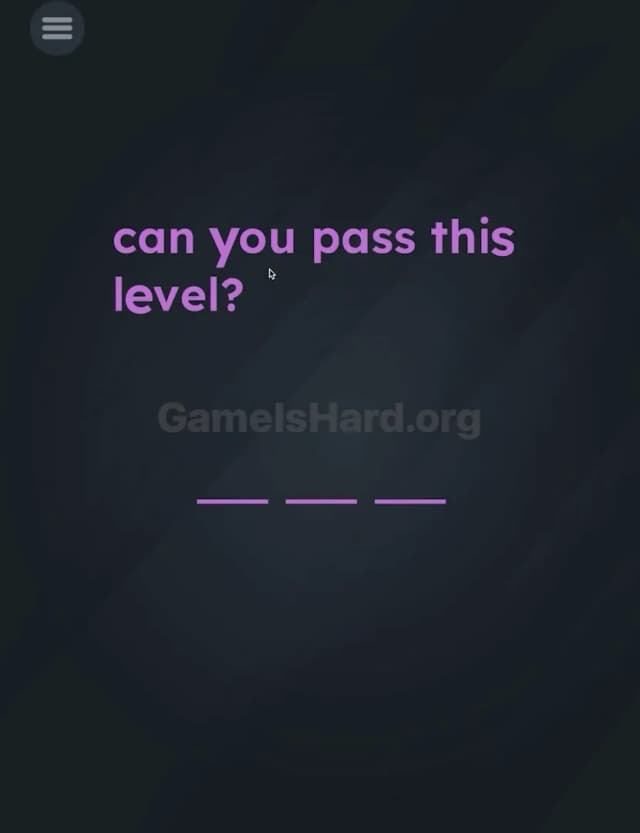
Let's break down the visual layout so you know exactly what we are working with. The background is a dark, moody grey.
- Top Center: The prompt text appears in a bright purple font: "can you pass this level?"
- Bottom Center: There are three distinct purple underlines
_ _ _arranged horizontally. These act as "slots" or "blanks." - The Trap: There are no other buttons. No "Submit," no "Enter," and crucially, no keyboard icon. The screen feels empty, which is designed to make you panic that the game has frozen or glitched.
What’s Tricking People in Game is hard Level 2
The Trap of Game is hard Level 2
The primary trap here is "UI Blindness." We spend our entire digital lives reading text on screens. We are conditioned to treat text as information, not as physical matter. Game is hard Level 2 exploits this. You see the sentence "can you pass this level?" and your brain reads it. It doesn't occur to your brain to touch the individual letters because, in 99% of apps, letters don't move.
The Wrong Instincts in Game is hard Level 2
I watched a friend play this. Here is what failed immediately:
- Tapping the blank lines repeatedly (hoping a cursor appears).
- Looking for a hidden "Yes" button in the menu icon.
- Swiping the whole sentence left or right.
- Trying to spell "NO" (cynical, but incorrect).
My Reaction to Game is hard Level 2
I stared at this for a solid minute. I felt dumb. I tried shaking my phone violently, thinking it was a sensor puzzle. Then, my thumb slipped on the word "level," and I saw the "e" wiggle. That’s when it clicked. I wasn't reading a question; I was looking at a box of Lego bricks shaped like letters.
Game is hard Level 2 Step-by-Step Walkthrough
The Setup of Game is hard Level 2
Ignore the meaning of the sentence. Look at the sentence "can you pass this level?" as a supply depot of spare parts. You need to scavenge three specific parts: a y, an e, and an s.
The Action in Game is hard Level 2
- Step 1: Place your finger specifically on the y in the word "you". Hold it for a split second to grab it.
- Step 2: Drag the y down to the first blank line at the bottom. Release it. It should stick.
- Step 3: Grab the e from the word "level" (or even the 'e' from "pass" doesn't matter, but "level" is easier to hit). Drag it to the second blank line.
- Step 4: Grab the s from the word "this" (or "pass"). Drag it to the third blank line.
Verification
As soon as you drop the final s onto the third line, the level will complete instantly. If the letters snap back to their original position, you missed the "drop zone."
Troubleshooting in Game is hard Level 2
- "The letter won't move!" You might be grabbing the space between letters. Aim for the center of the character.
- "It snapped back!" You didn't drop it close enough to the underline. Try to center the bottom of the letter on the line.
Micro-Details That Make the Move Register in Game is hard Level 2
Precision matters here, but not surgical precision. The "hitbox" for the letters is usually a square surrounding the letter.
- Grab Point: You don't need to long-press. A simple touch-and-drag works.
- Drop Zone: The underline is the magnet. If you drop the letter "y" too high above the line, the game thinks you are just rearranging the text and returns it. You need to drag it onto the line.
- Snapping: There is a slight magnetic "snap" effect when you get close to the blank line. Watch for the letter to align itself perfectly.
I fixed it by dragging the letter slightly BELOW the line rather than right on top of it, so my finger wasn't blocking my view of the target.
The Logic Behind Game is Hard Level 2
This level is a classic lesson in Deconstruction. The game is teaching you its language. The rule being established here is: "Everything on screen is an object."
In most games, text is part of the HUD (Heads-Up Display). In Game is hard, text is part of the gameplay environment. By forcing you to rip the letters out of the question, the developer is breaking the "fourth wall" of the user interface. This logic will return in harder levels where you might need to use a period as a ball, or an exclamation mark as a bat.
Pro Tip for Game is Hard Level 2
If you are replaying or speed-running this:
- Don't wait for animations.
- Use two fingers if your phone supports multi-touch (you can sometimes drag the y and e simultaneously).
- Grab the s from "pass" instead of "this"—it’s sometimes closer to the drop zone depending on screen size.
Alternative Attempts of Game is hard Level 2 (What Doesn’t Work, and Why)
- Tapping the blanks: This triggers nothing; there is no hidden keyboard script.
- Shaking the device: This is a common solution in this game, but not for Level 2.
- Dragging the word "pass": The prompt asks if you can pass, but dragging the whole word doesn't fit the three-letter limit.
- Spelling "can": While "can" has three letters and is on screen, it is not the affirmative answer the game logic demands.
- Waiting: Some levels require doing nothing. This is not one of them. You will wait forever.
- Volume Keys: Pressing volume up/down does nothing here.
Common Mistakes for Game is Hard Level 2
- Dragging the whole word: Players try to drag "you" instead of just the y. You must target the individual character.
- Overshooting the line: Dragging the letter past the underline causes it to reset.
- Fat-fingering: Trying to grab the e in "level" but accidentally grabbing the v.
- Ignoring the question: Some players try to spell other words they find, like "sup" or "pan," just to see what happens. Only YES triggers the win state.
- Thinking it's broken: Quitting the app because no keyboard appeared.
- Dragging to the wrong order: Placing S-E-Y will not trigger the win. Spelling matters!
Pattern Recognition: How to Spot This Trick in Future Game is Hard Levels
The Tell
Whenever you see a question that seems rhetorical, or a prompt that asks you to input something but gives you no input tools (buttons/keys), look at the text.
The Habit
Touch the text. In future levels, if you are stuck, run your finger over the instructions. If a letter wiggles, moves, or changes color, you know you are dealing with a "Text as Object" puzzle. Always treat the instructions as physical items first, and instructions second.
FAQ of Game is hard Level 2 (Short, Useful)
Q: Can I use the 's' from "pass" instead of "this" in Game is hard Level 2? A: Yes. Any instance of the letter 's' on the screen will work. The game tracks the letter identity, not its source word.
Q: Why isn't the keyboard popping up in Game is hard Level 2? A: There is no keyboard. You must manually drag letters from the question sentence to the blanks.
Q: Does it have to be in order in Game is hard Level 2? A: Yes, you must spell Y-E-S. Order usually doesn't matter for the dragging, but the final arrangement must read YES.
Q: What if I drag the wrong letter in Game is hard Level 2? A: Just let go of it anywhere that isn't a blank line. It will snap back to its original spot in the sentence.
Get more level walkthrough on Gameishard.org
If you found this guide helpful, we have the solutions for the next levels ready to go. Our guides cut the fluff and get you straight to the solution so you can keep your win streak alive. Share this with your friends if they are stuck scratching their heads at the missing keyboard!
Good luck on Game is hard Level 3!