Game Is Hard Level 46 Solution Walkthrough & Answer
How to solve Game Is Hard level 46? Get instant solution & answer for Game Is Hard level 46: "takes too long!"
Doesn't look like your level?
App updates can sometimes shuffle the order of puzzles. If this level 46 walkthrough doesn't match your screen, don't worry! You can browse our All Levels guide to find your exact puzzle by its picture.
Quick Answer for Game is hard Level 46 (Do This)
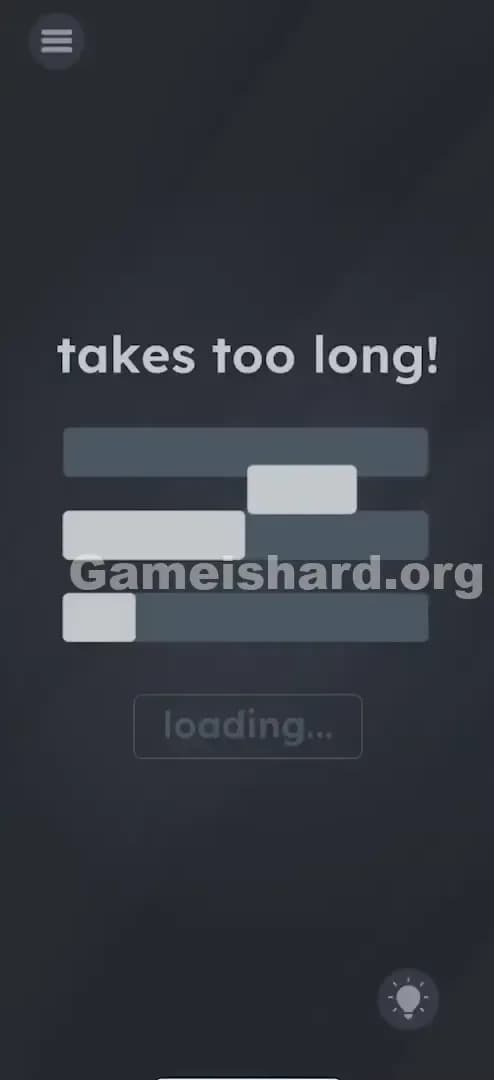
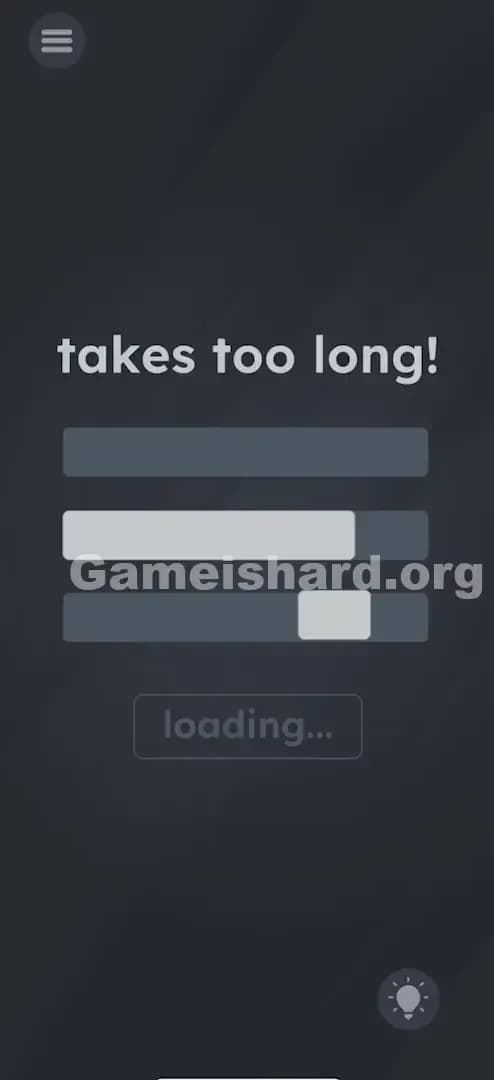
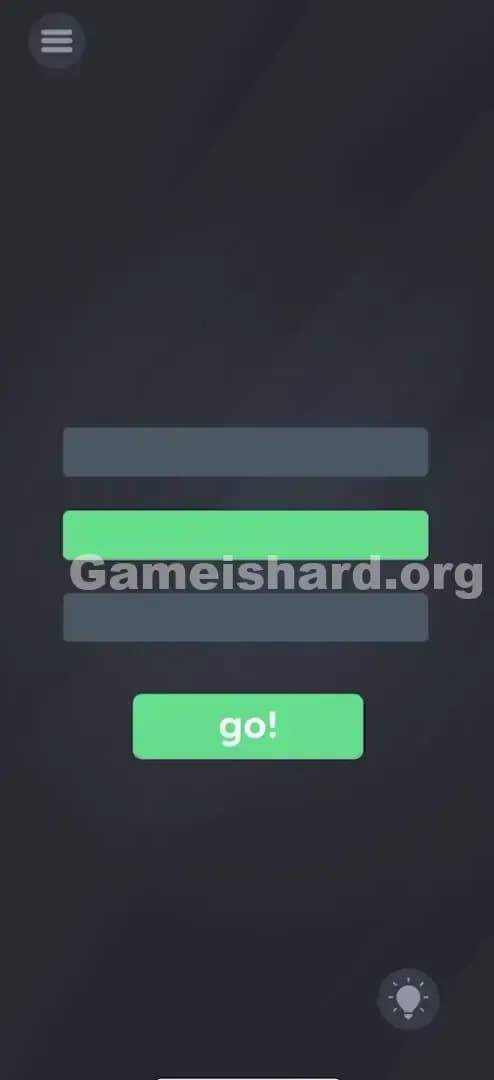
Solution: Drag the top loading bar and the bottom loading bar directly onto the middle loading bar to merge them, then tap the button when it turns green and says “go!”.
Target the filled gray parts of the bars, not the empty space, and stack them like Legos.
Game is Hard Level 46 Overview
The Hook of Game is hard Level 46
This level is every gamer's nightmare: infinite loading screens. You stare at the screen. The bars aren't moving. The text "takes too long!" is mocking you. It feels like the game froze or crashed, which is exactly what the developers want you to think. You wait for five seconds, ten seconds... nothing happens. It's frustrating because we are conditioned to wait for loading bars, not attack them.
The Objective in Game is hard Level 46
Your goal isn't to wait for the loading to finish. The game isn't actually loading anything. Your goal is to manually force the loading process to complete by combining the progress of three slow bars into one fast one. You are literally building the solution.
Key Mechanics involved in Game is hard Level 46
- UI Dragging: The bars aren't just indicators; they are physical objects you can grab.
- Object Merging: Similar to inventory puzzles, you combine items to make a new one.
- Button State Change: The "loading..." button is inactive until the condition (full bar) is met.
- Logic Trap: The trap is passivity. Doing nothing gets you nowhere.
It’s not a loading screen. It’s a puzzle with a progress bar skin.
What You See on Screen in Game is hard Level 46
Let's break down the scene. It’s minimal, dark, and annoying.
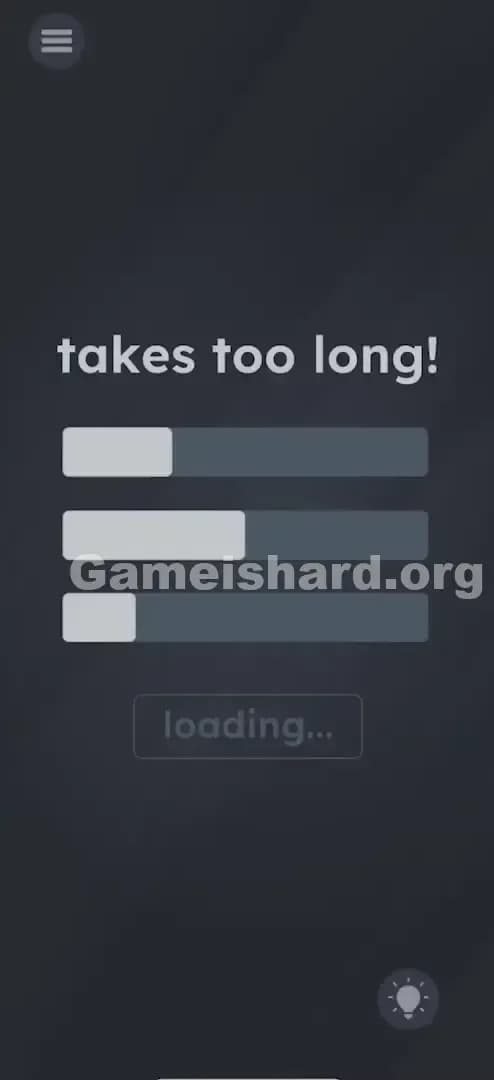
- Top Text: "takes too long!" sits at the top center. It's white and bold.
- The Bars: There are three horizontal bars in the middle of the screen.
- The Top Bar is about 30% full.
- The Middle Bar is about 50% full.
- The Bottom Bar is about 20% full.
- The Button: Below the bars, there is a grayed-out button that reads "loading...".
- The Background: Standard dark gray void.
Everything looks static. The "fill" inside the bars is a light gray, while the empty track is a darker gray. It looks exactly like a system process that has hung up.
What’s Tricking People in Game is hard Level 46
The Trap of Game is hard Level 46
The biggest trap here is "UI Blindness." We are trained by thousands of hours of computer usage to view progress bars as read-only information. We watch them. We curse at them. We never touch them. Game is hard Level 46 exploits this habit. You assume the bars are outputting information to you, but actually, they are input devices waiting for your command.
The Wrong Instincts in Game is hard Level 46
Most players sit there. When that fails, they start tapping the "loading..." button furiously. It’s grayed out, so it does nothing. Some people try shaking the phone to "speed up" the loading, or they try to swipe the bars left to right to "fill" them like a coloring book. None of this works because you aren't treating the bars as movable objects.
My Reaction to Game is hard Level 46
I stared at this for a solid minute. I thought my WiFi dropped. I actually minimized the app and reopened it, thinking it was a glitch. Then I accidentally dragged my thumb across the screen and saw one of the bars wiggle. Facepalm city. I felt like an idiot for waiting on a fake loading screen.
Game is hard Level 46 Step-by-Step Walkthrough
The Setup of Game is hard Level 46
Identify the three bars. Notice that none of them are full, but if you mentally add them up (30% + 50% + 20%), they equal 100%. That is your clue. You need all the pieces in one place.
The Action in Game is hard Level 46
- Grab the Top Bar: Place your finger on the filled (light gray) part of the top loading bar.
- Drag Down: Drag it downwards and drop it directly onto the middle loading bar. It should "snap" or merge into it, making the middle bar fill up more.
- Grab the Bottom Bar: Now, grab the filled part of the bottom bar.
- Drag Up: Drag it upwards and drop it onto that same middle loading bar.
- Tap to Finish: Once all three parts are merged, the middle bar will turn bright green. The text on the button below will change from "loading..." to "go!". Tap the "go!" button immediately.
Troubleshooting in Game is hard Level 46
- If the bars don't merge: Ensure you are dragging the filled part of the bar, not the empty track background. The empty track is just decoration; the "fill" is the object.
- If the button doesn't work: You must merge both the top and bottom bars into the middle one. If you only do one, the bar isn't 100% full, and the button won't activate.
- Precision: You don't need pixel-perfect precision, but you need to overlap them significantly. Drop the center of the bar onto the center of the target bar.
Micro-Details That Make the Move Register in Game is hard Level 46
This level can be finicky if you have "fat fingers" or a small screen. Here is how to get it right every time:
- The "Hit Box": The draggable area is strictly the light gray rectangle. If you grab the dark background of the bar, nothing moves.
- Speed: Drag speed doesn't matter, but dropping speed does. Release your finger cleanly once the bars overlap.
- Visual Feedback: There is no sound effect when you merge them, but you will see the middle bar visually lengthen. If the bar doesn't get longer, the merge didn't register. Pick it up and try again.
- Order: It doesn't matter if you drag Top-to-Middle first or Bottom-to-Middle first. You can even drag Middle-to-Top and Bottom-to-Top if you want! The goal is just to get them all into one container.
I fixed my struggle by dragging the bars slightly slower so I could see exactly where my finger was positioning the block over the target.
The Logic Behind Game is Hard Level 46
This puzzle is a classic lateral thinking exercise. It challenges the "User Interface as Law" rule. Usually, UI elements are fixed. In Game is hard, UI elements are loose. The logic here is essentially: "If the system is too slow, do it yourself."
It treats the concept of "loading" as a resource management puzzle. You have three partial resources. To progress, you must consolidate your resources. It’s a metaphor for efficiency, but mostly it’s just the developers trolling us for hating loading screens. The "loading..." text is a distractor; the "takes too long!" text is the hint. It takes too long unless you intervene.
Pro Tip for Game is Hard Level 46
If you are speed-running or replaying, here is the fastest method:
- Use two fingers simultaneously.
- Grab the top bar with your index finger and the bottom bar with your thumb.
- Pinch them together onto the middle bar at the same time.
- Tap "go!" with your other hand.
Do not waste time: Waiting. Tapping the button before the bar is green. Shaking the device.
Alternative Attempts of Game is hard Level 46 (What Doesn’t Work, and Why)
- Waiting for 5 minutes: The bars are static images. They will never move on their own.
- Tapping the "loading..." button repeatedly: The button is disabled. It's not a clicker game.
- Shaking the phone: There are no accelerometer triggers in this level.
- Rubbing the bars to "charge" them: This isn't a scratch-card mechanic.
- Typing on the text: "Takes too long!" is just a label, not an input field.
- Dragging the button: The button is fixed in place; only the progress bars move.
- Tilting the phone: Gravity doesn't affect the bar levels.
- Restarting the app: This just resets the puzzle; it doesn't bypass the "loading."
Common Mistakes for Game is Hard Level 46
- Mistake: Thinking the game crashed.
- Correction: It's part of the puzzle. Touch things!
- Mistake: Dragging the bars off-screen.
- Correction: They need to be combined, not removed.
- Mistake: Merging only two bars.
- Correction: You need 100% capacity. Two bars only get you to ~80%.
- Mistake: Dragging the empty space.
- Correction: Aim for the light gray "filled" pixels.
- Mistake: Tapping the green bar instead of the button.
- Correction: Once the bar is green, the interaction moves to the button below.
- Mistake: Trying to stretch one bar.
- Correction: You can't resize them; you must stack them.
Pattern Recognition: How to Spot This Trick in Future Game is Hard Levels
The tell
Whenever you see a UI element that implies waiting (a clock, a loading bar, a "please wait" sign), it is a lie. The game never requires passive waiting. If you are waiting for more than 3 seconds, you are doing it wrong.
The habit
When the screen looks static, drag everything. Drag the text. Drag the icons. Drag the background. In Game is hard, if it’s on the screen, assume it’s a loose object until proven otherwise.
Game is hard Level 46 FAQ (Short, Useful)
Q: Can I merge them into the top bar instead of the middle one in Game is hard Level 46? A: Yes! As long as all three parts end up in one single bar, the button will activate. The middle is just the easiest target.
Q: My bars won't move when I touch them in Game is hard Level 46. A: Make sure you are touching the colored "fill" part of the bar. If you have a screen protector, try pressing a bit harder or using a different finger.
Q: Why does it say "takes too long!" in Game is hard Level 46? A: It's a hint. The game is acknowledging that normal loading takes too long, prompting you to speed it up manually.
Q: Does shaking the phone help in Game is hard Level 46? A: No. This level is strictly touch-and-drag. No sensors are used.
Get more level walkthrough on Gameishard.org
That’s the fix for Game is hard Level 46. If you get stuck on the next one, check out our other guides on Gameishard.org. We keep them short, sweet, and free of the usual recipe-blog fluff. Send this to your friend who’s been staring at that loading screen for ten minutes.
Good luck on the next one!