Game Is Hard Level 240 Solution Walkthrough & Answer
How to solve Game Is Hard level 240? Get instant solution & answer for Game Is Hard level 240: "Leave me alone for a moment!"
Doesn't look like your level?
App updates can sometimes shuffle the order of puzzles. If this level 240 walkthrough doesn't match your screen, don't worry! You can browse our All Levels guide to find your exact puzzle by its picture.


Quick Answer for Game is hard Level 240 (Do This)
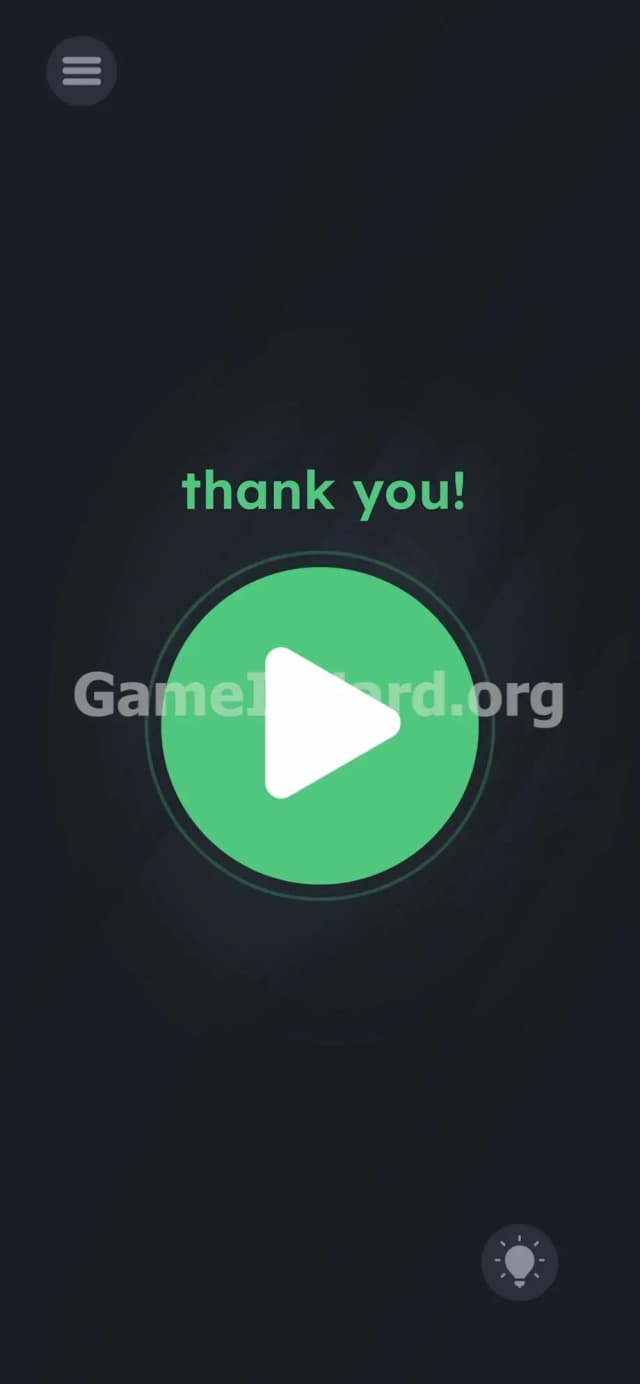
Solution: Lock your screen or background the app for a sec, and the screen will go from leave me alone for a moment! to thank you! with a green play button, then you tap that green button.
You physically need to stop interacting with the app to trigger the next phase.
Game is Hard Level 240 Overview
The Hook
You are staring at a completely flat, deadpan yellow face. It looks annoyed. The text above it explicitly tells you to go away. Most players immediately assume this is reverse psychology. You start swiping. You start poking the eyes. Nothing happens. The screen is a brick. The game is outright refusing to play with you, and it feels incredibly frustrating when every other stage before this demanded hyper-active tapping.
The Objective
Your goal is to figure out how to give a digital object exactly what it wants: isolation. Instead of dragging words or tilting your phone to fix a problem on the screen, you have to manipulate the actual state of your device. You are proving that you understand the phone itself is part of the puzzle.
- Timing / waiting
- Device state manipulation (backgrounding the app)
- Hidden UI
- Literal instructions
It’s not a typo. It’s ammo.
What You See on Screen in Game is hard Level 240
Let's break down the board. The setup is brutally minimalist. Dead center, taking up most of the visual space, is a massive yellow circle acting as a face. Two tiny black squares for eyes. One straight, flat black line for a mouth. Absolute peak apathy.
Above the face sits the orange prompt text: leave me alone for a moment!
Down in the bottom right corner, you have your standard hint bulb. Top left has the pause menu icon. That is the entire screen. There are no missing letters to find. No weird gaps between the words. No misaligned shapes to snap back into place. You just have a totally barren interface actively demanding that you stop playing the game.
What’s Tricking People in Game is hard Level 240
The Trap
Players get stuck here because of severe UI blindness. We are hardwired to touch the glass when playing a mobile game. If a level is loaded, our brains demand interaction. You try to drag the word alone off the screen. You try to pull the flat mouth up into a smile. You mash the center of the yellow circle. None of it registers. The trap is assuming the solution exists inside the app’s visible borders.
The Wrong Instincts
I tried literally pulling the words apart with two fingers. I shook my phone aggressively, thinking I could rattle the yellow face into changing its expression. I even held down both of the square eyes and yelled into my phone's microphone. Total waste of time. Every single physical action you take on the glass is the exact opposite of what the text is asking you to do.
My Reaction
Absolute facepalm. I stared at this deadpan face for five minutes straight. When I finally gave up in frustration and locked my phone to grab a drink, the solution accidentally triggered. Getting played by a basic sleep-mode function is a humbling experience.
Game is hard Level 240 Step-by-Step Walkthrough
The Setup
Stop tapping the screen. Take your fingers off the glass completely. The yellow face wants you gone, so you have to remove the game from your phone's active focus.
The Action
- Press the physical power button on your phone to turn off the screen, OR swipe up/press the home button to push the app into the background.
- Wait three to five seconds. Give the game its literal moment of peace.
- Wake up your phone or tap the app icon to reopen the game.
- Look at the screen. The annoyed yellow face is gone. The text has changed to a bright green thank you!
- Tap the massive green play button sitting in the middle of the screen to clear the stage.
Troubleshooting
- If you lock the screen and instantly wake it back up, the level might not register the break. Count to three slowly while the screen is black before you wake the device back up.
- Do not force-quit or swipe the app away from your recent tasks menu. Closing the app completely resets the level. You only want to minimize it.
- Swiping down your notification shade usually isn't enough to trigger the state change on most phones. Go all the way out to your home screen to be safe.
The Logic Behind Game is Hard Level 240
This specific stage tests your willingness to break the fourth wall. It forces you to interact with your phone's operating system instead of the game's internal graphics.
Behind the scenes, mobile games have code that triggers when an app goes into an "OnPause" state (when you background it) and an "OnResume" state (when you open it back up). Game is hard Level 240 specifically monitors these system states. The instructions are bait; the UI is the real puzzle. It treats your hardware's power button and home screen as actual puzzle pieces. When the game says leave me alone, it is literally asking you to execute that "OnPause" command by leaving the app entirely.
Pro Tip for Game is Hard Level 240
Skip the trial and error. Treat this like a hardware check rather than a brain teaser. Speedrunners and replay grinders use this exact sequence to clear the screen in under five seconds.
- Swipe to your home screen the exact second the yellow face loads.
- Count to three in your head.
- Tap the game icon to jump right back in.
- Smash the green play button.
Do not waste a single second trying to drag the exclamation point or the word moment.
FAQ
Why won't the yellow face change when I look away from my screen? The game's camera isn't tracking your physical eyes. It monitors the app's software state. You have to lock your device or minimize the window to trigger the change.
Can I just close the app completely to leave it alone? No. Force quitting destroys your session and resets the level back to the beginning. Do not swipe it away from your recent apps. Minimize it.
Does turning down my phone's brightness work? Dimming the screen does nothing. The screen needs to completely lock, or the app needs to be pushed to the background OS level.
I locked my screen, but nothing happened when I turned it back on. Why? You were too fast. The game requires a brief duration to register the "moment" you left it alone. Give it at least three full seconds in the dark before hitting the power button again.
Get more level walkthrough on Gameishard.org
We build these guides to get you past the frustration and back to actually enjoying your phone. Fast, brutal, and straight to the point. Share this guide with your Discord friends if they are stuck sweating over a yellow circle that won't move. Keep pushing through the next levels.