Game Is Hard Level 283 Solution Walkthrough & Answer
How to solve Game Is Hard level 283? Get instant solution & answer for Game Is Hard level 283: "Put the ball at the junction."
Doesn't look like your level?
App updates can sometimes shuffle the order of puzzles. If this level 283 walkthrough doesn't match your screen, don't worry! You can browse our All Levels guide to find your exact puzzle by its picture.
Quick Answer for Game is hard Level 283 (Do This)
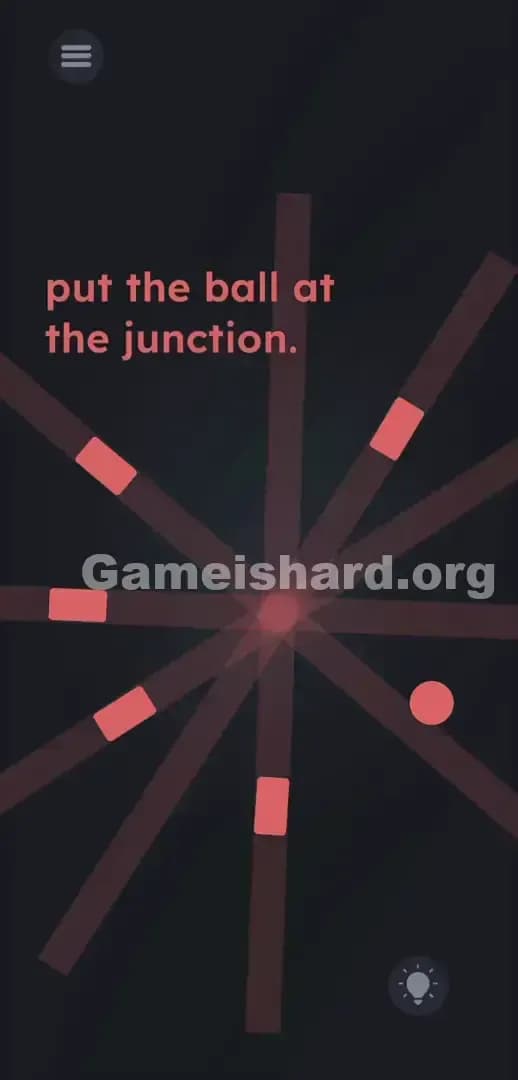
Solution: Drag the ball to the exact center point where all the short lines would cross if you mentally extended them inward.
Drop the ball directly into the empty negative space in the middle of the screen to form an invisible crosshair.
Game is Hard Level 283 Overview
The Hook
You launch the level. The text demands you put the ball at the junction. But there is no junction. Just a bunch of floating red shapes scattered in the void. You are staring at an incomplete drawing. Game developers love to mess with your expectations. Game is hard Level 283 is actively lying to you about the interface. You are told to find a specific location, but the game refuses to draw it for you.
The Objective
Figure out where the missing junction actually is and move the object there. You have to use mental geometry to finish the puzzle. The shapes are not just random debris. They are pointing you directly toward the answer. You just have to follow their lead.
Here are the mechanics actively trying to ruin your speedrun on this stage:
- Hidden object: The actual goal line does not physically exist on the screen.
- UI drag: You must manually relocate an asset across the board.
- Logic trap: The game relies on your brain filtering out the angles of the rectangles.
It’s not a typo. It’s ammo.
What You See on Screen in Game is hard Level 283
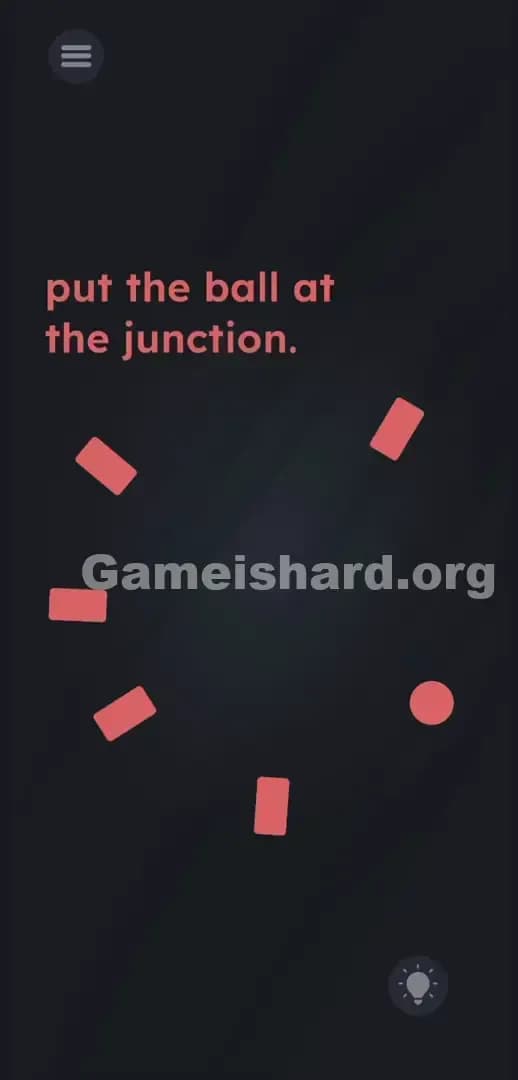
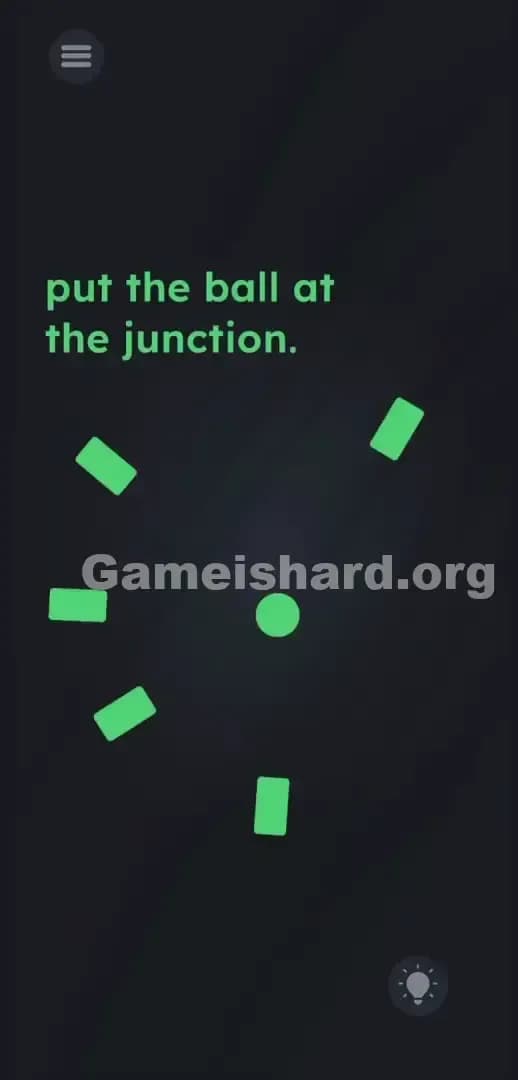
The screen is extremely minimal. Dark background. A handful of pale red objects. It looks like a minimalist art poster.
- Top Left: The standard circular menu button with three horizontal lines.
- Top Center: The instructional prompt reading put the ball at the junction.
- The Center Area: Five short, red, rectangular blocks. They are arranged in a wide, broken circular pattern. Each rectangle is tilted at a different angle.
- Right Side: One solid red ball sitting slightly out of formation, near the edge of the circular pattern.
- Bottom Right: A circular lightbulb icon used for purchasing hints.
The odd spacing immediately stands out. The rectangles are pointing inward, but they do not touch. They leave a massive, glaring empty spot right in the dead center of the screen.
What’s Tricking People in Game is hard Level 283
The Trap
Players look for a literal, visible junction. UI Blindness strikes hard here. We are trained by decades of gaming to look for obvious, brightly colored target zones. When the prompt says "junction," our brains immediately scan for a plus sign, an X, or crossing lines. When we do not see it, we assume we have to create it physically. People waste minutes trying to crash the rectangles together. They try to stack them. The game traps you in a cycle of interacting with the wrong objects.
The Wrong Instincts
Dragging the rectangles around is the first mistake. Shaking the phone to make them fall into place is the second. Tapping the word junction in the prompt to see if it turns into a physical object is the third. None of that works. The five rectangular lines are permanently locked to the background. You cannot rotate them. You cannot combine them. They are completely static.
My Reaction
I dragged the ball into every single corner before I actually stopped to look at the angles. I tried to smash it into the text. I tried to cover the word junction with it. Complete facepalm when I finally realized the rectangles were literal arrows pointing at the exact spot I needed to target.
Game is hard Level 283 Step-by-Step Walkthrough
The Setup
Stop touching the screen for a second. Look closely at the five red rectangles. Treat them like laser pointers. Notice how every single one of them is aimed directly at the same exact patch of empty space in the middle of the screen.
The Action
- Focus on the five red rectangular lines and mentally draw a straight line extending out from the flat end of each one.
- Find the exact invisible focal point in the dead center of the screen where all five of those imaginary lines cross.
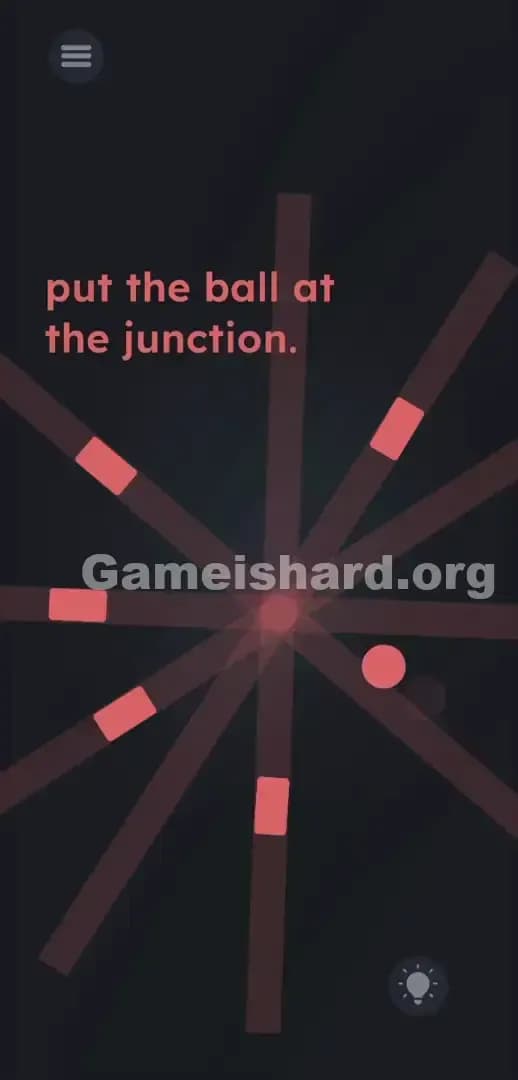
- Tap and hold the red ball located on the right side of the screen.
- Drag the ball directly onto that invisible center point.
- Release your finger. Wiggle the object slightly if the stage does not clear immediately.
Troubleshooting
- Nothing happened when I dropped it: Your placement is slightly off. The hit box for the invisible junction is very small. Grab the ball again and nudge it a few pixels left, right, up, or down.
- The ball bounced back: You missed the target zone entirely. Re-evaluate your imaginary lines. The spot is exactly equidistant from all five shapes.
- I can't move the ball: You might be accidentally swiping your screen edge. Tap directly in the center of the shape and hold for a fraction of a second before dragging.
The Logic Behind Game is Hard Level 283
The game is testing your spatial awareness. It forces you to interact with negative space. The shapes are not just obstacles or background flavor. They are directional markers.
This directly ties back to the core philosophy of the game. The instructions are bait; the UI is the real puzzle. Game is hard Level 283 takes away the finish line and asks you to deduce its location using context clues. It proves that you cannot just mindlessly tap your way to victory. You have to actually look at the geometry the developers laid out. The level treats empty space like a physical puzzle piece.
Pro Tip for Game is Hard Level 283
Do not overthink the setup. If you are replaying this stage or just want to blast through it, follow this rapid sequence:
- Ignore the text prompt completely.
- Grab the red ball.
- Drag it to the exact middle of the circular gap formed by the five blocks.
- Drop it.
Do not waste time trying to move the word junction. Do not waste time shaking your device. Target the dead center and move on.
FAQ (Short, Useful)
Why won't the red lines move when I swipe them? Because they are static background elements. They are painted onto the screen to guide your eyes. They are not interactive puzzle pieces.
Where exactly is the junction supposed to be? It is completely invisible. It exists in the exact midpoint between all five red lines. If you draw an X across the center of the screen, the junction is right in the middle.
Does tilting or shaking the device do anything here? No. This level strictly uses traditional drag-and-drop mechanics. Leave your phone flat.
I put the ball in the middle and it won't solve. Why? You missed the precise trigger area. The sweet spot is incredibly specific. Wiggle the shape around the center point in tiny circles until the game registers the overlap.
Get more level walkthrough on Gameishard.org
We hate fluff. We write guides to get you unstuck fast. When a game lies to your face, we give you the exact coordinates to beat it.
Share this guide with your friends who are currently raging at this geometry trap. Keep crushing the puzzle logic.