Game Is Hard Level 47 Solution Walkthrough & Answer
How to solve Game Is Hard level 47? Get instant solution & answer for Game Is Hard level 47: "set it free!"
Doesn't look like your level?
App updates can sometimes shuffle the order of puzzles. If this level 47 walkthrough doesn't match your screen, don't worry! You can browse our All Levels guide to find your exact puzzle by its picture.


Quick Answer for Game is hard Level 47 (Do This)
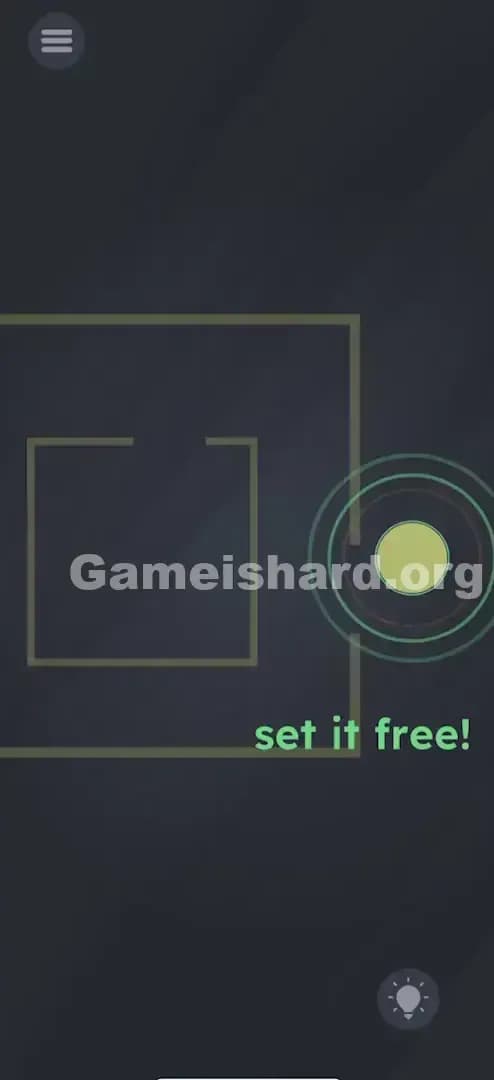
Solution: Use a two-finger pinch-out gesture on the screen to enlarge the square frames until the gaps are wide enough, then simply drag the orange ball out to the right.
Don't touch the ball first; focus your fingers on the empty space or the box outlines to resize the cage.
Game is Hard Level 47 Overview
The Hook of Game is hard Level 47
You are staring at a ball trapped in a cage. It looks like a standard maze puzzle, right? You probably tried to drag that orange ball immediately. You smashed it against the walls. You tried to wiggle it through that tiny gap on the right. Nothing. It feels like the game is broken or the hitbox on the ball is way too big. It’s annoying because the solution is staring you in the face, but the physics engine is saying "nope."
The Objective in Game is hard Level 47
Your goal in Game is hard Level 47 is deceptively simple: get the ball out of the box. The text commands you to "set it free!" But this isn't a maze where you find a hidden path. This is a physics sandbox disguised as a puzzle. The path exists, but your character (the ball) is physically too large to fit through the door. You have to change the architecture of the level itself.
Mechanics Involved in Game is hard Level 47
- Multi-touch / Pinch-to-Zoom: This is the core mechanic. The game engine allows you to scale objects, not just move them.
- Object Properties: The "walls" aren't static background art; they are interactive vectors that can grow.
- Physics Dragging: The ball has collision detection. It won't pass through lines unless there is clear space.
- Logic Trap: The trap is assuming the level layout is fixed.
It’s not a maze. It’s a renovation project.
What You See on Screen in Game is hard Level 47
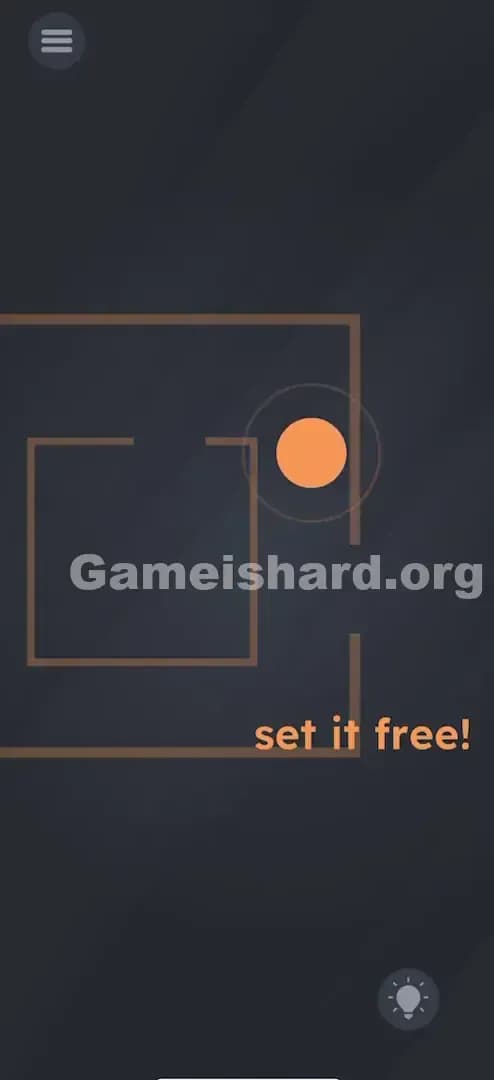
Let’s break down the visual data. You have a dark grey background—standard for this game. In the center, there is a geometric setup consisting of two brown, square frames.
The outer frame has a gap on the right side. The inner frame also has a gap on the right side. Inside the inner frame sits a solid orange ball.
Below this cage setup, the text reads: set it free! in a playful font. The UI elements (menu top-left, hint bulb bottom-right) are standard. The critical detail here is the ratio of the ball to the gap. The ball is clearly wider than the opening. No amount of force will squeeze it through. The geometry is hostile.
What’s Tricking People in Game is hard Level 47
The Trap of Game is hard Level 47
The biggest trap here is "Maze Mentality." We are trained by decades of gaming to accept walls as absolute limits. In Pac-Man, you don't eat the walls. In Mario, you don't scale the pipes to make them shorter. Game is hard Level 47 exploits this ingrained rule. You see walls, you assume they are immutable boundaries. You assume the only variable you can control is the position of the ball.
The Wrong Instincts in Game is hard Level 47
I watched a friend play this, and the first thing they did was tilt their phone aggressively, hoping the gyroscope would roll the ball out. When that failed, they started swiping the ball fast, trying to glitch it through the collision box. Neither works. This game rarely uses "glitch" mechanics as intended solutions. If you are trying to break the physics, you are overthinking it.
My Reaction of Game is hard Level 47
I stared at this for a solid two minutes. I tried dragging the words "set it free" to smash the box (a classic trick in other levels). I tried tapping the gaps to "open" them like doors. When I finally accidentally put my thumb and index finger down and the box grew? Massive facepalm. It was so obvious in hindsight.
Game is hard Level 47 Step-by-Step Walkthrough
The Setup of Game is hard Level 47
Stop trying to move the ball. Take your hand off the screen for a second to reset your brain. You are not moving the prisoner; you are expanding the prison.
The Action in Game is hard Level 47
- Position your fingers: Place two fingers (thumb and index usually work best) on the screen. You can place them anywhere, but centering them over the square frames gives you the best control.
- The Gesture: Perform a "pinch-out" or "spread" motion. Slide your fingers away from each other.
- Watch the Scale: As you spread your fingers, the brown square frames will physically get larger on the screen. Keep spreading until the gaps on the right side appear significantly wider than the orange ball.
- The Escape: Now, lift your scaling fingers. Use one finger to tap and hold the orange ball. Drag it carefully through the now-massive gaps on the right side of the screen.
Troubleshooting in Game is hard Level 47
- It's not zooming: Make sure you aren't starting your pinch on the ball itself. Sometimes the game thinks you are trying to drag the ball if you touch it first. Start your pinch on the empty background or directly on the brown lines.
- The ball is still stuck: You didn't make it big enough. There is no penalty for making the box enormous. Spread your fingers until the box takes up most of the screen if you have to.
Micro-Details That Make the Move Register in Game is hard Level 47
Precision matters slightly here. The collision detection in Game is hard Level 47 is pretty tight. If the ball scrapes the edge of the line, it will stop. It won't slide along the wall nicely like in a polished platformer; it just halts.
- Oversize it: Don't try to be minimal. Make the opening 2x or 3x the size of the ball.
- Drag Speed: Drag the ball slowly. If you flick it, the physics engine might bounce it off the inner wall before it exits the outer wall.
- One Finger vs Two: The pinch MUST be two fingers. The drag MUST be one finger. Do not try to drag while pinching. Do it in two distinct phases. Phase 1: Resize. Phase 2: Move.
I fixed my own struggle by realizing I was trying to pinch-zoom the ball to make it smaller. That logic is sound, but incorrect for this specific level code. The ball is fixed size; the world is variable.
The Logic Behind Game is Hard Level 47
This level teaches you that the UI and the "level geometry" are the same thing. In Unity or whatever engine this is built on, the square sprite has a Scale property. Most games lock this property during gameplay. Game is hard leaves it unlocked and maps it to a standard multi-touch gesture.
This is a recurring theme in puzzle games from this developer: Hierarchy of Control.
- Level 1 thinking: Move the character.
- Level 2 thinking: Move the obstacle.
- Level 3 thinking (This Level): Change the properties (size, gravity, orientation) of the obstacle.
The text "set it free" is a command to you, the player, not a narrative flavor text. It implies you have the power of a god over this environment. You aren't the ball. You are the screen.
Pro Tip for Game is Hard Level 47
If you are speedrunning or just want to clear this instantly next time:
- Ignore the ball completely at the start.
- Pinch aggressively immediately upon load. Don't wait for the animation to settle.
- Swipe right in one smooth motion once the box is big.
Do not waste time testing the boundaries. The default boundaries are a lie.
Alternative Attempts of Game is hard Level 47 (What Doesn’t Work, and Why)
Here is a graveyard of bad ideas I tried so you don't have to:
- Pinching the ball to shrink it: Logical, but the game has disabled scaling on the ball object. Only the frames scale.
- Rotating the phone to use gravity: The ball has no gravity component here. It is purely drag-controlled.
- Shaking the device: This usually resets positions or breaks things in other levels, but here it does absolutely nothing.
- Dragging the word "free" to the ball: Sometimes text interacts with objects. Here, the text is just text.
- Rubbing the walls: Trying to "erase" the lines (a mechanic in Brain Test) fails here. The lines are solid vectors.
- Tapping the gaps: Tapping does not open doors. There are no doors. It's just a gap in a line.
- Waiting: Doing nothing triggers nothing. There is no time-based event.
Common Mistakes for Game is Hard Level 47
- Trying to resize with one finger: You cannot scale with a single digit. It interprets that as a drag or a tap.
- Focusing on the inner square only: The pinch usually scales the whole "cage" group, but if you somehow only target one, you might still be trapped by the outer box. Make sure the entire structure grows.
- Dragging the ball too early: If you drag while resizing, the multi-touch input gets confused. Resize first. Stop. Then drag.
- Not dragging far enough: You need to drag the ball completely clear of the box area to trigger the "Win" state. Don't just leave it in the doorway.
- Assuming the game is frozen: Because the ball doesn't move when you tap the walls, people think the game crashed. It didn't. You're just interacting with the wrong layer.
Pattern Recognition: How to Spot This Trick in Future Game is Hard Levels
The Tell
Whenever you see a simple geometric shape (circle, square, triangle) containing another object, and the obvious exit is blocked by size constraints, the solution is almost always Scaling. If the hole is too small, make the hole bigger or the object smaller.
The Habit
When you are stuck on a screen with static objects:
- Try to drag them.
- Try to pinch them. Always check if the developer left the "Scale" attribute unlocked. It takes two seconds to test a pinch gesture on every new level. Make it part of your routine.
Game is hard Level 47 FAQ (Short, Useful)
Q: Can I shrink the ball instead of enlarging the box in Game is hard Level 47? A: No. In Game is hard Level 47, the ball's size is locked. You must enlarge the frames.
Q: Does it matter where I pinch on the screen in Game is hard Level 47? A: Generally, no, but pinching directly over the squares is the most consistent way to get the game to recognize the gesture.
Q: I dragged the ball out but the level didn't end in Game is hard Level 47? A: Drag it further away. Move it all the way to the edge of the screen to ensure it triggers the completion zone.
Q: My touch isn't registering. A: Ensure your fingers are dry and you are using two distinct points of contact. If your fingers are too close together, the phone might think it's one finger.
Get more level walkthrough on Gameishard.org
That’s the scaling trick for Game is hard Level 47. If this guide saved your phone from being thrown across the room, we’ve got plenty more no-nonsense fixes for the rest of the game. Share this with your friends when they get stuck—don’t tell them the answer, just send the link. Good luck on Game is hard Level 48!